
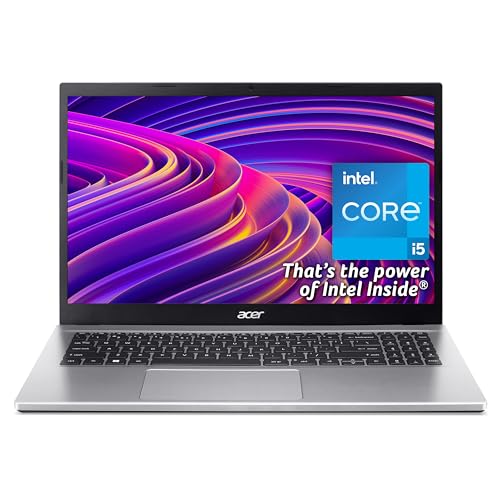
The Acer Aspire 3 is designed as a reliable everyday laptop for work, study, and general home use. It is well suited to people replacing an older machine who want something faster, smoother, and easier to live with. Typical use includes office work, remote working, online learning, video calls, web browsing, streaming, and light multitasking. It fits naturally into daily routines without demanding any technical knowledge from the user.
Why We Like This Laptop at YPC Outdoors
At YPC Outdoors, we tend to favour laptops that deliver dependable real world performance rather than headline specs that rarely get used. The Aspire 3 stands out because it feels quick and responsive in everyday use. The Intel Core i5 processor provides a noticeable uplift over entry level systems, while the Full HD IPS screen makes long sessions far more comfortable. It is the kind of laptop that quietly does its job well and continues to feel usable for years rather than months.
Pros and Cons
Pros
Intel Core i5 processor delivers strong everyday performance
Full HD IPS display offers sharp detail and wide viewing angles
512GB SSD ensures fast boot times and smooth app loading
Good quality webcam and microphones for video calls
Trusted Acer build quality and widespread support
Cons
8GB RAM may limit very heavy multitasking
Integrated graphics are not designed for demanding games
Uses WiFi 5 rather than the latest WiFi 6 standard
Performance in Everyday Use
The Intel Core i5 1235U is built to balance speed and efficiency. In real world terms, this means the laptop handles documents, spreadsheets, browsing with multiple tabs, streaming, and background tasks without slowing down. It feels responsive when switching between applications and remains stable during longer work sessions. Integrated graphics are perfectly adequate for media playback and light creative work.
Display and Visual Comfort
The 15.6 inch Full HD IPS display is one of the Aspire 3’s strongest features. Text appears crisp, colours look natural, and wide viewing angles reduce eye strain when working for extended periods. It works well for both productivity and entertainment, whether you are editing documents or watching films in the evening.
Video Calls and Remote Working
This laptop is well equipped for modern remote work and online communication. The HD webcam uses Acer’s TNR technology to improve clarity in different lighting conditions. Dual microphones with AI noise reduction help ensure your voice remains clear during calls, even in shared or busy environments.
Storage, Speed, and Long Term Usability
The 512GB SSD provides ample space for applications, documents, and media files. More importantly, it keeps the system feeling fast and responsive. Boot times are short, files open quickly, and the laptop feels noticeably smoother than older machines using traditional hard drives. This setup supports long term usability without constant maintenance.
Connectivity and Wireless Performance
The Aspire 3 includes dual band WiFi 5 for stable internet access at home, work, or study locations. While not the newest standard, it delivers reliable performance for streaming, browsing, and video conferencing. Bluetooth support allows easy connection of accessories such as headphones, keyboards, and mice.
Alternatives Worth Considering
If you are comparing similar laptops, you may also want to look at:
Lenovo IdeaPad 3 with comparable everyday performance
HP 15s series for a slightly different design approach
ASUS VivoBook 15 for lighter styling and portability
Each offers a similar balance of value and performance, though the Aspire 3 remains particularly strong in screen quality and reliability.
Comparison With Similar Laptops
Compared with Intel Core i3 based laptops, the Aspire 3 feels noticeably smoother when multitasking or working with larger documents. Against Ryzen 5 alternatives, performance is broadly similar for everyday tasks, with the Acer focusing more on stable, predictable behaviour rather than graphics performance.
Tips for Getting the Best Experience
Keep Windows and drivers updated for security and stability
Close unused background applications to maximise available memory
Use a laptop stand or external keyboard for longer desk sessions
Pair with an external monitor for a more spacious workspace
Full Tech Specification
Brand: Acer
Series: Aspire 3
Screen size: 15.6 inch
Display type: Full HD IPS
Resolution: 1920 x 1080
Processor: Intel Core i5 1235U
Graphics: Integrated Intel graphics
RAM: 8GB
Storage: 512GB SSD
Operating system: Windows 11
Webcam: HD with TNR technology
Microphones: Dual with AI noise reduction
Wireless: Dual band WiFi 5
Colour: Silver
Frequently Asked Questions
Is this laptop suitable for working from home?
Yes, it is well suited to office tasks, video calls, and daily productivity.
Can it handle online learning and studying?
Yes, it comfortably supports research, writing, and virtual classes.
Is it suitable for gaming?
It supports light and casual games but is not designed for demanding titles.
Does it have enough storage for everyday use?
Yes, 512GB is more than enough for most users.
Is the screen comfortable for long sessions?
Yes, the IPS panel provides good clarity and viewing comfort.
Can the RAM be upgraded later?
Not specified by the manufacturer.
Is it easy to carry around?
Yes, it is a practical size for home use and occasional travel.
Is it good for video conferencing?
Yes, the webcam and microphones perform well for calls.
Does it support streaming services well?
Yes, the Full HD display is ideal for streaming films and shows.
Is this a good long term purchase?
Yes, for everyday use it offers solid performance and longevity.
Buyer’s Guide
If you are still deciding, our laptop buyer’s guide explains how processors, memory, storage, and screen quality affect real world performance and long term satisfaction.
Looking for more options?
Browse our full range of Computers and Accessories for other great choices to suit your space, goals, and budget.


