
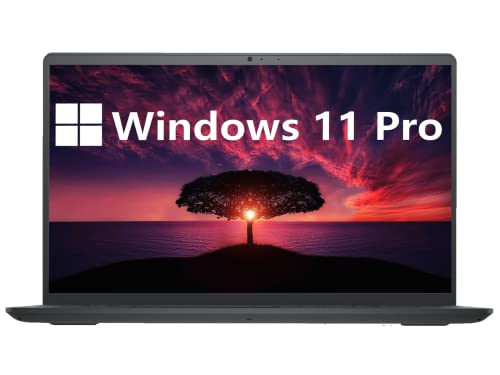
The Dell Inspiron 3000 Business Laptop is designed for everyday office, education and administrative use where reliability, storage capacity and ease of use matter more than raw performance. It is suited to document handling, spreadsheets, email, web based systems, video calls and general productivity tasks.
This laptop is a practical choice for small businesses, students, home offices and users who want a familiar Windows environment with ample storage and a comfortable full size keyboard.
Why We Like This Product Reviewed by the YPC Team
At YPC Outdoors, we like this Inspiron for its straightforward, no nonsense approach. The combination of 16GB of memory and a large 1TB hard drive makes it well suited to users who store a lot of files locally and keep many applications or browser tabs open.
We also appreciate the business friendly features such as the numeric keypad, SD card slot and Windows 11 Pro. It is not trying to be flashy. It is built to be dependable, easy to live with and good value for everyday productivity.
Pros and Cons
Pros
16GB RAM supports multitasking and office workflows
Large 1TB hard drive offers plenty of storage
Full size keyboard with numeric keypad
Windows 11 Pro includes business grade features
Wide range of ports including HDMI and SD card slot
Cons
HD resolution rather than Full HD
Hard drive is slower than an SSD
Processor is designed for light to moderate workloads
Processor Performance and Everyday Productivity
The laptop is powered by the Intel Pentium Silver N5030 processor, featuring four cores and four threads with boost speeds up to 3.10GHz. This processor is designed for efficient everyday computing rather than high performance workloads.
For office applications, web browsing, email, video conferencing and light multitasking, performance is stable and consistent. It is not intended for demanding software or modern gaming.
Display Quality and Viewing Comfort
The 15.6 inch display offers an HD resolution, providing a large viewing area for documents, spreadsheets and general use. Three side narrow borders help maximise screen space and create a more immersive viewing experience.
Dell Comfort View software helps reduce blue light exposure, making the screen more comfortable during long working sessions.
Memory and Storage Configuration
With 16GB of DDR4 memory, the Inspiron 3000 handles multiple applications and browser tabs more smoothly than typical entry level laptops.
Storage is provided by a 1TB hard disk drive, offering substantial space for documents, photos, videos and software. While a hard drive is slower than an SSD, it is well suited to users who prioritise capacity over speed.
Keyboard, Touchpad and Input Experience
The laptop features a full size keyboard with a numeric keypad, making it easier to work with numbers, spreadsheets and data entry tasks.
Larger keycaps and a spacious touchpad improve comfort and usability during extended typing and navigation.
Connectivity and Ports
The Inspiron 3000 includes a practical selection of ports for everyday business use. These include two USB 3.2 Gen 1 ports, one USB 2.0 port, an HDMI 1.4 port, an audio jack and an SD card slot.
Wireless connectivity includes WiFi and Bluetooth, supporting modern peripherals and accessories.
Webcam and Collaboration Features
A built in HD webcam supports video calls, online meetings and remote collaboration. Windows 11 Pro enhances productivity with improved multitasking tools and enterprise grade security features.
The system is designed to support communication and collaboration without additional accessories.
Battery and Charging
The laptop supports ExpressCharge functionality, allowing the battery to recharge up to 80 percent in around 60 minutes when using a compatible charger. Actual battery life will vary depending on workload and settings.
Build Design and Durability
The chassis includes rubber feet and hinge bumpers that improve stability on hard surfaces. The design focuses on durability and everyday usability rather than slimness or premium materials.
This makes it suitable for regular use in home, office and educational environments.
Operating System and Security
Windows 11 Pro 64 bit is pre installed, offering advanced security, management tools and productivity features. This makes it suitable for business and education users who require more control than Home editions provide.
Comparisons With Similar Alternatives
Compared with SSD based laptops, this model trades speed for much larger storage capacity.
Against Chromebooks, it offers full Windows software compatibility.
When compared with higher end business laptops, it focuses on value and practicality rather than performance.
Alternatives Worth Considering
Users who want faster startup and loading times may prefer an SSD based model.
Those who need Full HD resolution may want a higher resolution display.
For heavy workloads or creative tasks, a Core i series processor would be more suitable.
Tips on How to Use Correctly
Use ExpressCharge to minimise downtime when charging.
Manage startup programs to improve responsiveness.
Consider external storage backups for important data.
Adjust display scaling for comfortable text size on the HD screen.
Full Tech Specification
Screen size: 15.6 inch
Resolution: HD
Processor: Intel Pentium Silver N5030
Cores and threads: 4 cores 4 threads
Max boost frequency: Up to 3.10GHz
Cache: 4MB
Memory: 16GB DDR4 RAM
Storage: 1TB HDD
Wireless: WiFi
Bluetooth: Supported
Ports: 2 x USB 3.2 Gen 1, 1 x USB 2.0, HDMI 1.4, audio jack, SD card slot
Webcam: HD webcam
Operating system: Windows 11 Pro
Frequently Asked Questions
Is this laptop suitable for business use
Yes, it is designed for everyday business and office tasks.
Can it handle multitasking
Yes, 16GB of RAM supports multiple applications at once.
Is this laptop good for gaming
No, it is not designed for modern gaming.
Does it have a numeric keypad
Yes, a full size numeric keypad is included.
Is storage expandable
Additional external storage can be added via USB or SD card.
Is Windows included
Yes, Windows 11 Pro is pre installed.
Does it support video calls
Yes, it includes an HD webcam.
Is the display Full HD
No, it uses an HD resolution.
Is this laptop fast to boot
Boot times are slower than SSD based systems.
Is this good value for office use
Yes, especially for users who need storage capacity.
Buyer’s Guide
When choosing a business laptop, balance memory, storage type and display resolution. Large RAM capacity helps multitasking, while HDD storage suits users with large file libraries. Windows 11 Pro adds essential security and productivity features for professional environments.
Looking for more options?
Browse our full range of Computers and Accessories for other great choices to suit your space, goals, and budget.


