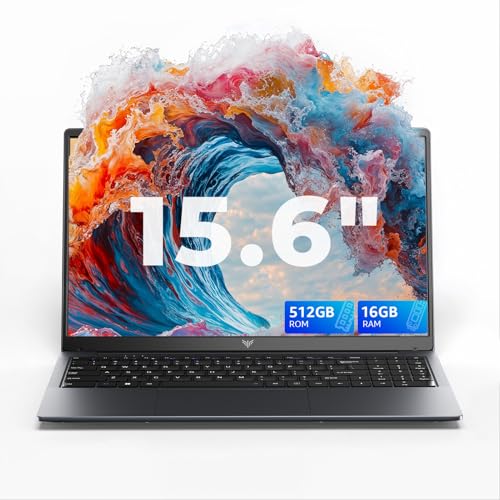
The Dell Latitude 3550 is a professional business laptop designed for everyday office work, study and enterprise use. It is built for users who need reliability, security and smooth multitasking for tasks such as document creation, data handling, email, video conferencing and remote working.
This model is well suited to professionals, students in higher education and organisations that need a dependable Windows laptop with modern connectivity and a comfortable large screen.
Why We Like This Product Reviewed by the YPC Team
At YPC Outdoors, we like the Latitude 3550 because it focuses on doing the basics extremely well. It is easy to use, feels solid, and delivers consistent performance for day to day work without unnecessary extras.
The combination of a modern Intel Core i5 processor, fast DDR5 memory and Windows 11 Pro makes it a sensible choice for productivity focused users. It offers good quality and genuine value for money, particularly for business and education environments where reliability matters more than flashy design.
Pros and Cons
Pros
Intel Core i5 processor delivers smooth everyday performance
16GB DDR5 RAM supports efficient multitasking
Full HD display offers comfortable viewing for work
WiFi 6E provides fast and stable wireless connectivity
Windows 11 Pro includes business and security features
Cons
Integrated graphics are not suitable for gaming
Design prioritises function over style
Not intended for heavy creative workloads
Performance and Everyday Productivity
The Dell Latitude 3550 is powered by an Intel Core i5 1335U processor, designed for efficient performance in business laptops. It handles everyday workloads such as spreadsheets, presentations, browsers and video calls smoothly.
Paired with 16GB of DDR5 memory, the system remains responsive even when multitasking across several applications. This makes it suitable for long working days without slowdowns.
Display Quality and Viewing Comfort
The 15.6 inch display features a Full HD resolution of 1920 by 1080, delivering clear text and sharp visuals. The larger screen size is particularly useful for split screen working, document editing and extended productivity sessions.
This size also suits media consumption and online learning without needing an external monitor.
Memory and Storage Configuration
With 16GB of DDR5 SDRAM, the Latitude 3550 offers improved bandwidth and efficiency compared with older memory types. This helps keep the system responsive during multitasking.
The 512GB solid state drive provides fast startup times, quick application loading and ample storage for documents, software and everyday files.
Connectivity and Wireless Performance
The laptop supports WiFi 6E using the 802.11ax standard, delivering faster speeds and more reliable performance on compatible networks. This is particularly useful in busy offices or shared environments.
Additional connectivity options are present but not specified in detail and should be confirmed at purchase.
Build Quality and Design
Finished in grey, the Latitude 3550 has a clean, professional appearance that suits business and educational settings. The design focuses on durability and ease of use rather than visual flair.
The overall build quality feels solid and appropriate for daily transport and long term use.
Operating System and Business Features
Windows 11 Pro comes pre installed, offering enhanced security, productivity tools and management features. This includes support for professional workflows, secure access and compatibility with business software.
It is well suited to organisations and individuals who need more control and functionality than Home editions provide.
Comparisons With Similar Alternatives
Compared with entry level laptops, the Latitude 3550 offers better memory capacity and professional features.
Against consumer models, it provides stronger security and long term reliability.
When compared with higher end workstations, it focuses on value and everyday productivity rather than specialist performance.
Alternatives Worth Considering
Users needing dedicated graphics should consider workstation class laptops.
Those who prioritise portability may prefer a smaller screen size.
If budget is a concern, lower memory configurations may be suitable for lighter workloads.
Tips on How to Use Correctly
Take advantage of Windows 11 Pro security features for work data.
Use WiFi 6E networks where available for best wireless performance.
Manage startup applications to keep boot times fast.
Adjust display brightness to balance comfort and battery life.
Full Tech Specification
Screen size: 15.6 inch
Resolution: Full HD 1920 x 1080
Processor: Intel Core i5 1335U
Memory: 16GB DDR5 SDRAM
Storage: 512GB SSD
Wireless: WiFi 6E 802.11ax
Operating system: Windows 11 Pro
Colour: Grey
Frequently Asked Questions
Is this laptop suitable for business use
Yes, it is designed specifically for professional and educational environments.
Can it handle multitasking
Yes, 16GB of DDR5 memory supports smooth multitasking.
Is this laptop good for gaming
No, it uses integrated graphics and is not designed for gaming.
Does it support modern WiFi
Yes, WiFi 6E is supported.
Is Windows included
Yes, Windows 11 Pro is pre installed.
Is the screen Full HD
Yes, it has a Full HD resolution.
Is this laptop easy to use
Yes, it is designed for simple and convenient everyday use.
Is storage fast
Yes, it uses a solid state drive.
Is this good value for money
Yes, particularly for business and study use.
Is the build quality good
Yes, it is built for reliability and long term use.
Buyer’s Guide
When choosing a business laptop, prioritise processor efficiency, memory capacity and operating system features. A modern Intel Core i5 processor with DDR5 memory provides smooth everyday performance, while Windows 11 Pro adds essential security and productivity tools. Full HD displays improve comfort during long work sessions.
Looking for more options?
Browse our full range of Computers and Accessories for other great choices to suit your space, goals, and budget.