Quick Summary
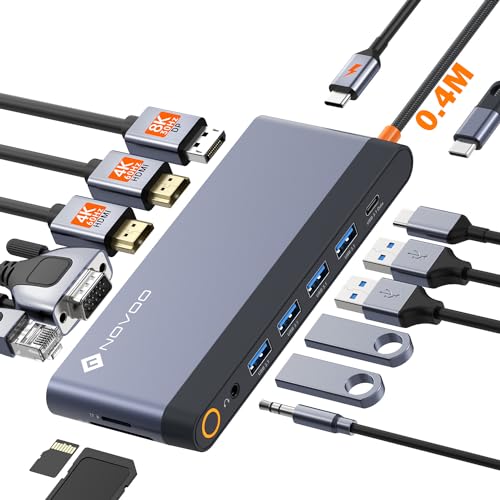
This USB C docking station is a 15 in 1 dock with dual HDMI, DisplayPort, VGA, RJ45 Ethernet, audio, SD/TF card reader and multiple USB ports. It is supplied with a 1m cable and supports plug and play use.
It is set out for dual, triple and quad monitor display, with Windows Quad Display Extended Mode mentioned in the description. MacOS laptops are stated to support SST mode only, so the external monitors show the same screen in that case.
Who It Is Best For
This dock suits buyers who want one USB C connection to add displays, wired networking, card reading, audio and several USB ports to a laptop. It also suits users who need to check video output support before ordering, especially where HDMI, DisplayPort or VGA use is intended.
Key Details
| Detail | Verified information and buyer relevance |
|---|---|
| Product type | USB C docking station with 15 in 1 functions for expanding a laptop connection. |
| Video outputs | 2 HDMI ports, DisplayPort and VGA for multi-monitor use. |
| HDMI and display limits | HDMI 1 is stated up to 4K@60Hz, HDMI 2 up to 4K@30Hz, DisplayPort up to 4K@60Hz and VGA up to 1080P. |
| Data ports | 1 USB A 3.1, 1 USB C 3.1, 2 USB 3.0 and 2 USB 2.0 for connecting peripherals and storage devices. |
| Card reader | SD/TF card reader stated up to 104Mbps. |
| Power delivery | 100W PD input with 87W safe output to the laptop as stated. |
| Network | RJ45 Ethernet stated at 1000Mbps for wired networking. |
| Audio | 3.5mm audio jack included. |
| Cable | Supplied with a 1m cable. |
Why Buyers Choose It
- 2 HDMI ports, DisplayPort and VGA give several display connection options from one dock.
- RJ45 Ethernet gives a wired network connection where a laptop has no Ethernet socket.
- 100W PD input and 87W safe output are stated for charging while the dock is in use.
- The 1m cable gives a defined connection length between the dock and the host device.
What To Know Before You Buy
Confirm that your laptop supports video output or DP alt mode through USB C before ordering, as the HDMI and DisplayPort functions are not for every USB C laptop. MacOS laptops are stated to support SST mode only, so the external screens mirror rather than extend in that case. Review the selected display setup, port count and cable length against your workspace before choosing this dock.
Common Buyer Questions
Can it run more than one monitor?
Yes. Dual, triple and quad monitor display are stated, depending on the host device and operating mode.
Does it support wired internet?
Yes. It includes RJ45 Ethernet stated at 1000Mbps.
Will it work with any USB C laptop?
No. The HDMI and DisplayPort functions require host device support for video output or DP alt mode.
What happens on MacOS laptops?
MacOS laptops are stated to support SST mode only, so the external monitor display is the same rather than extended.
Final Buying View
Choose this dock if you want a USB C docking station with multiple video outputs, wired Ethernet, card reading and several USB ports in one unit. Check video-output support, display mode and your preferred monitor setup before ordering.