Quick Summary
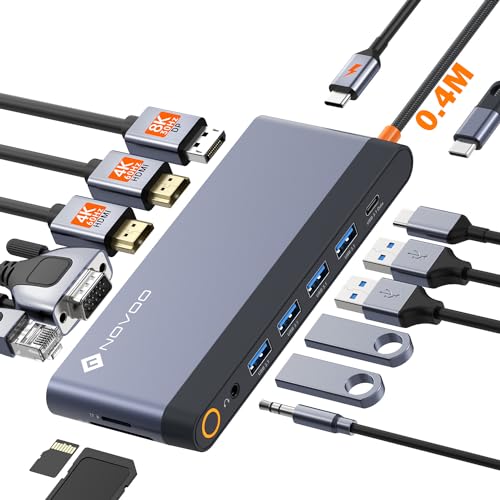
The HODO USB-C docking station is a 9 in 1 multiport adapter for laptops with a full-featured USB Type-C port. It brings together 2 HDMI ports, a DisplayPort, VGA, USB ports and PD charging in one hub, with video output details that vary by display setup.
For single display use, the DisplayPort can reach 8K@30Hz or 4K@144Hz. The two HDMI ports are stated as 4K outputs at 60Hz and 30Hz, and the VGA port is listed as 1080P. Check your laptop’s USB-C support and display requirements before ordering.
Who It Is Best For
This docking station is aimed at users who want to connect a laptop to multiple displays and add extra USB connections from one USB-C port. It is also relevant if you need PD charging through the dock and use a laptop with a full-featured USB Type-C connection.
It is listed for Dell, HP, Lenovo, Surface and MacBook Pro/Air models, but the key check is whether your laptop supports the required USB-C functions and, where relevant, DP 1.4 DSC.
Key Details
| Detail | Verified information and buyer relevance |
|---|---|
| Product type | 9 in 1 USB-C docking station / multiport adapter for laptop connectivity. |
| Video outputs | 2 HDMI, 1 DisplayPort and 1 VGA for multi-screen connection options. |
| DisplayPort output | Listed as 8K@30Hz or 4K@144Hz for single display use. |
| HDMI output | 2 HDMI ports are listed as 4K at 60Hz and 30Hz. |
| VGA output | Listed as 1080P, and using VGA affects all displays up to 1080P only. |
| USB ports | 1 USB 3.0 port, 2 USB 2.0 ports and 1 USB-C port for peripherals and data connections. |
| USB 3.0 speed | Up to 5Gbps for faster file transfer than USB 2.0. |
| USB 2.0 speed | Up to 480Mbps, suitable for keyboard or mouse connection. |
| PD charging | Up to 100W input and 85W safe output into the laptop, with a power adapter not included. |
| Compatibility | Designed for laptops with a full-featured USB Type-C port that supports display, charging and data transfer protocols. |
Why Buyers Choose It
- 2 HDMI ports, DisplayPort and VGA give several ways to connect external displays from one dock.
- USB 3.0 at up to 5Gbps is listed for file transfers from flash drives and hard disks.
- PD charging support up to 100W input and 85W output lets the dock handle both connection and charging needs.
- USB 2.0 ports and a USB-C port are listed for accessories such as a keyboard or mouse.
How It Works
- Connect the dock to a laptop with a full-featured USB Type-C port.
- Attach your displays using the HDMI, DisplayPort or VGA connections as required.
- Use the USB 3.0, USB 2.0 and USB-C ports for storage or peripherals.
- For charging, use a USB-C power adapter with at least 65W, as the power adapter and power cord are not included.
- Check display mode requirements carefully, especially if you use MacOS or VGA.
Real World Use
This dock suits home office or workstation setups where a laptop needs several external connections at once. The multi-display layout can be used differently depending on the laptop’s USB-C and DP 1.4 DSC support, so the available display output should be checked before purchase.
On MacOS, the external screens are stated to show the same image whether mirror mode or extended mode is selected.
What To Know Before You Buy
Confirm that your laptop has a full-featured USB Type-C port before ordering. If you want the higher display resolutions listed, make sure your laptop supports DP 1.4 DSC. If you use the VGA port, all displays are limited to 1080P only.
The power adapter and power cord are not included, and a USB-C power adapter of at least 65W is stated for charging use. Also check the number of displays you want to run, as the listed output levels change between single, dual, triple and quadruple display setups.
Pros: Multiple display outputs and several USB ports are built into one dock.
Cons: Display performance depends on the laptop’s USB-C and DP 1.4 DSC support, and VGA reduces the display limit to 1080P.
Common Buyer Questions
Can this dock charge a laptop?
Yes. It is listed with up to 100W input and 85W safe output into the laptop, using USB-C PD.
Does it work with multiple monitors?
Yes. It includes 2 HDMI ports, 1 DisplayPort and 1 VGA port, with output depending on your laptop support and display setup.
Is a power adapter included?
No. The power adapter and power cord are not included, and at least a 65W adapter is stated for charging use.
Will it work with MacOS?
It is listed for MacBook Pro/Air, but on MacOS the external screens are stated to show the same image rather than separate extended displays.
Final Buying View
If you need a USB-C dock with multiple monitor outputs, extra USB ports and PD charging, this HODO 9 in 1 hub brings those functions into one unit. The main checks are your laptop’s USB-C support, the display standard needed for higher resolutions, and whether VGA limitations matter for your setup.