
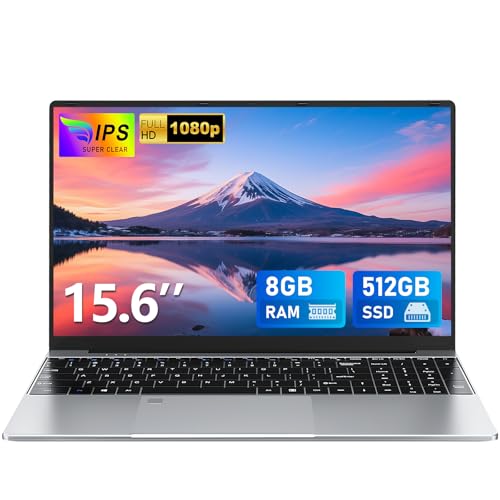
The FUNYET 15.6 inch laptop is designed for everyday computing where a large screen, comfortable keyboard layout and simple performance are the priority. It suits users replacing an older laptop, students, home users and those who need a straightforward machine for browsing, documents, email, streaming and light office tasks.
This model is particularly appealing to users who value screen size and usability over raw performance, such as working with spreadsheets, online forms, video calls and general home administration.
Why We Like This Product Reviewed by the YPC Team
At YPC Outdoors, we see this laptop as a practical choice for users who want clarity and simplicity. The large 15.6 inch display combined with a full keyboard and numeric keypad makes everyday tasks more comfortable, especially for data entry and document work.
The 180 degree hinge is a nice touch, allowing flexible positioning on desks or shared surfaces. While the processor is entry level, the inclusion of a solid state drive and sensible memory capacity helps keep the system feeling responsive for its intended use.
Pros and Cons
Pros
Large 15.6 inch Full HD IPS display
Comfortable keyboard with numeric keypad
180 degree hinge allows flexible positioning
Solid state storage improves everyday responsiveness
Windows 11 Pro included
Cons
Intel N4000 processor is suited to light workloads only
Not suitable for demanding multitasking or creative software
Mini HDMI rather than full size HDMI
Performance and Everyday Use
The laptop is powered by an Intel N4000 processor, paired with 8GB of DDR4 memory. This setup is designed for basic computing tasks such as web browsing, email, document editing and media playback.
While this processor is not intended for heavy multitasking or performance intensive applications, the presence of a 512GB solid state drive ensures fast boot times and responsive file access. For everyday home and study use, it delivers a smooth and predictable experience.
Display Quality and Viewing Comfort
The 15.6 inch IPS display features a Full HD resolution of 1920 by 1080, offering sharp text and clear visuals. Colours appear natural and viewing angles are wide, making it suitable for watching videos or working with others nearby.
The slim bezel design helps maximise screen space, and the large panel size makes it easier to work comfortably without constantly switching windows or zooming content.
Keyboard Layout and Usability
This laptop includes a full size keyboard with an integrated numeric keypad, which is especially useful for spreadsheets, accounting tasks and general data entry.
The keyboard layout is designed for comfortable everyday typing, and the manufacturer includes a local language keyboard mask, which can be helpful for international users or replacements.
Connectivity and Ports
Wireless connectivity includes dual band WiFi supporting both 2.4GHz and 5GHz networks, along with Bluetooth for accessories such as mice, keyboards and headphones.
Physical connections include USB 3.0, a TF card slot for storage expansion, mini HDMI for external displays, a headphone jack and a DC power input. This selection covers most everyday peripheral needs without adapters.
Battery Life and Portability
The laptop is equipped with a 5000mAh battery, designed to support several hours of light to moderate use depending on workload and screen brightness.
Its size makes it better suited to desk based or occasional portable use rather than constant commuting, but it remains manageable for moving between rooms or locations when needed.
Operating System and Software
This model ships with Windows 11 Pro, which provides additional features compared with the Home edition, including improved security options and business focused controls.
For users who want a familiar Windows environment without additional setup, this adds reassurance and convenience.
Comparisons With Similar Alternatives
Compared with smaller 14 inch laptops, this model offers a larger display and more comfortable keyboard layout.
Against systems with older mechanical hard drives, the solid state storage here provides a noticeable improvement in speed and usability.
When compared with laptops using newer processors, performance is lower, but cost and simplicity are the trade offs.
Alternatives Worth Considering
Users who need faster performance for multitasking may prefer laptops with newer Intel N series or Core processors.
Those who travel frequently may want a lighter, smaller screen size.
For purely basic tasks, lower storage capacities may reduce cost but limit long term flexibility.
Tips on How to Use Correctly
Keep background applications to a minimum to maintain smooth performance.
Use cloud storage or external drives to manage large files.
Adjust screen brightness to balance comfort and battery life.
Avoid running demanding software not suited to entry level processors.
Full Tech Specification
Screen size: 15.6 inch
Resolution: 1920 x 1080 Full HD
Panel type: IPS
Processor: Intel N4000
Memory: 8GB DDR4
Storage: 512GB SSD
Storage expansion: TF card supported
Wireless: Dual band WiFi 2.4GHz and 5GHz
Bluetooth: Supported
Ports: USB 3.0, mini HDMI, TF card slot, headphone jack, DC input
Battery: 5000mAh
Hinge: 180 degree opening
Keyboard: Full size with numeric keypad
Operating system: Windows 11 Pro
Frequently Asked Questions
Is this laptop suitable for home use
Yes, it is designed for everyday home computing tasks.
Can it handle office applications
Yes, it works well with word processing, spreadsheets and email.
Is this laptop good for gaming
No, it is not designed for gaming beyond very basic titles.
Does it support external monitors
Yes, via the mini HDMI port.
Can storage be expanded
Yes, via the TF card slot.
Is the screen Full HD
Yes, it has a 1920 by 1080 IPS display.
Does it include Windows
Yes, it comes with Windows 11 Pro installed.
Is the keyboard suitable for numbers
Yes, it includes a dedicated numeric keypad.
Does it support Bluetooth accessories
Yes, Bluetooth is built in.
Is warranty included
Yes, a 365 day warranty is provided by the manufacturer.
Buyer’s Guide
When choosing an entry level laptop, focus on screen size, storage type and memory capacity. A solid state drive makes a noticeable difference to everyday responsiveness, while a large Full HD display improves comfort for longer sessions. Entry level processors are best suited to light workloads, so matching expectations to usage is key.
Looking for more options?
Browse our full range of Computers and Accessories for other great choices to suit your space, goals, and budget.


