Quick Summary
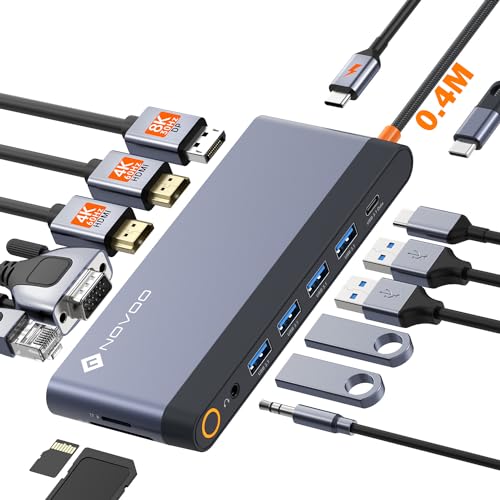
The MagBac USB C docking station is a 15-in-1 laptop dock with dual monitor support, 4K 60Hz output on a single display, and a 65W AC power adapter. It brings together HDMI, DisplayPort, USB, Ethernet, SD and TF connections in one unit for Mac and Windows laptops.
It also includes a 3.3ft USB C to C cable and can be used horizontally or vertically on a desk.
Who It Is Best For
This dock is for buyers who need to connect a laptop to multiple displays and several everyday peripherals from one hub. It is also relevant if you want wired network access, memory card slots, or a compact dock that can sit beside or behind a monitor.
Key Details
| Detail | Verified information and buyer relevance |
|---|---|
| Product type | 15-in-1 USB C docking station for laptop use. |
| Monitor support | Includes 2 HDMI ports and 1 DisplayPort for up to three monitor connections. |
| Single-display resolution | Up to 4K@60Hz when one display is used. |
| Multi-display resolution | With three monitors connected, the stated resolution is 2K@60Hz; with two monitors, it is 4K@30Hz. |
| Data ports | Includes 2 USB C ports, 1 USB C host connection, 1 USB A 10Gbps port, 2 USB A 5Gbps ports and 2 USB A 2.0 ports. |
| Network | Includes a 1Gbps Gigabit Ethernet port, backward compatible with 10Mbps/100Mbps/1000Mbps network transfers. |
| Card slots | Includes SD and TF card slots. |
| Power | Includes a 65W AC power adapter and 65W DC in port. |
| Cable | Supplied with a 3.3ft USB C to C cable. |
| Compatibility | Listed for Mac and Windows, and mentions Thunderbolt 3/4 support. |
How It Works
- Connect the dock to your laptop with the supplied USB C to C cable.
- Attach monitors through the HDMI and DisplayPort connections as needed.
- Plug in USB accessories, memory cards, or an Ethernet cable if required.
- Use the 65W AC power adapter to supply the dock.
- Check your chosen monitor mode before use, as Windows and macOS are stated to support different display arrangements.
What To Know Before You Buy
Check that your laptop connection and display requirements match the dock before ordering. The monitor section includes two HDMI ports and one DisplayPort, but the supported display arrangements differ between Windows and macOS systems. The product also states that MacBook M1, M2, M3 and M4 models can only extend one display.
Review the charging note as well. The notebook charging power should be less than 65W, and the product recommends using the laptop original charger for better charging effect.
Common Buyer Questions
Can it run three monitors?
Yes. The dock includes 2 HDMI ports and 1 DisplayPort, with stated three-monitor support.
What happens when more than one display is connected?
The stated resolution changes to 4K@30Hz with two monitors and 2K@60Hz with three monitors.
Does it include network access?
Yes. It includes a 1Gbps Gigabit Ethernet port.
What comes in the box?
The package includes the docking station, a 3.3ft USB C to C cable, a user manual, a 65W AC adapter and an AC power cable.
Final Buying View
This MagBac dock suits buyers who want a compact laptop docking station with multiple display outputs, wired networking and a wide mix of USB connections. Confirm your laptop’s display support and charging needs before ordering, especially if you use a MacBook with M1, M2, M3 or M4 silicon.