
Quick Summary
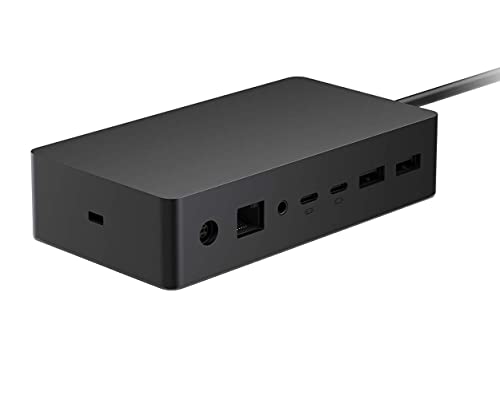
Microsoft Surface Dock 2 is a wired dock for connecting a notebook, desktop PC, smartphone, monitor, keyboard and mouse. It includes 6 USB ports and network (RJ-45) connectivity, giving you a single connection point for supported devices.
Who It Is Best For
This dock suits buyers who want a wired connection hub for the listed device types and need USB and network connections in one place. It is worth checking that your intended devices and setup match the stated connection details before ordering.
Key Details
| Detail | Verified information and buyer relevance |
|---|---|
| Product | Microsoft Surface Dock 2, a wired dock for connecting supported devices. |
| Device support | Notebook, desktop PC, smartphone, monitor, keyboard and mouse are listed as supported devices. |
| USB ports | 6 USB ports are stated, which gives multiple connection points. |
| USB-C | 2 x USB-C® (10 Gbps) ports with 15W are listed. |
| USB-C video display | 2 x USB-C® (10 Gbps) video display enabled ports with 7.5W are listed. |
| Network | Network (RJ-45) is included for a wired network connection. |
| Power | 199 W is stated. |
What To Know Before You Buy
Check that your chosen devices match the listed support for notebook, desktop PC, smartphone, monitor, keyboard and mouse. The dock is wired, so it is intended for a cable connection rather than a wireless setup. Review the USB-C details and the 199 W figure against your intended use before ordering.
Common Buyer Questions
What type of connection does this dock use?
It uses a wired connection.
How many USB ports are included?
Six USB ports are stated.
Does it include network connection?
Yes, Network (RJ-45) is listed.
Are USB-C ports included?
Yes, 2 x USB-C® (10 Gbps) ports and 2 x USB-C® (10 Gbps) video display enabled ports are listed.
Final Buying View
Microsoft Surface Dock 2 is a wired dock with 6 USB ports, USB-C connectivity and RJ-45 network support. Confirm your device and connection requirements match the listed features before making your choice.


