Quick Summary
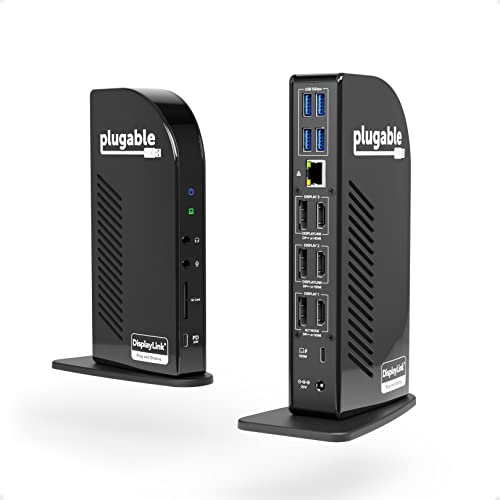
The Plugable UD-ULTC4K is a 13-in-1 USB-C docking station for adding multiple displays and extra connections through one dock. It supports triple monitor output, with up to 4K at 30Hz on the main display and up to 1920×1200 at 60Hz on displays two and three.
It also offers up to 100W charging, with 96W certified, plus a front USB-C port that provides 20W charging for connected devices.
Who It Is Best For
This dock suits buyers who want to connect a laptop to three monitors and expand available ports at the same time. It is aimed at Windows, ChromeOS and macOS users, with macOS requiring DisplayLink Drivers. It also supports systems with USB4, Thunderbolt 4, Thunderbolt 3 and USB-C.
Key Details
| Detail | Verified information and buyer relevance |
|---|---|
| Brand | Plugable. |
| Model | UD-ULTC4K. |
| Product type | 13-in-1 USB-C docking station for expanding laptop connections. |
| Display support | Triple monitor output with up to 4K 30Hz on the main display and up to 1920×1200 at 60Hz on displays two and three. |
| Charging | Up to 100W charging, with 96W certified, plus 20W charging through the front USB-C port. |
| Compatibility | Windows 10 or later, ChromeOS 100.x or later, and macOS 11+ with USB4, Thunderbolt 4, Thunderbolt 3 and USB-C. macOS requires DisplayLink Drivers. |
| Connection options | 1x front-facing USB-C 3.0, 4x USB 3.0, SD card reader, Gigabit Ethernet, and audio in and out ports. |
Why Buyers Choose It
- Triple monitor support gives you a single dock for a multi-screen setup.
- Up to 100W charging keeps the laptop powered through the dock, with 96W certified.
- The front USB-C port adds 20W charging for a connected device.
- The extra USB, SD card, Ethernet and audio ports expand a laptop connection point into a fuller desktop-style setup.
How It Works
- Connect the docking station to a compatible USB-C, USB4 or Thunderbolt system.
- Install DisplayLink Drivers on macOS if required.
- Use the display outputs to connect up to three monitors.
- Use the USB, SD card, Ethernet and audio ports as needed for your setup.
- Use the charging connection to power the laptop through the dock.
What To Know Before You Buy
Check that your laptop or computer matches the stated compatibility before ordering. macOS users need DisplayLink Drivers, and the dock is listed for Windows 10 or later, ChromeOS 100.x or later, and macOS 11+ systems with USB4, Thunderbolt 4, Thunderbolt 3 and USB-C.
Review your monitor setup as the dock supports up to 4K 30Hz on the main display and up to 1920×1200 at 60Hz on displays two and three. Also check that the charging level and port mix suit your intended setup.
Common Buyer Questions
Can this dock run three monitors?
Yes. It supports triple monitor output, including up to 4K 30Hz on the main display and up to 1920×1200 at 60Hz on the other two displays.
Does it charge the laptop through the dock?
Yes. It offers up to 100W charging, with 96W certified.
Does macOS need extra software?
Yes. macOS requires installation of DisplayLink Drivers.
What extra ports are included?
It includes a front USB-C 3.0 port, four USB 3.0 ports, an SD card reader, Gigabit Ethernet, and audio in and out ports.
Final Buying View
If you want one dock to add three monitors, laptop charging and extra ports, the Plugable UD-ULTC4K is built around that use. Confirm your system compatibility, display requirements and macOS driver needs before choosing it.