
Quick Summary
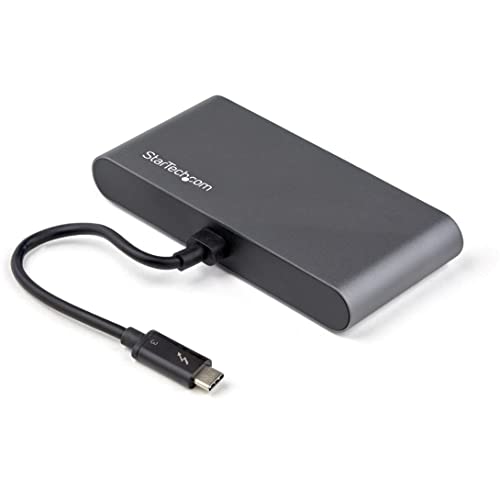
The StarTech.com Thunderbolt 3 Mini Dock (TB3DKMHDL) is a portable docking station with an attached 11in (28cm) cable. It offers dual 4K 60Hz HDMI outputs, a 2-port USB-A hub, and a Gigabit Ethernet port for Thunderbolt 3 laptop setups.
It is described as a driverless, plug-and-play dock with Thunderbolt 3 (40 Gbps) support. The compact cable length may also be useful where you want a neater connection between the dock and host device.
Who It Is Best For
This dock suits buyers who need a portable multiport adapter for a compatible laptop and want to connect external displays, USB peripherals, and wired networking through one unit. It is also relevant if the attached cable length matters for your desk or riser setup.
Check compatibility carefully if you plan to use it with a Thunderbolt or USB4 laptop, or with a MacBook or iPad Pro in a multi-display setup.
Key Details
| Detail | Verified information and buyer relevance |
|---|---|
| Product type | Thunderbolt 3 mini dock / multiport adapter for expanding laptop connections. |
| Model | TB3DKMHDL for identifying the exact dock variant. |
| Video outputs | Dual HDMI outputs with support for 4K at 60Hz. |
| USB ports | 2-port USB-A hub, including 1x USB 3.2 Gen 1 5Gbps and 1x USB 2.0. |
| Network port | Gigabit Ethernet port for wired network connection. |
| Cable length | Attached 11in (28cm) cable for the host connection. |
| Connection standard | Thunderbolt 3 at 40 Gbps. |
| Compatibility | Compatible with Windows, macOS, and Ubuntu, and supports Thunderbolt or USB4 laptops. |
Why Buyers Choose It
- Dual HDMI outputs with 4K 60Hz support give you the option to connect two external displays where the host setup supports it.
- The 2-port USB-A hub provides space for everyday peripherals such as accessories that use USB-A connections.
- The Gigabit Ethernet port adds a wired network connection alongside display and USB expansion.
- The attached 11in (28cm) cable may help reduce dangling cable clutter at the host connector.
How It Works
The dock is set up as a driverless, plug-and-play device. Connect it to a compatible Thunderbolt 3, Thunderbolt, or USB4 laptop, then use the HDMI, USB-A, and Ethernet ports as needed.
For supported systems, the dock can be used for dual displays on M1, M2, M3 Max/Pro, and M4 Pro/Max MacBooks, and for a single display on base M-series MacBooks and iPad Pro M1, later.
What To Know Before You Buy
Confirm that your laptop or device is compatible with the dock before ordering, especially if you intend to use more than one display. The host connection uses an attached 11in (28cm) cable, so check that this length suits your setup.
Review the display support for your specific device, since the multi-display and single-display behaviour varies across the listed MacBook and iPad Pro models.
Common Buyer Questions
Does it need drivers?
No, it is described as a driverless dock with plug-and-play setup.
What display outputs does it have?
It has dual HDMI outputs with support for 4K at 60Hz.
What network connection does it include?
It includes a Gigabit Ethernet port.
How long is the attached cable?
The attached cable is 11in (28cm) long.
Final Buying View
If you need a Thunderbolt 3 dock with dual HDMI, USB-A expansion, and wired Ethernet in a compact format, this model is built around those connections. Check your device type, display needs, and cable-length preference before choosing it.


