Quick Summary
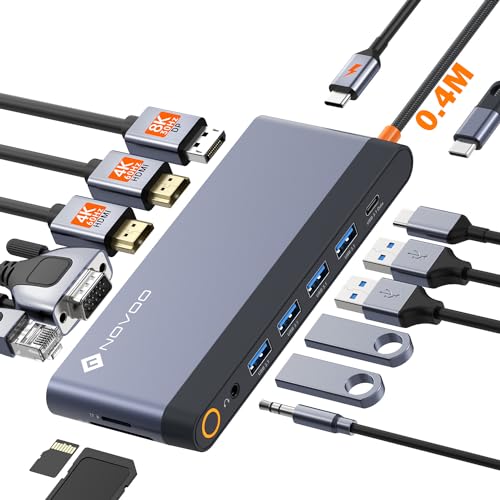
This Surface Pro docking station hub is designed for Surface Pro 9, Surface Pro 10, Surface Pro 11 and Surface Pro X. It converts 2 USB-C ports into 8 connections, including 4K HDMI, USB-C Thunderbolt 4, Ethernet, USB-A, SD and Micro SD card readers, and a 3.5mm audio and microphone jack.
It also supports USB-C pass-through power delivery, with 100W mentioned for Surface Pro 9 and 60W for Surface Pro X. A plug and play setup is stated, so no driver is needed.
Who It Is Best For
This hub suits buyers who want to add wired display, network, storage card and USB connections through the USB-C ports on a compatible Surface Pro device. It is also relevant for anyone who wants a single docking station for a Surface Pro 9, 10, 11 or X setup.
Key Details
| Detail | Verified information and buyer relevance |
|---|---|
| Compatible devices | Surface Pro 9, Surface Pro 10, Surface Pro 11 and Surface Pro X. |
| Port expansion | Converts 2 USB-C ports into 8 ports for a wider connection setup. |
| HDMI output | 1 x HDMI with 4K at 30Hz support for video and audio transmission. |
| USB-C Thunderbolt 4 | Supports up to 40Gbps data transmission and extended screen use. |
| Ethernet | 100M Ethernet LAN is included for wired network access. |
| USB-A ports | 2 x USB 3.0 ports are included. |
| Card readers | SD card reader and Micro SD (TF) card reader are included. |
| Audio | 3.5mm audio and microphone jack is included. |
| Power delivery | USB-C pass-through charging is supported, with 100W mentioned for Surface Pro 9. |
| Setup | Plug and play, with no driver needed. |
Why Buyers Choose It
- The 8-port layout brings several connection types into one hub for a tidier desk setup.
- The 4K HDMI output gives a direct wired display connection for a monitor, TV or projector.
- The Ethernet port provides a wired network option alongside the USB and card reader connections.
- Pass-through charging keeps the Surface connected while using the hub.
How It Works
- Connect the hub to the compatible Surface Pro device through the USB-C ports.
- Use the HDMI, USB-A, Ethernet, card reader or audio connections as needed.
- Use USB-C pass-through charging if you want power delivery while the hub is attached.
- Remove a Surface protective cover when using the hub if required for fit.
What To Know Before You Buy
Check that your device is Surface Pro 9, Surface Pro 10, Surface Pro 11 or Surface Pro X before ordering. Review the required display setup, since the HDMI output is stated at 4K at 30Hz and the USB-C Thunderbolt 4 connection is stated separately with higher-resolution support.
The source also mentions different pass-through power figures for Surface Pro 9 and Surface Pro X, so confirm which device version you have. If you use a protective cover, make sure it is removed when using the hub.
Common Buyer Questions
Which Surface devices does this hub fit?
It is stated for Surface Pro 9, Surface Pro 10, Surface Pro 11 and Surface Pro X.
How many ports does it add?
It converts 2 USB-C ports into 8 ports.
Does it support a monitor connection?
Yes, it includes 1 x HDMI output with 4K at 30Hz support.
Does it need drivers?
No, it is stated to work as plug and play.
Final Buying View
If you need a multi-port hub for a compatible Surface Pro device, this docking station brings together display, Ethernet, USB, card reader and audio connections in one unit. Check the exact Surface model and the pass-through charging details before choosing the variation.