
Quick Summary
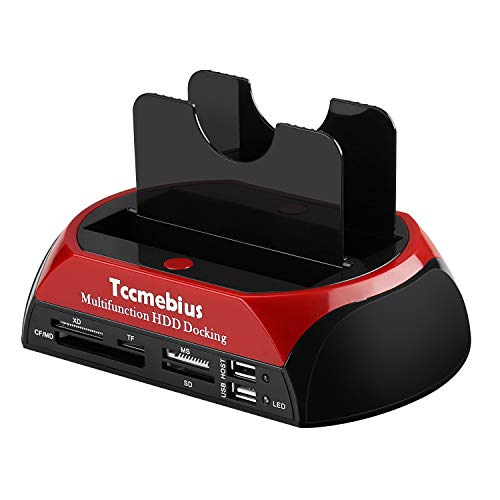
The Tccmebius TCC-S862-UK is a USB 2.0 external hard drive docking station with dual slots for 2.5 inch and 3.5 inch IDE and SATA drives. It also includes an all-in-1 card reader and a USB 2.0 hub, making it a multi-function docking unit for connecting drives and memory cards through one device.
The docking station supports 2.5 inch and 3.5 inch IDE / SATA I / II / III hard disks and SSDs, with adjustable IDE connectors. It is stated to support up to 20TB for SATA interface hard disks and up to 1TB for IDE interface hard drives.
Who It Is Best For
This unit is aimed at buyers who need a dock for both IDE and SATA drives and want card-reading functions in the same device. It is also relevant if you need to connect a drive to a computer through USB 2.0 and want the added convenience of a USB hub.
Check the selected drive type, size and interface before ordering, as the dock is specified for 2.5 inch and 3.5 inch IDE and SATA drives.
Key Details
| Detail | Verified information and buyer relevance |
|---|---|
| Brand and model | Tccmebius TCC-S862-UK for product identification. |
| Connection | USB 2.0 for linking the dock to a computer. |
| Drive support | Supports 2.5 inch and 3.5 inch IDE / SATA I / II / III hard disks and SSDs. |
| IDE connectors | Adjustable IDE connectors are included for supported IDE drives. |
| Capacity support | Up to 20TB for SATA interface hard disks and up to 1TB for IDE interface hard drives. |
| Card reader | Integrated all-in-1 card reader for XD, TF, MS (Duo / Pro), CF and SD cards. |
| Card reading behaviour | At the same time, the card reader can read only one memory card. |
| Card capacity | Up to 64GB for the card reader. |
| Backup function | One-Touch Backup functionality is included for copying data and documents to an external hard drive. |
| Operating systems | Compatible with Windows XP / Vista / 7 / 8 / 8.1 / 10 / 11 and Mac OS 10.10 or later. |
Why Buyers Choose It
- USB 2.0 connectivity gives a single connection path to a computer for supported drives.
- The dual IDE and SATA slots reduce the need for separate docks when working with different drive interfaces.
- The integrated card reader adds support for several card formats in one unit.
- One-Touch Backup provides a direct copying function for documents and data.
How It Works
- Insert a supported 2.5 inch or 3.5 inch IDE or SATA drive into the docking station.
- Use the adjustable IDE connectors when fitting a supported IDE drive.
- Connect the dock to your computer through the USB 2.0 port.
- Use the all-in-1 card reader for a supported memory card, noting that only one card can be read at a time.
- Use the One-Touch Backup function with the relevant OTB software guidance provided for the product.
Real World Use
The dock is set up for desktop-style drive access through USB 2.0, so it suits users who need to connect supported internal drives to a computer without building them into a case. The card reader and hub add extra functions in the same unit, which may reduce the number of separate accessories on a desk.
What To Know Before You Buy
Confirm the drive interface, drive size and capacity requirement before ordering. The dock is specified for 2.5 inch and 3.5 inch IDE and SATA I / II / III drives, with different stated maximum capacities for SATA and IDE use. If you want to use the One-Touch Backup feature, check the software guidance carefully, as the OTB software cannot be installed on macOS and iOS systems.
Pros: It combines drive docking, card reading and a USB 2.0 hub in one unit.
Cons: The card reader can read only one memory card at a time.
Common Buyer Questions
Which drives does it support?
It supports 2.5 inch and 3.5 inch IDE / SATA I / II / III hard disks and SSDs.
Can it read more than one memory card at once?
No, the card reader can read only one memory card at a time.
Which card formats are supported?
The integrated reader supports XD, TF, MS (Duo / Pro), CF and SD cards.
Which operating systems are supported?
It is compatible with Windows XP / Vista / 7 / 8 / 8.1 / 10 / 11 and Mac OS 10.10 or later.
Final Buying View
This docking station suits buyers who need USB 2.0 access for supported IDE and SATA drives, plus integrated card-reading functions. Check the drive interface, size and capacity against your intended use before choosing it, and review the One-Touch Backup software notes if that feature matters to you.


