
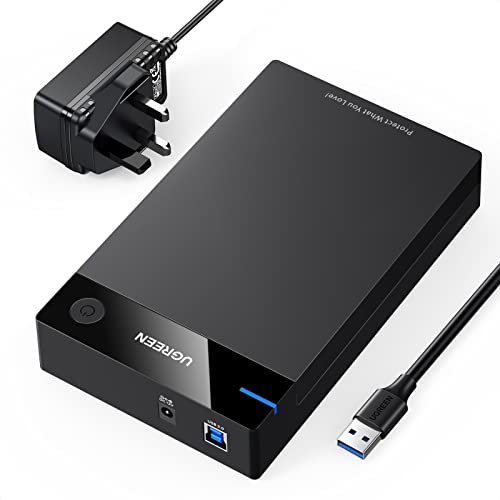
Quick Summary
The UGREEN Hard Drive Enclosure is a SATA to USB 3.0 docking station for 2.5 inch and 3.5 inch HDD and SSD drives up to 22TB. It is a lay-flat drive dock with a DC power adapter, and it is described as tool-free.
It is presented for use with Windows, Linux, macOS, PS4 and Xbox, so it is aimed at buyers who need to connect a SATA drive through USB and want to check compatibility before ordering.
Who It Is Best For
This enclosure suits buyers who want to use a 2.5 inch or 3.5 inch SATA HDD or SSD as an external drive through USB 3.0. It also suits anyone who needs to check a large-capacity drive up to 22TB, or who wants a lay-flat docking style rather than a closed case.
Key Details
| Detail | Verified information and buyer relevance |
|---|---|
| Brand | UGREEN, which identifies the product line clearly. |
| Product type | Hard drive enclosure with SATA to USB 3.0 connection. |
| Supported drive sizes | Fits 2.5 inch and 3.5 inch drives, so the selected drive size should match. |
| Drive type | Works with HDD and SSD drives. |
| Capacity support | Up to 22TB, which is a key check for larger drives. |
| Power | Includes a DC power adapter. |
| Design | Tool-free and lay-flat, which affects how the drive is fitted and positioned. |
| Compatible systems | Windows, Linux and macOS are listed, along with PS4 and Xbox. |
Why Buyers Choose It
- 2.5 inch and 3.5 inch drive support gives flexibility when selecting a SATA drive to use with the enclosure.
- Up to 22TB capacity support is relevant if you are planning to use a larger drive.
- Tool-free fitting reduces the need for extra tools when placing the drive in the dock.
- The lay-flat design changes how the drive sits on a desk or work surface.
How It Works
The enclosure connects a SATA HDD or SSD to a USB 3.0 port. The drive is secured without tools, then the unit is powered through the included DC adapter. The product description also states that it is plug and play and driver-free on Windows 11/10/8/7/XP/Vista, Linux, Mac OS and Chrome OS.
An LED indicator shows the working status, and the enclosure is said to enter sleep mode automatically after 3 minutes without operation.
Real World Use
In use, the enclosure is intended to sit flat while a compatible drive is connected through USB. That makes it a straightforward choice for turning a SATA drive into an external storage setup, provided the selected drive size and system match the listed compatibility.
What To Know Before You Buy
Check that your drive is a 2.5 inch or 3.5 inch SATA HDD or SSD and that its capacity is within the stated 22TB limit. Confirm that your intended device or system matches the listed compatibility before ordering.
The lay-flat style and tool-free fitting are part of the product’s setup, so make sure that is the format you want for your drive enclosure.
Common Buyer Questions
Which drives fit this enclosure?
It fits 2.5 inch and 3.5 inch SATA HDD and SSD drives, up to 22TB.
Does it need tools to install the drive?
No, it is described as tool-free.
What systems is it listed for?
Windows, Linux, macOS, PS4 and Xbox are listed, and the description also mentions Chrome OS support.
Does it have a power supply?
Yes, a DC power adapter is included.
Final Buying View
This enclosure is for buyers who want a SATA to USB 3.0 dock for 2.5 inch or 3.5 inch HDD and SSD drives, with support for drives up to 22TB. Check the drive size, capacity and device compatibility before choosing it.
Pros: It supports both 2.5 inch and 3.5 inch drives, with tool-free fitting and a DC power adapter.
Cons: The lay-flat dock style may not suit buyers looking for an enclosed, upright storage case.


