Quick Summary
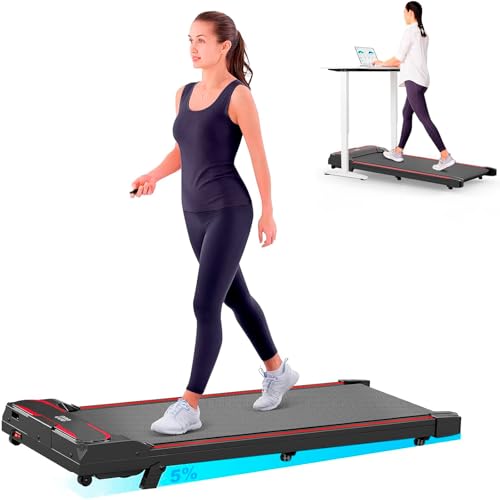
This under desk walking pad combines a flat, handle-free design with vibration settings and a manual incline of up to 15%. It is made for walking alongside a suitable standing desk, as well as faster-paced home use, with speed available up to 8 km/h.
The LED display shows steps, time, speed, distance and estimated calories, while the handheld remote lets you adjust speed and modes without reaching for the machine.
Who It Is Best For
This walking pad suits buyers who want a low-profile treadmill for indoor walking, desk-time movement or active breaks at home. It also suits anyone who wants to switch between walking, incline use and vibration settings in one compact unit.
Key Details
| Detail | Verified information and buyer relevance |
|---|---|
| Product type | Under desk walking pad with vibration, designed for indoor walking and desk-time movement. |
| Manual incline | Up to 15% incline by raising the support feet while the walking pad is stopped. |
| Top speed | Up to 8 km/h for walking and faster-paced home sessions. |
| Vibration settings | Three vibration levels are included as a separate active-break mode. |
| Display | LED display shows steps, time, speed, distance and estimated calories. |
| Control method | Handheld remote control for adjusting speed and available modes. |
| Storage style | Flat, compact, handle-free design with built-in transport wheels for moving and storing the unit. |
Why Buyers Choose It
- The 15% manual incline adds a more challenging walking option without changing the unit’s compact format.
- The vibration function gives a separate active-break setting with three levels to choose from.
- The LED display keeps key workout information visible while you walk.
- The remote control lets you make adjustments without stopping to use the display controls.
How It Works
- Set the support feet evenly if you want to use the manual incline, and only do this while the walking pad is stopped.
- Choose your walking speed, up to 8 km/h, with the remote control.
- Select a vibration level if you want to use that separate mode.
- Watch the LED display for steps, time, speed, distance and estimated calories during use.
- Use the built-in transport wheels to move the unit when needed, then store it flat when not in use.
Real World Use
The flat, handle-free design works well beside a suitable standing desk and also in a home office, living area or smaller exercise space. The low profile makes it easier to position under furniture, but you should measure the available clearance and check the confirmed dimensions before placing it in position.
What To Know Before You Buy
Confirm that the walking pad fits your available space before ordering, especially if you plan to store it beneath furniture. If you want to use the incline, remember that it is manually adjusted and should be set with the unit stopped and both sides even. The vibration function is a separate mode with a recommended maximum operating time of 5 minutes and a required cooling interval after extended use.
Common Buyer Questions
Can it be used under a standing desk?
Yes. The flat, handle-free design is intended for walking alongside a suitable standing desk.
How fast does it go?
It reaches up to 8 km/h, which supports both walking and faster-paced home sessions.
How is the incline set?
It is adjusted manually by raising the support feet while the walking pad is stopped, up to 15%.
What does the display show?
The LED display shows steps, time, speed, distance and estimated calories.
Final Buying View
This walking pad is a compact option for indoor movement, desk-time walking and active breaks, with the added choice of manual incline and vibration settings. Check the space available, confirm the fit beneath furniture if needed, and review the vibration operating time before you choose.