
Quick Summary
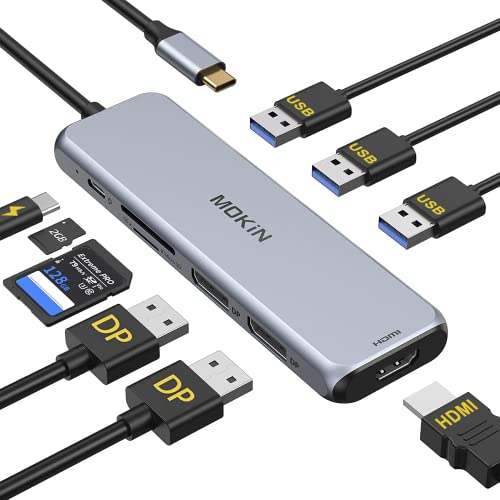
This USB C docking station is a 9 in 1 laptop hub with 2 DisplayPort outputs, 1 HDMI port, 3 USB 3.0 ports, SD and microSD card slots, and a 100W PD charging port. It is intended to turn a USB-C laptop into a fuller workstation for multiple displays and extra connections.
It supports up to three external displays at once through the dual DisplayPort and HDMI outputs, although MacOS mirrors the same content on external monitors. MacBooks with M1 chip can only drive one external display.
Who It Is Best For
This dock suits buyers who want extra monitor output, USB ports, card reading, and USB-C charging from one hub. It is relevant for USB-C laptops that support DisplayPort Alt Mode, and it is especially worth checking compatibility if you use a MacBook or another USB-C device with display output requirements.
Key Details
| Detail | Verified information and buyer relevance |
|---|---|
| Product type | 9 in 1 USB C laptop docking station for adding displays, USB ports, card slots, and charging. |
| Display outputs | 2 DisplayPort outputs and 1 HDMI port for external monitor connections. |
| Multi-display support | Supports up to three external displays simultaneously, with MacOS mirroring the same content on external monitors. |
| USB ports | 3 USB 3.0 ports for connecting peripherals and transferring files. |
| Card slots | SD and microSD card slots for reading and writing cards. |
| Charging | 100W PD charging port, with up to 87W safe charging to the laptop. |
| Compatibility | Compatible with Thunderbolt 3 or USB-C devices supporting DisplayPort Alt Mode, and not all USB-C laptops are supported. |
Why Buyers Choose It
- 2 DisplayPort outputs plus HDMI give several display connection options from one dock.
- 3 USB 3.0 ports let you connect common peripherals and storage alongside your displays.
- SD and microSD slots make it easier to move files from cameras or mobile devices.
- The 100W PD input and up to 87W laptop charging support keep power delivery in the same setup.
What To Know Before You Buy
Check that your laptop or device supports USB-C with DisplayPort Alt Mode before ordering, as HDMI and DP functions depend on that support. MacOS external monitors mirror the same content, and MacBooks with M1 chip can only drive one external display. Some USB-C laptops are not compatible, including models named in the source such as HP Pavilion, EliteBook and Lenovo IdeaPad.
Review your display setup carefully if you need true multi-monitor output, and confirm that the selected dock matches your device’s video output capability.
Common Buyer Questions
Can this dock charge a laptop while in use?
Yes. It includes a 100W PD charging port and supports up to 87W charging to the laptop.
How many displays can it support?
It supports up to three external displays simultaneously through the dual DisplayPort and HDMI outputs, subject to host device and system limits.
Will it work with any USB-C laptop?
No. It requires USB-C devices that support DisplayPort Alt Mode, and some USB-C laptops are not compatible.
Can I use SD and microSD cards at the same time?
The dock includes both SD and microSD card slots for reading and writing cards.
Final Buying View
This 9 in 1 USB C docking station is for buyers who need monitor output, USB ports, card slots and PD charging from one hub. The key check is whether your device supports USB-C DisplayPort Alt Mode and whether your chosen display setup matches the MacOS and M1 limits if relevant.
Compare your laptop’s video output support with the dock’s display connections before ordering.


