
Quick Summary
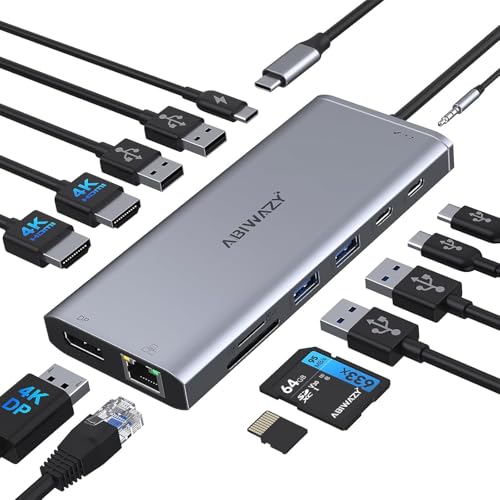
This USB C laptop docking station is a 14 in 1 dock hub with dual HDMI, DisplayPort, Ethernet, USB ports, SD/TF, 3.5mm Audio&Mic and USB C PD charging. It is set up for extending a laptop to external monitors, with stated support for 2 or 3 displays depending on the setup.
The dock includes video, data, network, audio and charging connections in one unit, so it brings several laptop connections together at once. Check laptop compatibility before ordering, especially for video output support and monitor arrangement.
Who It Is Best For
This dock suits buyers who want to connect a USB C laptop to external monitors and use wired accessories, storage cards, Ethernet and audio through one hub. It is aimed at use with compatible laptops, including Thunderbolt 3/4 devices.
Key Details
| Detail | Verified information and buyer relevance |
|---|---|
| Product type | USB C laptop docking station and multiport hub for expanding laptop connections. |
| Port count | 14 in 1, bringing multiple connection types into one dock. |
| Video ports | 2 HDMI and 1 DisplayPort for external monitor connections. |
| Display support | Stated support for 2 or 3 monitors, with different resolution limits depending on the setup. |
| Power delivery | USB C PD charging up to 100W protocol is stated. |
| Data and network | USB 2.0, USB 3.0, USB C and Ethernet are included for peripherals and network connection. |
| Audio and media | 3.5mm Audio&Mic plus SD/TF slots are included. |
| Compatibility note | Video output ports work only with compatible laptops, and Thunderbolt 3/4 devices are mentioned. |
Why Buyers Choose It
- 2 HDMI and 1 DisplayPort give more than one way to connect external screens.
- USB 2.0, USB 3.0 and USB C ports let you attach common peripherals and drives through the dock.
- Ethernet is stated at 1000Mbps, which supports a wired network connection through the dock.
- SD/TF, audio and charging connections are built in, reducing the need for separate adapters.
How It Works
- Connect the dock to a compatible USB C or Thunderbolt 3/4 laptop.
- Attach external monitors using the HDMI or DisplayPort outputs.
- Connect accessories such as a mouse, keyboard, hard drive, Ethernet cable or audio device.
- Use the USB C PD charging port for laptop charging within the stated 100W protocol.
- Check your display arrangement carefully, because MacOS only extends one monitor while the others mirror the display in the stated setup.
Real World Use
The dock is set up for a desk or workstation where a laptop needs several extra connections at the same time. It brings together monitor outputs, data ports, wired internet, audio and card slots, so the laptop can stay connected through one hub rather than several separate adapters.
What To Know Before You Buy
Confirm that your laptop is compatible with the video output ports before ordering, especially if you plan to use more than one monitor. The stated display limits vary by setup, with different maximum resolutions for single, dual and triple monitor use. MacOS users should also check the mirror and extend behaviour before choosing this dock.
Review the selected connection needs carefully if you want charging, external monitors, Ethernet, SD/TF access and USB peripherals from the same device.
Common Buyer Questions
How many ports does it have?
It is a 14 in 1 docking station with HDMI, DisplayPort, USB, SD/TF, Ethernet, audio and USB C PD connections.
Can it charge a laptop?
Yes, it includes USB C PD charging up to 100W protocol, with actual laptop input affected by the laptop’s own power limit.
Will it work with every USB C laptop?
No, the video output ports only work with compatible laptops, so compatibility should be checked before ordering.
Can it support multiple monitors?
Yes, it is stated for 2 or 3 external monitors, with different resolution limits depending on the display setup.
Final Buying View
This docking station suits buyers who need a USB C hub with monitor outputs, network, audio, card slots and charging in one unit. The key decision point is compatibility, especially for video output and the number of monitors you want to use. Check the chosen laptop and display setup before ordering.


