
Quick Summary
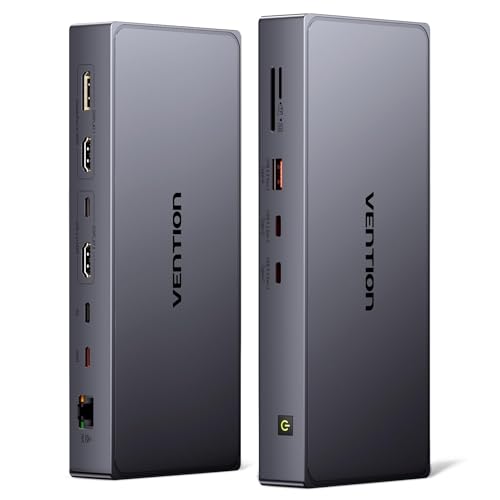
The VENTION USB-C docking station is an 11-in-1 DisplayLink dock for dual monitor setups, with 4K@60Hz display support and a range of USB, video, network and card reader connections. It is designed for laptops with Thunderbolt 3, Thunderbolt 4, Thunderbolt 5 or USB-C 3.1 full-function ports.
The dock supports dual monitors with display output choices across its video ports, and the two ports in each display group cannot be used together. It also includes a 100W USB-C PD port, with up to 92W laptop charging stated when in use.
Who It Is Best For
This dock suits buyers who want to add multiple displays and extra connections from a compatible USB-C laptop. It is also a consideration for MacBook users who want dual-screen functionality with independent content on each monitor after installing the DisplayLink driver.
Key Details
| Detail | Verified information and buyer relevance |
|---|---|
| Brand | VENTION, so the product can be identified clearly when comparing listings. |
| Product type | USB-C docking station with DisplayLink support for expanded laptop connectivity. |
| Display support | Dual monitor use with 4K@60Hz support stated across the display outputs. |
| Video ports | HDMI, DP and USB-C video options are included, with one display group offering HDMI or DP and another offering HDMI or USB-C. |
| Data ports | 2 x 10Gbps USB-C ports and 1 x 10Gbps USB-A port are stated for file transfer and peripherals. |
| Power delivery | 100W USB-C PD port with up to 92W laptop charging stated, noting that a power adapter is not included. |
| Network | 1000Mbps Ethernet port for a wired connection. |
| Card readers | SD/TF 3.0 card readers are included. |
| Compatibility | Designed for laptops with Thunderbolt 3, 4 or 5, or USB-C 3.1 full-function ports. |
| Included items | 1 displayLink dock, 1 x 0.5m USB 4.0 USB-C cable, and 7x24h customer service are stated. |
Why Buyers Choose It
- 11-in-1 connectivity gives one dock multiple stated connection types in a single unit.
- Dual monitor support with 4K@60Hz output suits buyers setting up more than one display.
- The stated 10Gbps USB-C and USB-A ports support faster file transfers than slower USB data connections.
- The 1000Mbps Ethernet port gives the option of a wired network connection.
- The DisplayLink chip is stated to remove the screen duplication restriction on MacBook models when the driver is installed.
How It Works
- Connect the dock to a compatible laptop using the USB-C host connection.
- Choose the display outputs from the available video ports, following the stated rule that the two ports in each display group cannot be used together.
- Install the DisplayLink driver if you want the stated MacBook dual-screen behaviour.
- Connect peripherals, storage, network and cards through the remaining ports as needed.
- Use the 100W USB-C PD port for charging, noting the stated up to 92W laptop charging figure and that a power adapter is not included.
What To Know Before You Buy
Check that your laptop has Thunderbolt 3, 4 or 5, or a USB-C 3.1 full-function port before ordering. If you want dual screens on a MacBook, the DisplayLink driver is part of the setup. Also review the display port grouping carefully, as the two ports in each display group cannot be used together.
Review the included cable length, charging arrangement and the stated port mix against your desk setup before choosing this dock.
Common Buyer Questions
Can this dock run two monitors?
Yes. Dual monitor support is stated, with 4K@60Hz output across the available display ports.
Does it work with MacBook models?
Yes. MacBook M1, M2, M3 and M4 Pro or Max models are stated as compatible, and DisplayLink driver installation is needed for the dual-screen function described.
What network speed does it support?
The dock includes a 1000Mbps Ethernet port for a wired connection.
Is a power adapter included?
No. The description states that the power adapter is not included.
Final Buying View
This VENTION dock is aimed at users who need dual display support, a broad mix of ports and wired network connectivity from a compatible USB-C laptop. Confirm your laptop port type, the display output combination you need, and whether you are happy to install the DisplayLink driver before ordering.


