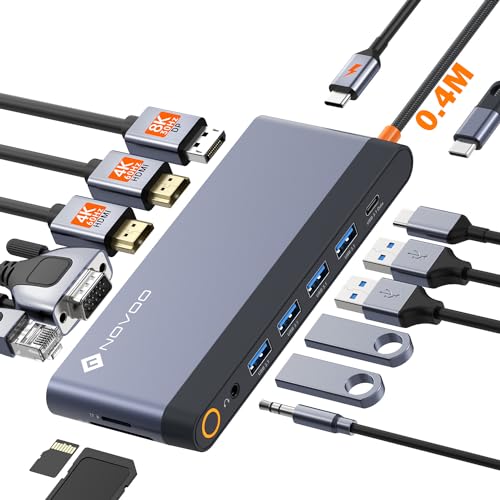
Quick Summary
The WAVLINK USB 3.0 / USB-C Dual 4K docking station connects a PC or Mac to dual displays through HDMI or DisplayPort, while also adding Ethernet, audio in and out, four USB 3.0 ports and two USB-C ports. It supports up to 65W USB-C Power Delivery to the host computer on supported devices.
It is aimed at users who want a single dock to combine display output, data ports and charging from one connection, with support for Windows and macOS noted in the listing.
Who It Is Best For
This dock is for buyers who need a USB-C or USB 3.0 connection from a computer to external displays and peripherals. It will suit someone who wants to run two screens and connect network, audio and USB devices from one unit.
Check your operating system before ordering, as Windows 11, 10, 8.x and 7 are listed, along with macOS 10.14 or later.
Key Details
| Detail | Verified information and buyer relevance |
|---|---|
| Brand | WAVLINK. |
| Connection | USB 3.0 / USB-C link from a PC or Mac. |
| Display outputs | HDMI and DisplayPort for dual display use. |
| Display support | Up to dual 4K at 60Hz, with 5K support stated for dual DisplayPort on a single monitor configuration. |
| Ports | Gigabit Ethernet, audio input/output, four USB 3.0 ports and two USB-C ports. |
| Charging | Up to 65W USB-C Power Delivery to the host computer on supported devices. |
| Compatibility | Windows 11, 10, 8.x and 7, plus macOS 10.14 or later. |
| Included items | 100W power adapter, USB Type-C to C cable, USB Type-C to A cable, CD driver download card and instruction manual. |
Why Buyers Choose It
- USB-C or USB 3.0 connection means it can be used with either type of host connection listed.
- HDMI and DisplayPort outputs give options for dual-display setups.
- Four USB 3.0 ports and two USB-C ports provide space for multiple peripherals.
- Up to 65W power delivery to supported hosts reduces the need to use a separate laptop charger at the desk.
What To Know Before You Buy
Check that your computer runs one of the listed Windows versions or macOS 10.14 or later before ordering. For DisplayPort use, the listing notes that the monitor should support DP 1.2 and be set to DP 1.2.
The dock is not supported on Linux or Unix, and the listing also notes that some non-DisplayLink adapters and HDCP encrypted or copy-protected content are not supported.
Common Buyer Questions
Which computers does it work with?
It is listed for Windows 11, 10, 8.x and 7, plus macOS 10.14 or later.
What display setups are supported?
The listing states dual 4K DisplayPort, dual 4K HDMI, or 4K HDMI plus 4K DisplayPort at 3840 x 2160 at 60Hz, with 5K stated for dual DisplayPort on a single monitor configuration.
Does it charge the laptop?
Yes, up to 65W USB-C Power Delivery is stated for supported host devices.
What is included in the box?
A USB C Dual 4K Universal Dock station, 100W power adapter, USB Type-C to C cable, USB Type-C to A cable, CD driver download card and instruction manual.
Final Buying View
This dock suits buyers who want dual external display support, multiple data ports and host charging from one unit. Confirm your computer system, display inputs and USB-C Power Delivery support before choosing it.