
Quick Summary
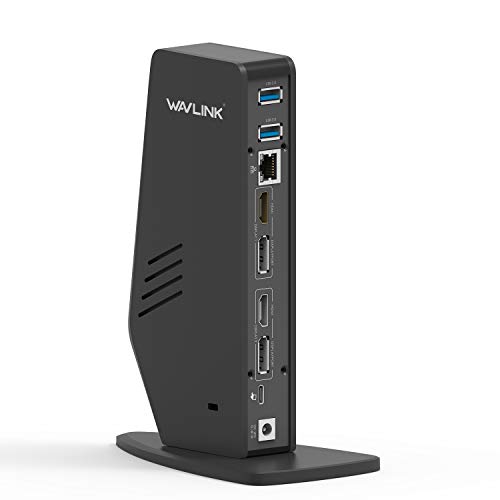
The WAVLINK USB 3.0/USB-C dual 4K display laptop docking station connects a PC or Mac through USB 3.0 Type-A or USB-C and adds dual video, Gigabit Ethernet, audio, and five USB 3.0 ports. It supports DisplayPort and HDMI output, with support for up to two external monitors in the stated display combinations.
The dock uses the DisplayLink DL-6950 chipset and includes a USB-C to C cable, a USB-C to A cable, a 20V/2A power adapter, a driver download card, an instruction manual and a warranty card.
Who It Is Best For
This dock suits buyers who want a single connection point for a laptop or computer and need external displays, wired network access, audio and extra USB ports. It is aimed at users on Windows or macOS who are prepared to follow the stated driver installation steps, especially on macOS.
Key Details
| Detail | Verified information and buyer relevance |
|---|---|
| Brand | WAVLINK, so the product identity is clear. |
| Connection | USB 3.0 Type-A or USB-C link from PC or Mac. |
| Video outputs | DisplayPort and HDMI support for dual video use. |
| External display support | Supports two external monitors in the stated dual DP, dual HDMI, dual DisplayPort, or single DisplayPort plus single HDMI combinations. |
| Maximum resolution | Up to 4K 4096 x 2160@60Hz for two external monitors, with up to 5K 5120 x 2880@60Hz when using dual DP ports to one monitor. |
| Chipset | DisplayLink DL-6950 chipset. |
| Operating system support | Windows 11, 10, 8.x and 7, plus macOS 10.14 or later. |
| Network port | Gigabit Ethernet RJ-45, backward compatible with 10/100 Ethernet. |
| USB ports | 5 USB 3.0 ports, backward compatible with USB 2.0 and 1.1. |
| Audio | 2 in 1 Audio Line-out Jack for earphone and Line-In Jack Microphone. |
| Power and charging | Includes a 20V/2A power adapter, and laptop charging is not supported. |
| Included in the box | USB C Universal Dock station, USB Type C to C cable, USB Type C to A cable, driver download card, instruction manual and warranty card. |
What To Know Before You Buy
Confirm your laptop or computer connection type, as this dock uses USB 3.0 Type-A or USB-C. Check your display setup carefully, because the supported monitor combinations and stated resolutions depend on how you connect the dock. It does not support laptop charging, so you will need a separate charging arrangement for your device.
On macOS, manual driver installation is required, while Windows Update supports plug and play driver installation. The product is stated as not recommended for gaming, video playback, or 2D and 3D graphic tools.
Common Buyer Questions
How many monitors can it run?
It supports two external monitors in the stated dual display combinations.
Does it charge a laptop?
No, laptop charging is not supported.
Which operating systems work with it?
It is compatible with Windows 11, 10, 8.x and 7, and macOS 10.14 or later.
What comes in the box?
The box includes the dock, a 20V/2A power adapter, USB Type C to C cable, USB Type C to A cable, driver download card, instruction manual and warranty card.
Final Buying View
This dock is for buyers who need dual display support, wired networking, audio and multiple USB ports from one USB 3.0 Type-A or USB-C connection. Review your monitor setup, operating system and the no-laptop-charging limitation before choosing it.


