
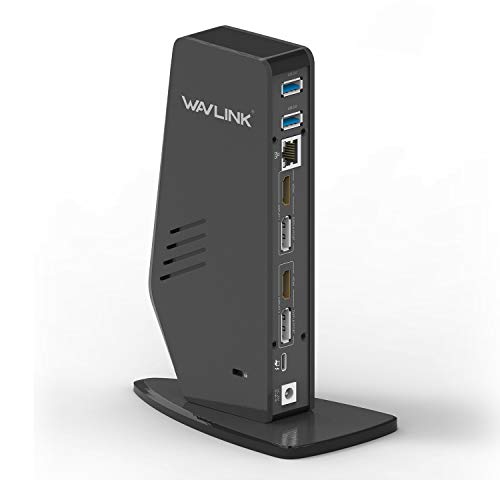
Quick Summary
The WAVLINK USB 3.0 / USB-C dual display laptop docking station connects a PC or Mac through USB 3.0 Type-A or USB-C and supports dual external monitors, Gigabit Ethernet, audio, and five USB ports. It also offers up to 65W USB-C Power Delivery for supported laptops.
For display use, it supports up to 5K when using dual DP ports to one monitor, or up to 4K at 60Hz when using Dual HDMI, Dual DisplayPort, or a Single DisplayPort plus Single HDMI.
Who It Is Best For
This dock suits buyers who want one connection point for a laptop setup with external displays, wired networking, audio, and multiple USB peripherals. It is also relevant for users with supported USB-C Power Delivery laptops who want desk charging from the dock.
Key Details
| Detail | Verified information and buyer relevance |
|---|---|
| Brand | WAVLINK, helping identify the product clearly. |
| Connection options | USB 3.0 Type-A or USB-C link from a PC or Mac. |
| Display support | Dual external monitors are supported, with up to 5K on dual DP to one monitor or up to 4K at 60Hz on listed dual-screen combinations. |
| Power delivery | Up to 65W USB-C Power Delivery for laptops that support USB-C PD. |
| Ports | Gigabit Ethernet, audio port, and 5 USB ports. |
| USB compatibility | USB ports are backward compatible with USB 2.0 and 1.1, with USB over-current protection and hot swapping noted. |
| System support | Compatible with Windows 11, 10, 8.x and 7, and macOS 10.14 or later. |
| Included items | Docking station, 20V/5A power adapter, USB Type-C to C cable, USB Type-C to A cable, driver download card, instruction manual, and warranty card. |
Why Buyers Choose It
- USB 3.0 Type-A and USB-C connection options make it easier to match different laptop ports.
- Dual monitor support gives a single dock for multi-display desk setups.
- Up to 65W USB-C Power Delivery reduces the need to use a separate charger on supported laptops.
- Five USB ports, Gigabit Ethernet, and audio provide a central connection point for peripherals.
How It Works
- Connect the dock to a PC or Mac using the USB 3.0 Type-A or USB-C link.
- Attach your external monitors using the supported DisplayPort and HDMI combinations.
- Connect USB devices, Ethernet, and audio as needed.
- If your laptop supports USB-C Power Delivery, the dock can provide up to 65W charging through the USB-C connection.
- On Windows, driver installation is handled via Windows Update. On macOS, manual driver installation is required.
Real World Use
This docking station is set up for desk use with a laptop and external equipment. It gives you a single connection point for displays, wired internet, audio, and USB accessories, while also supporting charging on compatible laptops.
The dock is noted for web and productivity software use, and it is not recommended for gaming. It also does not support some non-DisplayLink adapters, and HDCP will not play encrypted or copy-protected content.
What To Know Before You Buy
Check that your laptop supports USB-C Power Delivery if you want charging from the dock. Confirm that your preferred monitor setup matches one of the supported DisplayPort and HDMI combinations, especially if you want dual-screen use. macOS users should be prepared for manual driver installation, while Windows users can use Windows Update for driver installation.
Pros: It combines display output, Ethernet, audio, USB expansion, and laptop charging in one dock.
Cons: It is not recommended for gaming, and HDCP playback is not supported for encrypted or copy-protected content.
Common Buyer Questions
Does it charge a laptop?
Yes, it supports up to 65W USB-C Power Delivery for laptops that support USB-C PD.
Can it run two monitors?
Yes, it supports dual external monitors with the listed DisplayPort and HDMI combinations.
Which operating systems are supported?
It supports Windows 11, 10, 8.x and 7, plus macOS 10.14 or later.
What comes in the box?
The package includes the docking station, power adapter, USB Type-C to C cable, USB Type-C to A cable, driver download card, instruction manual, and warranty card.
Final Buying View
This docking station is a strong fit for a laptop desk setup that needs dual displays, USB expansion, Ethernet, audio, and optional 65W charging. Review your monitor connections, operating system, and laptop charging support before choosing it.


