
Computer Mice
Computer mice are essential input devices used to control a cursor, select items, scroll pages, play games and work more efficiently on laptops, desktop PCs and compatible devices. They are useful for home offices, gaming setups, study desks, travel bags, creative work and everyday computer use, depending on the product features listed.
The right computer mouse should suit your hand, device, workspace and the way you use your computer. Connection type, shape, size, buttons, sensitivity, power source and compatibility are all worth comparing before choosing.
- Computer Mice
TENMOS M101 Wireless Mouse 2.4G Silent Optical Travel Mouse (Butterfly)
£13.99 *View On Amazon* - Computer Mice
KLIM Blaze X RGB Rechargeable Wireless Gaming Mouse with Charging Dock
£39.97 *View On Amazon* - Computer Mice
Hama EMW-500L Left-Handed Vertical Ergonomic Wireless Mouse, Black
£24.15 *View On Amazon* - Computer Mice
Perixx PERIMICE-804 Bluetooth Vertical Mouse
Original price was: £24.99.£15.99Current price is: £15.99. *View On Amazon* - Computer Mice
Uineer Rechargeable Vertical Wireless Mouse, 59° Ergonomic, 2.4G, 2400 DPI, 6 Buttons
Original price was: £19.99.£16.99Current price is: £16.99. *View On Amazon* - Computer Mice
INFINMIND Wireless Side Scroll Mouse with Multi-Device, Ergonomic Computer Mouse, Smart Flying Scroll, Silent Bluetooth Mouse, Grey
Original price was: £19.99.£18.99Current price is: £18.99. *View On Amazon* - Computer Mice
Ultra Slim 2.4 GHz Wireless Mouse with USB Mini Receiver (Pink)
£5.35 *View On Amazon* - Computer Mice
Wireless Mini Optical Mouse, 3 Buttons, 1600 DPI, Blue
Original price was: £14.47.£13.73Current price is: £13.73. *View On Amazon* - Computer Mice
INPHIC Wireless Rechargeable Mouse with Battery Level Visible, Silent Click, USB 2.4G, 6 Buttons, 2400 DPI, Black
Original price was: £13.99.£11.89Current price is: £11.89. *View On Amazon*




What Are Computer Mice?
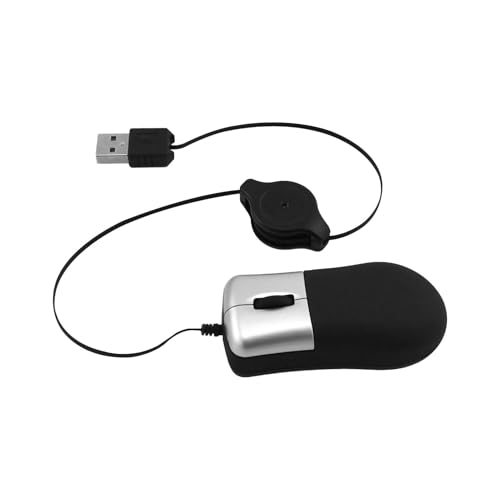
Computer mice are hand controlled devices used to move a pointer on a screen and interact with software. They usually include left and right click buttons, a scroll wheel and a sensor underneath, although designs can vary widely.
Products in this category may include wired mice, wireless mice, Bluetooth mice, gaming mice, ergonomic mice, vertical mice, compact travel mice, trackball mice and multi button mice, depending on the products listed.
Some computer mice are designed for simple everyday use, while others focus on comfort, gaming features, portability or specialist control where stated. Always check the product details carefully before buying.
What Are Computer Mice Used For?
Computer mice are used for browsing, office work, gaming, design tasks, spreadsheets, school work, online shopping, editing, presentations and general computer control. They can make many tasks easier than using a laptop trackpad, especially for longer sessions or more precise movement.
For office work, a comfortable mouse can help with documents, emails, spreadsheets and web use. For gaming, extra buttons, adjustable sensitivity and a suitable shape may matter more where listed. For travel, a compact wireless mouse can be useful with a laptop. For creative work, accuracy, comfort and control can be important.
A good mouse should feel natural in the hand and suit the way you actually work or play.
How To Choose The Right Computer Mouse
Start by choosing the connection type. A wired mouse connects directly to a computer, often through USB. A wireless mouse may use a small USB receiver, Bluetooth or another connection method where listed. Make sure your device has the right port or wireless support before buying.
Next, think about comfort. Mouse shape, size and grip style can affect how it feels during use. A compact mouse may be easy to carry, but it may feel less comfortable for long sessions. A larger mouse may support the hand better for some users, but it may not suit smaller hands or travel use.
Consider what you use the computer for. Basic browsing and office work may only need a simple reliable mouse. Gaming, editing, design or productivity work may benefit from extra buttons, adjustable sensitivity or a more specialised shape where listed.
Also check whether the mouse needs batteries, charging or a cable. For wireless models, battery life, charging method and included receiver details can vary by product.
Key Features To Compare
When comparing computer mice, look at connection type, size, shape, sensor type, sensitivity settings where listed, button layout, scroll wheel design, weight, power source and compatibility.
Sensitivity is often described using DPI where listed. Higher or adjustable DPI can be useful for some tasks, but it is not automatically better for everyone. The best setting depends on screen size, software, gaming style and personal preference.
Button layout is another useful detail. Extra side buttons may help with web browsing, gaming shortcuts or productivity tasks where compatible. However, a simpler mouse may be easier for general use.
Scroll wheel design can affect everyday comfort. Some products may include smooth scrolling, stepped scrolling, tilt scrolling or additional scroll controls where listed.
Shape matters more than many buyers expect. A mouse that looks good but feels awkward can become frustrating during long work sessions.
Computer Mice Compared With Trackpads Touchscreens And Graphics Tablets
A computer mouse gives physical control and is often more comfortable for long desktop sessions than a laptop trackpad. It can also make clicking, dragging and selecting feel easier for many users.
A trackpad is useful for laptops and gestures, but it may feel less precise for some tasks. It is convenient when travelling, but a mouse can be better for desk based work.
A touchscreen can be simple for tapping and swiping, but it is not always practical for detailed computer work, gaming or long periods at a desk.
A graphics tablet is designed for drawing, design and pen based input. It can be useful for creative work, but it does not replace a mouse for every task. Many users keep both depending on the job.
Guidance For Beginner Regular And Experienced Users
Beginners should choose a computer mouse that is simple, comfortable and clearly compatible with their device. A basic wired or wireless mouse can be a practical starting point for everyday use.
Regular users should compare hand comfort, button layout, scroll feel and reliability more closely. If you use a computer for several hours a day, small comfort details can make a noticeable difference.
Experienced users may prefer more specific features such as adjustable sensitivity, programmable buttons, ergonomic shapes, low weight designs, Bluetooth pairing or gaming focused settings where listed. The right choice depends on the setup and software being used.
Use Cases By Device And Setup
For home offices, a comfortable mouse can make emails, spreadsheets, documents and web browsing easier. A full size mouse may feel better than a compact travel model for regular desk use.
For laptops, a wireless or Bluetooth mouse can be useful when working away from the main desk. Check compatibility with your laptop ports and operating system before buying.
For desktop PCs, wired and wireless mice can both work well where compatible. Wired options avoid charging concerns, while wireless options can reduce desk cable clutter.
For gaming, compare sensitivity settings, button layout, weight, grip style and software compatibility where listed. A gaming mouse should suit the games played and the user’s hand comfort.
For students, a compact mouse can be useful for study spaces, libraries, travel and shared desks. Durability and easy setup may matter more than advanced features.
For creative work, precision, comfort and smooth movement can be important. Some users may prefer a mouse with adjustable sensitivity or additional buttons where suitable.
Fit Compatibility And Device Checks
Computer mouse compatibility starts with the device connection. Check whether your computer has USB A, USB C, Bluetooth or the required receiver support where relevant. Some mice may need an adapter if your device does not have the right port.
Operating system compatibility should also be checked where listed. Basic functions may work on many systems, but extra buttons, custom settings or software features may require specific support.
Wireless mice may use a small receiver that needs to stay plugged into the computer. Bluetooth mice may connect without a receiver where compatible. If you use multiple devices, check whether the mouse supports device switching where listed.
If buying for a gaming console, tablet, smart TV or specialist device, check compatibility carefully. A mouse made for computers may not work fully with every device.
Comfort Hand Size And Ergonomics
A computer mouse should feel comfortable in the hand and allow relaxed clicking, scrolling and movement. The wrist, fingers and forearm should not feel strained during normal use.
Different shapes suit different grips. Some users rest the palm on the mouse, while others use fingertip or claw style control. Larger mice may suit palm grip users, while smaller mice may suit travel or lighter fingertip use, depending on preference.
Ergonomic, vertical or trackball mice may suit some users who want a different hand position where listed. These designs can feel helpful for some people, but they are not automatically better for everyone and may take time to get used to.
If you experience pain, numbness or persistent discomfort, changing a mouse may help comfort, but it should not replace appropriate medical or ergonomic advice where needed.
Wired Wireless And Bluetooth Options
Wired computer mice are often simple to use because they connect directly to the computer and do not usually need charging or batteries. They can be practical for fixed desks, gaming setups and users who prefer a direct connection.
Wireless mice can reduce cable clutter and make a desk feel tidier. They may use batteries, rechargeable power or a USB receiver depending on the product.
Bluetooth mice can be useful for laptops, tablets and devices with limited ports where compatible. They do not always need a receiver, but setup and performance can depend on the device and operating system.
The best option depends on how you use your computer. A wired mouse may suit a permanent desk, while a wireless or Bluetooth mouse may suit travel, shared spaces and cleaner setups.
Care Maintenance And Storage
Keep the mouse clean and free from dust, crumbs and dirt. Wipe the outer surface gently according to the product guidance, and clean around buttons and the scroll wheel carefully where needed.
The sensor area underneath should be kept clear so the mouse can track properly. If movement becomes jumpy or inconsistent, check the surface, sensor and mouse mat.
For wireless mice, replace or recharge batteries as needed. Remove batteries before long term storage if the product guidance recommends it.
Avoid dropping the mouse, pulling cables sharply or leaving it where it may be crushed in a bag. For travel, a small pouch or laptop bag compartment can help protect it.
Useful Accessories To Consider
Useful accessories can include mouse mats, wrist rests, keyboards, laptop stands, USB hubs, docking stations, cable organisers, batteries, chargers and desk mats.
A mouse mat can improve comfort and tracking on some surfaces. For home offices, pairing a comfortable mouse with a suitable keyboard and laptop stand can create a more practical desk setup.
For travel, a compact pouch for cables, adapters and a wireless mouse can help keep computer accessories organised.
Why Buy Computer Mice From YPC?
At YPC, we understand active lifestyles and the need for practical products that work in real use. Computer mice can vary by shape, connection type, compatibility, button layout, sensitivity, power source and comfort, so comparing the details helps you choose with more confidence.
YPC helps you browse computer accessories with real everyday setups in mind, whether you are buying for work, study, gaming, travel, home offices or general computer use. Explore the Computer Mice category to browse the available options and compare the features that matter most for your device and routine.
FAQs
What should I look for in a computer mouse?
Look for compatibility, connection type, comfortable shape, suitable size, button layout, scroll wheel feel, sensitivity settings where listed and the power source if it is wireless.
Is a wired or wireless mouse better?
Neither is automatically better. A wired mouse can be simple and reliable for a fixed desk, while a wireless mouse can reduce cable clutter and suit laptops or travel where compatible.
Will any mouse work with my laptop?
Not always. Check whether your laptop has the right port, Bluetooth support or receiver compatibility. Also check operating system support where listed, especially for extra buttons or software features.
What is DPI on a computer mouse?
DPI is a sensitivity measurement used on some mice. Higher or adjustable DPI can change how quickly the cursor moves, but the most comfortable setting depends on your screen, task and preference.
Are gaming mice only for gaming?
No. Gaming mice can also be used for general computer work where compatible, but their extra buttons, shape and settings may not be necessary for every user.
Are ergonomic mice worth considering?
Ergonomic mice may be useful for users who want a different hand position or more comfort during longer sessions. Fit and preference vary, so check the shape and size carefully.
Do wireless mice need batteries?
Some wireless mice use replaceable batteries, while others are rechargeable where listed. Check the product details so you know how the mouse is powered.
Do I need a mouse mat?
A mouse mat is not always essential, but it can improve comfort and tracking on some surfaces. It can also help protect a desk and make movement feel smoother.
 Getting ready for Summer? View our Home and Garden Products

Heading outdoors this winter? Take a look at our Outdoor Clothing.