Quick Summary
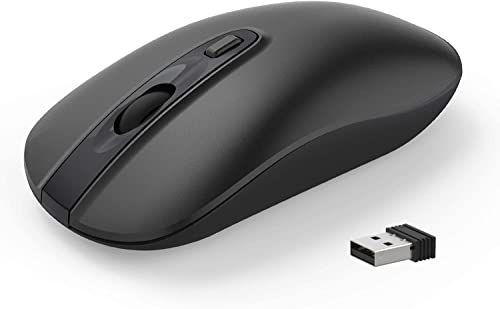
The TENMOS M101 is a 2.4G wireless mouse with a USB receiver, silent left and right buttons, and 1600 DPI precision control. It is described as a travel mouse and suits use with a notebook, PC, laptop, computer or Macbook.
The mouse uses plug and play setup with no additional software required. The USB receiver can stay in the USB port or be stored in the back slot of the mouse when not in use.
Who It Is Best For
This mouse suits buyers who want a compact wireless mouse for everyday use with compatible devices, and who value a quieter clicking experience. It also suits users who want the receiver stored on the mouse when travelling or storing it away.
Key Details
| Detail | Verified information and buyer relevance |
|---|---|
| Brand | TENMOS. |
| Model | M101. |
| Connection | 2.4G wireless with USB receiver for cable-free use. |
| Control feel | Silent left and right buttons for quieter clicking. |
| DPI | 1600 DPI for precise control. |
| Buttons | 3 buttons. |
| Compatibility | Notebook, PC, laptop, computer and Macbook are named in the product title, and the description also mentions Windows XP, Windows Vista, Windows 7 and Mac OS X 10.4 or later. |
| Setup | Plug and play with no additional software required. |
| Receiver storage | The USB receiver can be kept in the USB port or stored in the back slot of the mouse when not in use. |
| Variation | Butterfly finish or style as stated in the title. |
What To Know Before You Buy
Check that your device has a USB port for the receiver. If you are choosing this variation, review the Butterfly option carefully before ordering. The stated compatibility covers several computers and operating systems, including Windows XP, Windows Vista, Windows 7 and Mac OS X 10.4 or later.
Pros: Silent buttons and receiver storage on the mouse make it easier to use and keep together.
Cons: The product is limited to the stated 2.4G wireless receiver setup.
Common Buyer Questions
Does it need software installation?
No. It is plug and play and does not require additional software.
Can the receiver be stored with the mouse?
Yes. The USB receiver can be stored in the back slot of the mouse when not in use.
Which operating systems are mentioned?
Windows XP, Windows Vista, Windows 7 and Mac OS X 10.4 or later are mentioned.
Final Buying View
If you want a wireless mouse with silent buttons, 1600 DPI control and receiver storage built in, the TENMOS M101 is a clear option. Confirm your device has a USB port and check the Butterfly variation before ordering.