

Quick Summary
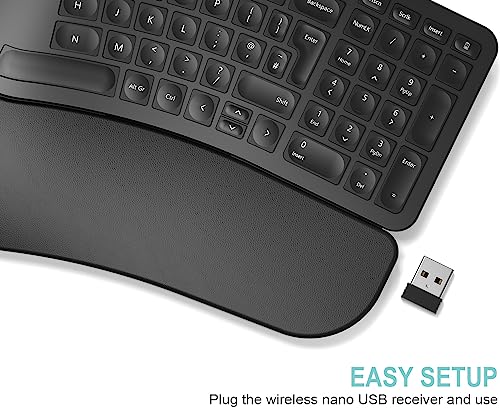
The Arteck Split Ergonomic Keyboard is a 2.4G USB wireless keyboard with a split design and a cushioned wrist and palm rest. It is made for use with a Windows computer desktop or laptop, and the nano USB receiver lets you start using it after a simple setup.
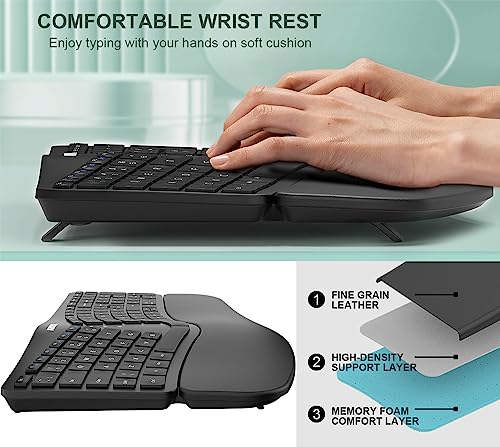
The keyboard is described as comfortable and natural ergonomic split keyboard, with a soft cushioned wrist rest to support your wrist and forearm while typing.
Who It Is Best For
This keyboard suits buyers who want a split ergonomic layout and a wireless USB setup for a Windows computer desktop or laptop. It is also relevant if you want the included wrist and palm rest support during typing.
Key Details
| Detail | Verified information and buyer relevance |
|---|---|
| Brand | Arteck. |
| Product type | Split ergonomic keyboard with cushioned wrist and palm rest. |
| Wireless connection | 2.4G USB wireless using a nano USB receiver. |
| Compatibility | For Windows computer desktop laptop. |
| Battery | Rechargeable lithium battery. |
| Stated battery life | 6 months on a single charge based on 2 hours non-stop use per day. |
| Included items | Keyboard, nano USB receiver, USB-C charging cable, welcome guide. |
| Warranty | 24-month warranty. |
Why Buyers Choose It
- The split design helps position wrists and forearms in a natural, relaxed position.
- The soft cushioned wrist rest gives a supported place to rest your wrist and forearm while typing.
- The nano USB receiver supports simple setup by plugging it into your computer.
- The included USB-C charging cable and rechargeable lithium battery mean the keyboard is set up for wireless use with charging included.
How It Works
- Insert the nano USB receiver into your computer.
- Use the keyboard once the receiver is connected.
- Charge the rechargeable lithium battery with the included USB-C charging cable when needed.
What To Know Before You Buy
Check that you want a split ergonomic keyboard rather than a standard layout, as the split design is part of the product. Confirm that your device is a Windows computer desktop or laptop before ordering. The battery life figure is based on 2 hours non-stop use per day, so your own use pattern may differ.
Pros: Split design, cushioned wrist and palm rest, and wireless USB setup are all included.
Cons: The stated battery life is based on a specific daily usage pattern.
Common Buyer Questions
How do I connect it?
Plug the nano USB receiver into your computer and use the keyboard.
What comes in the box?
The keyboard, nano USB receiver, USB-C charging cable, welcome guide, and 24-month warranty are included.
What kind of battery does it use?
It uses a rechargeable lithium battery.
Is it for Windows devices?
Yes, it is for Windows computer desktop and laptop use.
Final Buying View
If you want a wireless split ergonomic keyboard for a Windows desktop or laptop, this Arteck model brings together the split layout, cushioned wrist and palm rest, and included USB receiver. Review the compatibility and battery-life detail before choosing.