Quick Summary
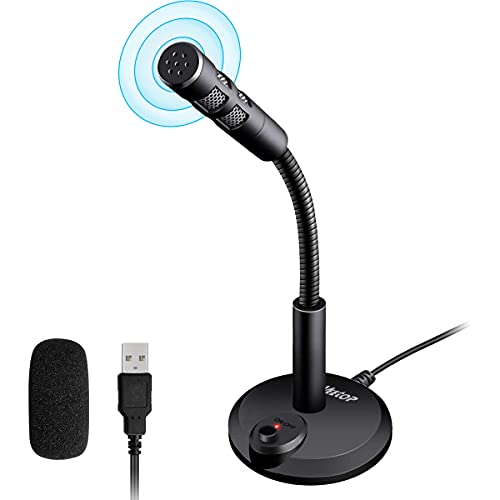
The TKGOU USB conference microphone is a plug and play desktop mic for online meetings, classes, Skype, recording, chatting and Zoom. It has an LED indicator, an omnidirectional condenser pickup, and support for Windows and Mac OS X.
It is a microphone, not a speaker or speakerphone. The built-in light shows working status, with blue for working and no light for mute.
Who It Is Best For
This microphone suits people who need a desktop mic for one-to-one or small-group conference calls, online chatting, podcast recording, YouTube video work or streaming on Twitch. It also fits distance education and video meetings where a simple USB setup is preferred.
Key Details
| Detail | Verified information and buyer relevance |
|---|---|
| Product type | USB conference microphone for desktop and laptop use. |
| Pickup pattern | Omnidirectional condenser microphone with a stated 360° sensitivity pickup range. |
| Pickup range | 3 m / 10 ft stated sensitivity range, useful for checking intended speaking distance. |
| Compatibility | Compatible with Windows and Mac OS X. |
| Connection | USB plug and play design with no drivers to install. |
| Indicator light | Blue indicates working and no light indicates mute. |
| Cable length | 2.0 m / 6.5 ft USB cable, which affects how far the mic can be positioned from the device. |
| Weight | 120 g, which supports easier carrying. |
| Size | Radius 2.75 inches / 7 cm and thickness 0.59 inches / 15 mm. |
| Material | Sturdy metal material with an anti-slip mat on the base. |
Why Buyers Choose It
- The plug and play USB connection removes driver installation from the setup process.
- The LED indicator gives a clear working and mute status check during use.
- The stated 3 m / 10 ft pickup range gives a useful guide for positioning the mic in a meeting setup.
- The compact 120 g design is easier to carry in a pocket or briefcase.
- The 2.0 m USB cable gives some flexibility when placing the microphone on a desk.
How It Works
- Connect the microphone to a laptop or desktop using the USB cable.
- Use it without installing drivers.
- Check the indicator light: blue means working and no light means mute.
- Position it within the stated pickup range for your call or recording setup.
Real World Use
The compact desktop design takes up less space when in use, and the microphone can be carried in a pocket or briefcase. The base includes an anti-slip mat to help keep it stable on a desk during use.
What To Know Before You Buy
Check that you need a microphone rather than a speaker or speakerphone, as this unit is a condenser microphone. Confirm that your device uses Windows or Mac OS X, since it is not compatible with Raspberry Pi, Linux, Android or Xbox. Review the stated cable length, pickup range and compact dimensions to make sure they suit your desk setup.
Common Buyer Questions
Is this a speakerphone?
No. It is a condenser microphone, not a speaker or speakerphone.
Which devices does it work with?
It is compatible with Windows and Mac OS X.
Does it need drivers?
No. It uses a plug and play USB design.
What does the light show?
Blue means working and no light means mute.
Final Buying View
This TKGOU USB conference microphone suits buyers who need a simple desktop mic for meetings, classes or recording on Windows or Mac. Check the compatibility list and the stated cable length before ordering.