





Quick Summary
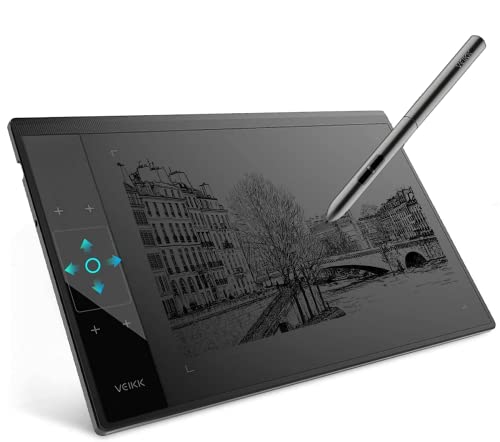
The VEIKK A30 is a graphic drawing tablet for drawing, design, online education, e-signatures, and photo or video editing. It features 4 touch keys, 1 gesture pad, an 8192 level battery-free tilt pen, and a 10 x 6 drawing area.
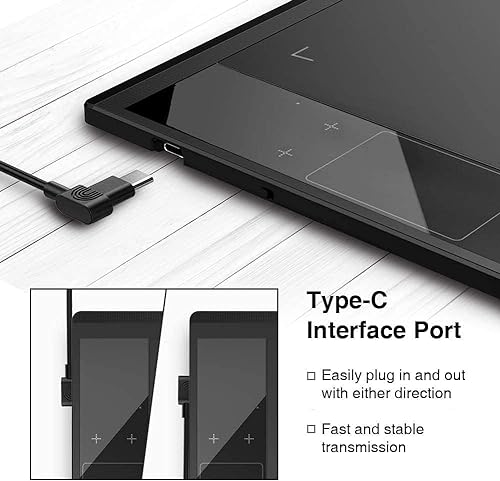
It is compatible with Windows 7 or later, Mac OS 10.12 or later, and Linux, and it uses a Type-C port design for plugging in either way.
Who It Is Best For
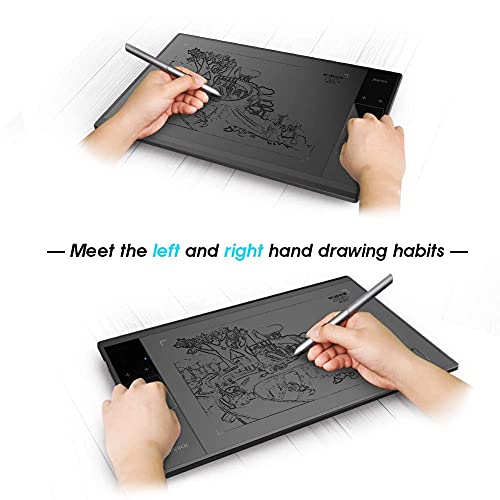
This tablet suits buyers who want a drawing pad for creative work, signing, or editing on a supported computer system. It is also relevant if you need left or right hand use and want a larger drawing area for artwork.
Key Details
| Detail | Verified information and buyer relevance |
|---|---|
| Brand and model | VEIKK A30, so you can identify the exact tablet variant. |
| Product type | Graphic drawing tablet for art design creation and related digital tasks. |
| Touch controls | 4 touch keys and 1 gesture pad for on-tablet input. |
| Pen | 8192 level battery-free tilt pen for uninterrupted drawing without charging or batteries. |
| Drawing area | 10 x 6 drawing area, giving space for artwork and editing work. |
| Compatibility | Supports Windows 7 or later, Mac OS 10.12 or later, and Linux. |
| Connection | Type-C port design with plug-in from either direction. |
| Hand use | Suitable for both right and left hand users. |
| Included accessories | 8 pen nibs, 2 OTG connectors, an artist glove, and a pen pocket are mentioned. |
Why Buyers Choose It
- 4 touch keys and a gesture pad give direct tablet input alongside pen use.
- The battery-free pen removes the need for charging or batteries.
- The 10 x 6 drawing area gives more room for drawing and design work.
- Type-C plug orientation both ways makes connection simpler to line up.
- Included extras such as nibs, OTG connectors, an artist glove, and a pen pocket add to the package contents.
What To Know Before You Buy
Check that your device runs Windows 7 or later, Mac OS 10.12 or later, or Linux before ordering. The tablet is listed with a 10 x 6 drawing area, so it is worth confirming that this size suits your workspace and drawing style. It is also described as suitable for both right and left hand users, which is useful if you share the tablet or switch hands.
Pros: The battery-free pen and included accessories add practical value for drawing and related tasks.
Cons: The tablet is tied to specific operating system versions, so compatibility needs checking before purchase.
Common Buyer Questions
Which systems does the VEIKK A30 support?
It supports Windows 7 or later, Mac OS 10.12 or later, and Linux.
Does the pen need charging?
No, the pen is battery-free, so it does not need charging or batteries.
Is it suitable for left-handed users?
Yes, it is described as suitable for both right and left hand users.
What comes with the tablet?
Extra accessories mentioned include 8 pen nibs, 2 OTG connectors, an artist glove, and a pen pocket.
Final Buying View
The VEIKK A30 is a straightforward choice for buyers who want a drawing tablet with touch controls, a battery-free pen, and broad computer compatibility. Review the operating system version and the 10 x 6 drawing area before ordering so the tablet matches your setup and working space.


