
Quick Summary
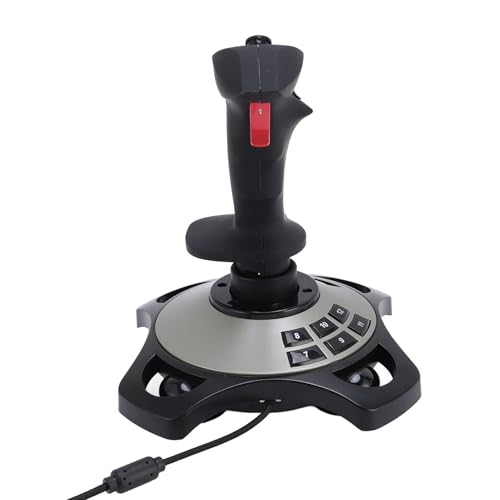
The Fockety Flight Simulator Joystick is a USB flight stick with a throttle, vibration function and comfortable grip. It is made for flight games and includes 12 programmable buttons, 4 axes control and an 8-way hat for hands-on control.
The joystick is also described as having quick fire trigger support and four strong suction cups at the base, which help keep it fixed on a table during use.
Who It Is Best For
This joystick is for buyers who want a flight control system for flight games on compatible Windows systems. It is also relevant if you want a stick with programmable buttons, throttle control and vibration feedback for supported games.
Key Details
| Detail | Verified information and buyer relevance |
|---|---|
| Brand | Fockety. |
| Product type | Flight simulator joystick / flight stick for game control. |
| Connection | USB connection with plug and play support. |
| Compatibility | Compatible with 7, 8, 10 and 11 systems. |
| Buttons and controls | 12 programmable buttons, 4 axes control, 8-way hat and quick fire trigger support. |
| Vibration function | Includes vibration effects that vary by game scene, with stronger feedback noted at 50% or higher vibration strength. |
| Grip and base | Comfortable grip with four strong suction cups at the bottom for table fixing. |
| Throttle | Includes precise throttle control. |
Why Buyers Choose It
- USB plug and play support means setup is kept straightforward when the system recognises the device.
- 12 programmable buttons and keyboard mapping support give more control options for supported flight games.
- The throttle, 4 axes control and 8-way hat provide several input points on one controller.
- Four suction cups at the base help keep the joystick in position on a table.
How It Works
- Connect the joystick by USB.
- Use plug and play setup if the computer recognises it automatically.
- If the device does not work, download the driver, unzip it and connect the joystick again.
- When the computer detects new software, installation completes automatically.
- Adjust vibration strength in your game settings, with 50% or higher suggested for noticeable vibration.
Real World Use
This flight stick is intended for use with flight games such as Ace Air Force and similar titles. The suction cups are relevant for table use, while the ergonomic grip and one-handed control layout help keep the main controls together in a single unit.
What To Know Before You Buy
Check that your system is 7, 8, 10 or 11 before ordering. Confirm that your flight game supports the joystick features you want to use, especially vibration, programmable buttons and keyboard mapping.
The product uses USB and is described as plug and play, but driver installation may still be needed if the device is not recognised at first.
Common Buyer Questions
Does it need drivers?
No, it is described as plug and play, although a driver download and unzip step is mentioned if the device does not work.
Which systems is it compatible with?
It is compatible with 7, 8, 10 and 11 systems.
Does it include vibration?
Yes, it includes a vibration function with different effects based on the game scene.
Can it be fixed to a table?
Yes, it has four strong suction cups at the bottom for fixing it to a table.
Final Buying View
If you want a USB flight joystick with throttle control, vibration and programmable buttons for supported flight games, this Fockety model brings those features together in one controller. Check your system version and confirm the features you want to use before ordering.


