Quick Summary
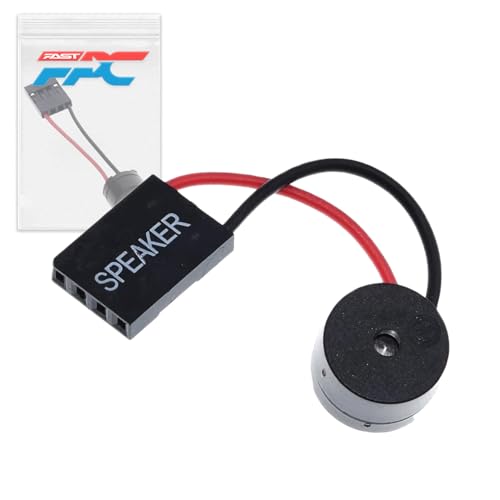
The FPC PC Motherboard Internal Speaker is a BIOS diagnostic buzzer for checking system beep codes during troubleshooting. It has a 2-pin connector, and the provided description also refers to a standard 4-pin connector design, so the connector details should be checked before ordering.
This internal speaker is intended to help with BIOS error diagnosis and POST-related issues by giving audible beep patterns from the motherboard.
Who It Is Best For
This product suits buyers who need an internal motherboard speaker for BIOS diagnostics and system troubleshooting. It is most relevant if you are checking beep codes or looking for an audible way to identify boot issues.
Key Details
| Detail | Verified information and buyer relevance |
|---|---|
| Brand | FPC, as shown in the product title. |
| Product type | Internal motherboard speaker for BIOS diagnostic use. |
| Connector | 2-pin connector in the title, with a description that also refers to a standard 4-pin connector design. Check the header on your motherboard before ordering. |
| Use | Provides audible BIOS beep codes for system troubleshooting and error diagnosis. |
| Installation | Two-wire design with red and black polarity markings for connection to motherboard headers. |
| Form factor | Compact size with integrated mounting features for placement. |
What To Know Before You Buy
Check the connector type on your motherboard before ordering, because the title and description do not fully agree on the connector detail. This speaker is for BIOS diagnostics rather than general audio use, and it is meant to work with a motherboard speaker header connection.
Review the product variation carefully so the connector and header style match your system.
Common Buyer Questions
What is this speaker used for?
It is used for BIOS beep codes, helping with system troubleshooting and error diagnosis.
How is it connected?
It uses a two-wire design with red and black polarity markings for connection to motherboard headers.
Should I check compatibility before ordering?
Yes. The connector details differ between the title and description, so confirm the header on your motherboard first.
Final Buying View
If you need an internal motherboard speaker for BIOS diagnostics, this FPC buzzer is aimed at that task. The main check is connector compatibility, so compare the listed connector style with your motherboard header before choosing it.