Quick Summary
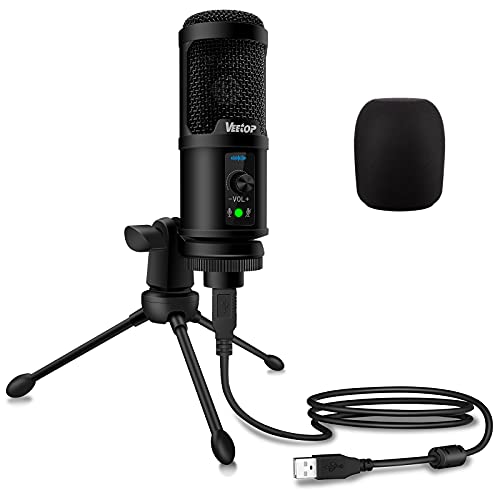
The Fyvadio USB conference microphone is a desktop computer mic for online calls, class sessions and recording video. It is a condenser microphone, not a speaker or speakerphone, and it has an omnidirectional pickup pattern with a stated pickup distance of 3 metres.
It connects by USB for plug and play use, with no drivers or software installation needed. The built-in mute function and LED indicator give a clear status check, with blue for working or connected and red for mute mode.
Who It Is Best For
This microphone suits buyers who need a desktop USB mic for meeting apps, online education, seminars, remote training or business negotiations. It is also a useful choice if you want a microphone that sits on a desk and does not take much space during use.
Key Details
| Detail | Verified information and buyer relevance |
|---|---|
| Brand | Fyvadio. |
| Product type | USB conference microphone for desktop computer use. |
| Pickup pattern | Omnidirectional pickup pattern for capturing sound from around the microphone. |
| Pickup distance | Stated pickup distance of 3 metres. |
| Connection | USB plug and play, with no driver or software installation needed. |
| Compatibility | Compatible with Windows and Mac OS. |
| Mute function | Built-in mute key with LED status indicator. |
| Indicator light | Blue light for working or connected, red light for mute mode. |
| Cable length | 2.0 m USB cable, which affects how far the mic can sit from the connection point. |
| Construction | Sturdy metal material with an anti-slip base mat. |
| Microphone diameter | 6.2 cm. |
Why Buyers Choose It
- The 3 metre pickup distance gives a clear guide for desk positioning during calls or recording.
- USB plug and play setup removes the need for driver or software installation.
- The mute key and LED indicator make status checks straightforward during use.
- The 2.0 m USB cable gives practical placement flexibility on a desk.
How It Works
- Connect the microphone to your computer using the USB cable.
- Use it straight away, as no driver or software installation is needed.
- If there is no response after plugging it in, go to your computer microphone settings and select the mic as the input device.
- Use the mute key when you want to switch to mute mode.
- Check the LED indicator for status, with blue for working or connected and red for mute mode.
Real World Use
The desktop design and anti-slip base suit use on a computer desk, and the metal body is paired with a base mat for stability during use. The stated 6.2 cm microphone diameter and 2.0 m USB cable are useful checks when planning desk space and cable reach.
What To Know Before You Buy
Check that you want a microphone rather than a speaker or speakerphone, as this product is specifically described as a condenser microphone. Confirm that USB connection and Windows or Mac OS compatibility suit your setup. The microphone is listed for meeting apps including Zoom, Skype, Microsoft Teams, Google meeting, Webex and Facetime, so it is aimed at online calls and recording rather than general audio playback.
Common Buyer Questions
Is this a speakerphone?
No. It is a condenser microphone and is specifically noted as not being a speaker or speakerphone.
Does it need software or drivers?
No. It is plug and play through USB, with no driver or software installation needed.
What systems does it work with?
It is compatible with Windows and Mac OS.
How do I know when it is muted?
The LED indicator shows blue for working or connected and red for mute mode.
Final Buying View
If you need a USB desktop microphone for meetings, calls or recording video, this Fyvadio model gives a clear set of practical features to check before choosing. Confirm the USB connection, Windows or Mac OS compatibility, and the 2.0 m cable length against your desk setup.