Quick Summary
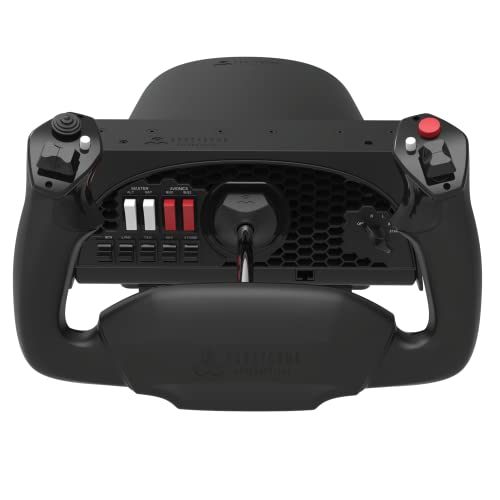
The Honeycomb Aeronautical Alpha Flight Controls Yoke & Switch Panel is a flight simulator control system for PC simmers, student pilots and pilots. It features full 180° yoke rotation and a switch panel with master, alternator, avionics and light switches, plus a 5-position ignition switch.
The yoke is described with a solid steel shaft, dual linear ball bearings and a dampened, selfcentring mechanism with no centre detent or minimal to no dead zone. Those details matter if you want a control layout that gives a more realistic feel in flight simulation.
Who It Is Best For
This setup suits buyers looking for a yoke and switch panel for flight simulation on PC. It also fits users who want a control system with multiple switches on the base and extra buttons on the handles for simulator input.
Key Details
| Detail | Verified information and buyer relevance |
|---|---|
| Brand | Honeycomb Aeronautical. |
| Product name | Alpha Flight Controls Yoke & Switch Panel. |
| Use | For flight simulators, with PC mentioned in the title. |
| Yoke rotation | Full 180° rotation for simulator control input. |
| Yoke mechanism | Solid steel shaft with dual linear ball bearings, plus a dampened, selfcentring mechanism. |
| Switch panel | Includes master, alternator, avionics and light switches, plus a 5-position ignition switch. |
| Handle controls | Each handle includes one 8-way hat switch, two vertical and two horizontal 2-way rocker switches, three buttons and a push to talk button. |
| Mounting | Supplied with two steel heavy-duty clamps, with a clamp-free option using a large 3M Micro-Suction Pad for thicker tabletops. |
Why Buyers Choose It
- Full 180° yoke rotation gives a clear stated control range for simulator flying.
- The switch panel adds hardware controls for master, alternator, avionics and light functions.
- The included clamps and Micro-Suction Pad give two stated mounting options for different desk setups.
- Handle switches and buttons provide additional mapped inputs for simulator controls.
What To Know Before You Buy
Check that your intended simulator setup is for PC before ordering. Review the mounting option that suits your desk or tabletop, especially if you plan to use the clamp-free Micro-Suction Pad on a thicker surface. The control layout includes both base switches and handle controls, so it is worth comparing the available inputs with the functions you want to map.
Common Buyer Questions
Does it include a switch panel?
Yes. The base includes master, alternator, avionics and light switches, plus a 5-position ignition switch.
How does it mount?
It comes with two steel heavy-duty clamps, and it also offers a clamp-free option using a large 3M Micro-Suction Pad for thicker tabletops.
What controls are on the handles?
Each handle has one 8-way hat switch, two vertical and two horizontal 2-way rocker switches, three buttons and a push to talk button.
Final Buying View
If you want a PC flight simulator yoke with a built-in switch panel and multiple handle controls, this is a clear match. Confirm your mounting preference and the simulator setup you plan to use before ordering.