
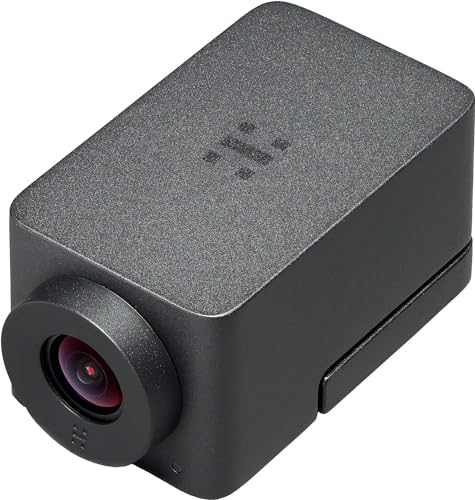
Quick Summary
Huddly GO is a compact HD PTZ video conferencing camera with a 2m USB cable. It combines a 16MP CMOS sensor, ultra-wide glass optics, digital pan, tilt and zoom, plus image enhancement and dewarping for video meetings.
The compact design is tripod mountable and supports plug-and-play use, with compatibility stated for Windows, macOS and Linux.
Who It Is Best For
This camera suits buyers setting up a huddle room, small conference space or personal workspace for video meetings. It is also a sensible fit if you want a camera that can be placed flexibly and connected with the included USB cable.
Key Details
| Detail | Verified information and buyer relevance |
|---|---|
| Product | Huddly GO compact HD PTZ video conferencing camera. |
| Sensor | 16MP CMOS sensor for the stated camera image capture. |
| Optics | Ultra-wide glass optics for wide-angle video framing. |
| Movement | Digital pan, tilt and zoom for flexible framing without mechanical parts. |
| Image processing | Image enhancement and dewarping are included to optimise video output. |
| Connection | Includes a 2m USB cable and is described as plug-and-play. |
| Compatibility | Windows, macOS and Linux are stated, so it should be checked against the intended computer setup. |
| Mounting | Tripod mountable for different placement options. |
| Condition | Renewed. |
Why Buyers Choose It
- The 16MP CMOS sensor and ultra-wide glass optics support the stated HD video and wide-angle view.
- Digital pan, tilt and zoom let you adjust framing without mechanical parts.
- The 2m USB cable and plug-and-play setup suit straightforward desktop or conference PC connection.
- Tripod mounting gives extra placement flexibility in smaller meeting spaces.
How It Works
- Connect the camera using the included 2m USB cable.
- Use it in a plug-and-play setup with a compatible Windows, macOS or Linux computer.
- Adjust framing digitally using pan, tilt and zoom functions.
- Use image enhancement and dewarping as part of the camera’s video processing.
- Mount it on a tripod if that suits the room layout better.
Real World Use
In day-to-day use, this camera is aimed at video conferencing in smaller rooms and workspaces. The ultra-wide optics and digital framing tools are useful when the camera needs to cover meeting participants from a fixed position, while the tripod mount gives another placement option.
What To Know Before You Buy
Check that your computer uses Windows, macOS or Linux before ordering, and make sure the 2m USB cable length works for your setup. If you need a camera for a larger or differently arranged room, review whether the stated compact format and tripod mounting suit your placement plan.
Pros: The included 2m USB cable and plug-and-play setup make connection straightforward.
Cons: The camera is renewed, so buyers should be comfortable with that condition.
Common Buyer Questions
Does it need software installation?
No, it is described as plug-and-play.
Which operating systems are stated?
Windows, macOS and Linux are stated as compatible.
Can it be mounted on a tripod?
Yes, it is tripod mountable.
What cable is included?
A 2m USB cable is included.
Final Buying View
Huddly GO is a compact renewed video conferencing camera for buyers who want HD meeting capture, digital framing control and simple USB connection. Confirm your operating system, cable length needs and preferred placement before choosing it.



