



Quick Summary
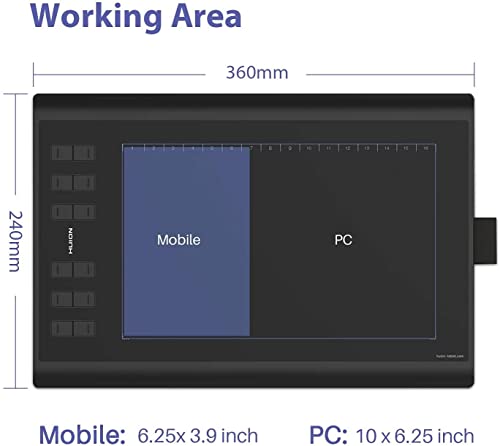
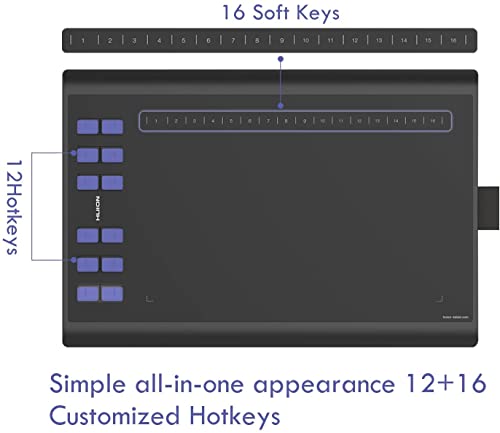
The Huion Inspiroy H1060P is a drawing tablet with a 10 x 6.25 inch drawing area for PC mode and a 6.25 x 3.9 inch working area for Android mobiles. It includes 12 custom buttons, 16 user-defined soft keys and a battery-free PW100 digital pen.
It is set up for drawing, design and art creation with supported use on Windows, Mac and Android devices, and it is described as having a slim 10mm structure.
Who It Is Best For
This tablet suits buyers who want a graphics tablet for sketching, painting or design work and who need shortcut keys for quicker access to chosen functions. It also suits users who want separate PC and Android working areas and a pen that does not need charging.
Key Details
| Detail | Verified information and buyer relevance |
|---|---|
| Product type | Huion Inspiroy H1060P drawing tablet for graphics, paint, design and art creation use. |
| Drawing area | 10 x 6.25 inches in PC mode, giving space for drawing on a larger working area. |
| Android working area | 6.25 x 3.9 inches for Android mobiles, so the active area changes by device mode. |
| Shortcut controls | 12 custom buttons and 16 user-defined soft keys for assigning functions in the driver. |
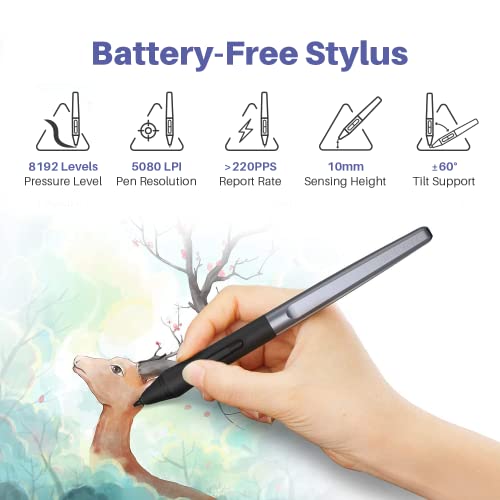
| Stylus | Battery-free PW100 digital pen with EMR technology. |
| Pen specifications | 8192 pressure sensitivity, >220 PPS reporting rate, 5080LPI and ±60° tilt support. |
| Compatibility | Works with Windows 7 or later, Mac OS 10.12 or above, and Android 6.0 or higher. |
| Software support | Compatible with mainstream drawing design software including Adobe Photoshop, Illustrator, Corel Painter, Manga Studio, SAI, AI and CDR. |
| Design | 10mm slim structure with a minimalist appearance. |
Why Buyers Choose It
- 12 custom buttons and 16 user-defined soft keys give you more shortcut options in the driver.
- The battery-free PW100 pen removes the need for charging during use.
- Separate PC and Android working areas let you match the active area to the device being used.
- 8192 pressure sensitivity and ±60° tilt support give the pen detailed input specifications for drawing work.
How It Works
- Use the tablet in PC mode or Android mobile mode, depending on your device.
- Assign functions to the 12 custom buttons and 16 soft keys in the driver.
- Use the PW100 digital pen for drawing and sketching without charging the pen.
- Choose your software from the supported drawing and design applications listed with the product.
What To Know Before You Buy
Check that your device matches the stated operating system support before ordering. The tablet uses different active areas for PC mode and Android mobiles, so review the mode you plan to use most often. If you rely on shortcut keys, the 12 custom buttons and 16 soft keys are a key part of the setup.
Confirm that the tablet size and working area suit your preferred drawing space. The pen is battery-free, so there is no charging step for the stylus itself.
Common Buyer Questions
Does the H1060P work with Android?
Yes. It works with Android 6.0 or higher.
Does the pen need charging?
No. The PW100 digital pen is battery-free.
How many shortcut keys does it have?
It has 12 custom buttons and 16 user-defined soft keys.
What drawing area does it provide?
It provides a 10 x 6.25 inch drawing area in PC mode and a 6.25 x 3.9 inch working area for Android mobiles.
Final Buying View
The Huion Inspiroy H1060P is a graphics tablet for drawing, design and art creation with clearly stated device support, shortcut controls and a battery-free pen. Compare the working area, device compatibility and shortcut layout with the way you plan to use it before ordering.


![[2 Pack] Genialba 8.5 Inch LCD Drawing Tablet for Kids, Pink & Blue](https://m.media-amazon.com/images/I/51lUXMcDSoL._SL500_.jpg)
