Quick Summary
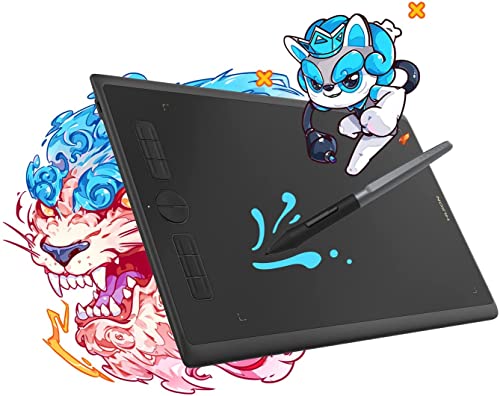
The HUION Inspiroy H610X is a drawing tablet with a 10 x 6.25 inch work area, a battery-free stylus, 8192 pen pressure and 8 express keys. It is presented as a graphics tablet for drawing, sketching and modelling, with a matte surface for a pen-on-paper feel.
The tablet is also described for online teaching and learning, with use for writing, calculating, annotating and teaching through video apps.
Who It Is Best For
This tablet suits buyers who want a pen tablet for creative work or for note-taking, annotation and teaching tasks. It is also relevant if you want the stated work area to sit alongside a laptop screen for drawing or remote learning.
Key Details
| Detail | Verified information and buyer relevance |
|---|---|
| Brand | HUION. |
| Model | Inspiroy H610X. |
| Work area | 10 x 6.25 inches, giving a stated drawing surface for sketching and modelling. |
| Stylus | Battery-free stylus, which removes the need to manage stylus charging from the stated setup. |
| Pen pressure | 8192 pen pressure for pressure-sensitive drawing input. |
| Pen resolution | 5080LPI pen resolution. |
| Express keys | 8 express keys for quick access to supported functions. |
| Tilt function | ±60° tilt function for brush input with the stated pen setup. |
| Compatibility | Windows, Mac, Linux and Android are listed in the title. |
Why Buyers Choose It
- The 10 x 6.25 inch work area gives a defined space for drawing and sketching.
- 8192 pen pressure supports pressure-sensitive pen input.
- The battery-free stylus removes one charging step from the pen setup.
- 8 express keys give direct access to functions without relying only on on-screen controls.
- The matte surface is described as giving a pen-on-paper drawing feel.
What To Know Before You Buy
Check that the 10 x 6.25 inch work area suits your desk space and your preferred drawing setup. The title also lists Windows, Mac, Linux and Android compatibility, so confirm your own device before ordering. If you plan to use it for remote teaching or homework, review the apps and workflow you intend to use with the tablet’s pen input.
Common Buyer Questions
Does it need batteries in the stylus?
No. The stylus is battery-free.
How many shortcut keys does it have?
It has 8 express keys.
What devices is it listed for?
Windows, Mac, Linux and Android are listed in the title.
What kind of drawing feel is mentioned?
A matte surface and fully covered panel are described as giving a pen-on-paper feel.
Final Buying View
Review the work area, pen features and device compatibility before ordering. If you want a pen tablet for drawing, sketching, modelling, annotation or teaching, the H610X has several clearly stated features worth checking against your setup.