
Quick Summary
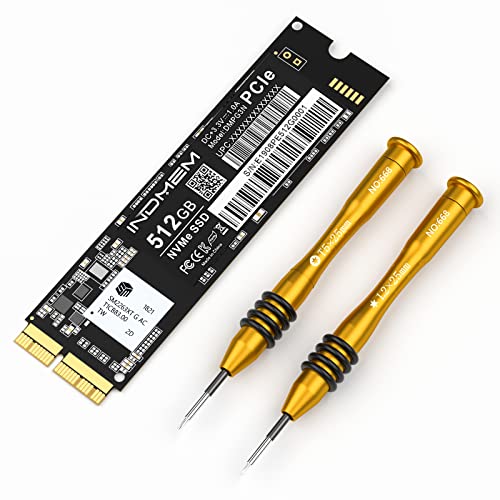
The INDMEM NVMe PCIe SSD 512GB is a replacement drive for compatible MacBook Pro, MacBook Air, iMac, Mac Pro and Mac Mini models listed in the title. It includes a screwdriver and is described with PCIe NVMe Gen3 x4 support for faster storage replacement.
The key verified checks are model fit and macOS version. The drive must be used with supported machines, and the original SSD should be updated to macOS 10.13 or later before moving it. If the original SSD was running macOS 10.12 or earlier, the new SSD will not be recognised after replacement.
Who It Is Best For
This SSD suits buyers replacing the original storage in the specific Mac models named in the title, and who are able to confirm the macOS requirement before fitting it. It is also relevant if you need the included screwdriver for the replacement process.
Key Details
| Detail | Verified information and buyer relevance |
|---|---|
| Brand | INDMEM. |
| Capacity | 512GB, which tells you the stated storage size of the drive. |
| Connection | NVMe PCIe SSD with PCIe NVMe Gen3 x4 wording in the description. |
| Included item | Screwdriver included for the replacement task. |
| Stated speed | Read speed up to 1800MB/s and write speed up to 1400MB/s. |
| Listed support | TRIM, NCQ and S.M.A.R.T support are stated. |
| Lifetime figure | MTBF stated as 1 million hours. |
| Compatibility | Listed for MacBook Pro Retina Late 2013 to Mid 2015, MacBook Air Mid 2013 to 2017, iMac Late 2013 to 2017, Mac Pro Late 2013 and Mac Mini Late 2014. |
| Setup requirement | Original SSD should be updated to macOS 10.13 or later before removal, and the new SSD needs macOS 10.13 High Sierra or newer installed. |
What To Know Before You Buy
Check that your Mac model matches one of the listed versions before ordering, as this drive is tied to specific machines. Confirm your original SSD has been updated to macOS 10.13 or later before replacement, because the new SSD will not be recognised if the original system was macOS 10.12 or earlier. You will also need to format the drive and install macOS 10.13 High Sierra or newer after fitting it.
Common Buyer Questions
Which Macs is this drive for?
It is listed for MacBook Pro Retina Late 2013 to Mid 2015, MacBook Air Mid 2013 to 2017, iMac Late 2013 to 2017, Mac Pro Late 2013 and Mac Mini Late 2014.
Does it include fitting tools?
Yes, a screwdriver is included.
What should I check before replacing the SSD?
Make sure the original SSD was updated to macOS 10.13 or later before removal, and plan to format and install macOS 10.13 High Sierra or newer on the replacement drive.
Are any storage features stated?
TRIM, NCQ and S.M.A.R.T support are stated in the product description.
Final Buying View
Choose this SSD only if your Mac matches the listed models and you can meet the macOS 10.13 or later requirement. The confirmed capacity, included screwdriver and stated compatibility are the main buying points here, so check your machine and software version carefully before ordering.


