
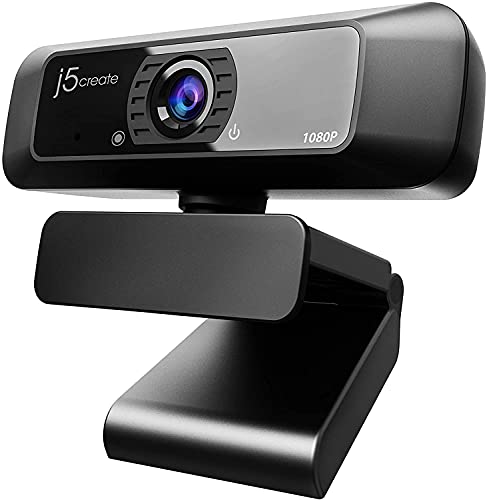
Quick Summary
The j5create USB Streaming Webcam JVCU100 is a plug-and-play webcam with a 1080p HD image sensor, 360° rotation and a built-in high-fidelity microphone. It is set up over USB and is intended for calling, conferencing and streaming use on PC, Macs and laptops.
Who It Is Best For
This webcam suits buyers who want a simple USB camera for video calls, online meetings and live streaming. It is also a sensible choice if you want a webcam with 360° rotation and compatibility across Windows, macOS and Chrome OS.
Key Details
| Detail | Verified information and buyer relevance |
|---|---|
| Brand | j5create, so the product identity is clear when matching listings. |
| Model | JVCU100, which helps confirm the exact webcam variant. |
| Image resolution | 1080p HD with maximum support for 1920 x 1080 at 30 FPS. |
| Rotation | 360° rotation for flexible camera positioning. |
| Microphone | Built-in high-fidelity microphone for video calling and conferencing. |
| Connection | USB plug-and-play for straightforward setup. |
| Compatibility | Supports Windows, macOS and Chrome OS systems. |
| Image formats | Supports H.264 and MJPEG image formats. |
| Lens and low light feature | Wide angle lens with built-in low light enhancement and an F/2.4 aperture lens. |
Why Buyers Choose It
- 1080p HD image capture gives a clear starting point for video calls and online meetings.
- 360° rotation makes it easier to position the camera for different desk setups.
- USB plug-and-play setup reduces the need for additional setup steps.
- The built-in microphone keeps the webcam self-contained for everyday calling and conferencing.
How It Works
- Connect the webcam using USB.
- Use it with a compatible Windows, macOS or Chrome OS system.
- Select the camera in your calling or streaming app.
- Adjust the webcam using the 360° rotation to suit your angle.
Real World Use
This webcam is intended for PC, Macs and laptops, so it fits desktop and portable computer setups. Its plug-and-play design and built-in microphone make it straightforward for calls, conferencing and streaming, while the wide angle lens and low light enhancement are useful details to check if your desk or room lighting changes from time to time.
What To Know Before You Buy
Check that your device uses Windows, macOS or Chrome OS before ordering. Confirm whether you need the built-in microphone for your setup, and note the Chromebook Discord microphone limitation if that matters to your use case. If you are choosing between webcams, compare the stated 1920 x 1080/30 FPS support and the 360° rotation against your intended setup.
Common Buyer Questions
Does it connect by USB?
Yes. It is a USB plug-and-play webcam.
Which systems does it support?
It supports Windows, macOS and Chrome OS systems.
What video resolution does it support?
It supports up to 1920 x 1080 at 30 FPS.
Does it have a microphone?
Yes. It includes a built-in high-fidelity microphone.
Final Buying View
If you want a USB webcam for calling, conferencing or streaming, the j5create JVCU100 gives you 1080p HD support, 360° rotation and a built-in microphone. Check system compatibility and the Chromebook Discord microphone note before you choose it.



