
Quick Summary
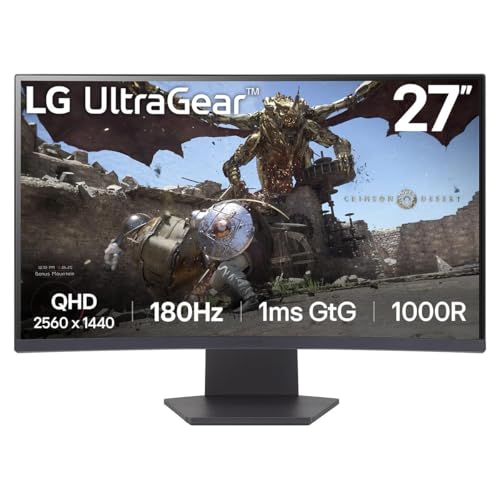
The LG UltraGear 27GS60QC is a 27 inch curved gaming monitor with 1440p resolution, a 180Hz refresh rate and 1ms response time. It is built for gaming sessions where smooth motion and quick on-screen changes matter.
It also includes a VA panel, AMD FreeSync, Smart Energy Saving, DisplayPort and HDMI. HDR10 and sRGB 99% (Typ.) are stated as part of the display’s picture features.
Who It Is Best For
This monitor suits buyers looking for a 27 inch curved display for gaming, especially if they want a high refresh rate and adaptive sync support. It is also worth checking the connection options against your existing setup before ordering.
Key Details
| Detail | Verified information and buyer relevance |
|---|---|
| Model | 27GS60QC, which identifies the specific LG UltraGear monitor variant. |
| Screen size | 27 inch, which helps you judge desk space and viewing distance. |
| Display shape | Curved, for buyers who want a curved screen layout. |
| Resolution | 1440p, giving the monitor’s stated image resolution. |
| Refresh rate | 180Hz, which is the stated refresh rate for fast-moving game scenes. |
| Response time | 1ms response time, a key specification for motion handling. |
| Panel type | VA panel, useful for buyers comparing panel types. |
| Adaptive sync | AMD FreeSync is included, alongside VESA certified AdaptiveSync. |
| Connections | DisplayPort and HDMI are listed as connection options. |
| Energy feature | Smart Energy Saving is stated as a feature of the monitor. |
| Picture features | HDR10 and sRGB 99% (Typ.) are stated in the product description. |
| Adjustment | Tilt adjustment is mentioned for setting the viewing angle. |
Why Buyers Choose It
- The 180Hz refresh rate supports smoother-looking motion in fast game scenes.
- The 1ms response time is a useful specification for buyers who want a monitor with minimal stated delay.
- AMD FreeSync and VESA certified AdaptiveSync are both listed, which gives buyers adaptive sync support to look for in a compatible setup.
- The 27 inch curved format may suit buyers who want an immersive desktop display.
What To Know Before You Buy
Check that 27 inch is the right size for your desk and viewing distance. Confirm that your device has DisplayPort or HDMI if you plan to use those connections. If you want to use the adaptive sync features, make sure your equipment and settings support them. Review the curved screen format and tilt adjustment to see whether they match your preferred viewing position.
Pros: The monitor combines 1440p resolution, 180Hz refresh rate and 1ms response time for buyers prioritising these stated gaming specifications.
Cons: Buyers who need more detailed mounting, size or full compatibility information should check their setup carefully before ordering.
Common Buyer Questions
What connections does it have?
DisplayPort and HDMI are listed, so buyers can check which input suits their device.
Does it support adaptive sync?
Yes, AMD FreeSync and VESA certified AdaptiveSync are both stated.
Can the screen angle be adjusted?
Yes, tilt adjustment is mentioned for finding a preferred viewing angle.
What type of panel does it use?
It uses a VA panel.
Final Buying View
The LG UltraGear 27GS60QC is aimed at buyers who want a curved 27 inch gaming monitor with 1440p resolution, 180Hz refresh rate and 1ms response time. Compare the listed connections and display format with your setup before making your choice.


