Quick Summary
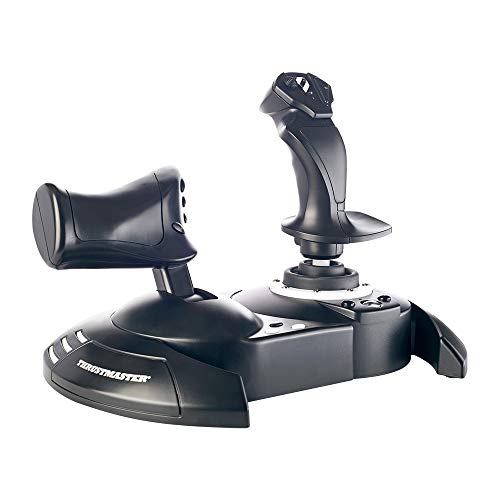
The Masyrt wired PC flight joystick is a flight simulator control stick with vibration function and throttle control. It is listed as compatible with PC, desktop computer and laptop, with support for 7, 8, 10 and 11 systems.
The joystick also includes four axes, an acceleration valve, 12 programmable buttons and an eight way cover. If vibration feels weak, the description advises setting the vibration intensity in the driver to 50 percent or higher.
Who It Is Best For
This joystick is for buyers looking for a wired flight simulator control stick for a computer or laptop setup. It is also relevant if you want the stated vibration function, throttle control and programmable buttons in one controller.
Check your device and system version before ordering, especially if you plan to use it with PC, desktop computer or laptop systems in the 7, 8, 10 or 11 range.
Key Details
| Detail | Verified information and buyer relevance |
|---|---|
| Brand | Masyrt. |
| Product type | Wired PC flight joystick for flight simulator control. |
| Control features | Vibration function, throttle control, four axes, an acceleration valve, 12 programmable buttons and an eight way cover. |
| Compatibility | Compatible with PC, desktop computer and laptop, with support for 7, 8, 10 and 11 systems. |
| Connection | Plug and play is stated, with no driver installation needed. |
| Vibration note | If vibration intensity is below 20 percent, the driver setting should be raised to 50 percent or higher. |
Why Buyers Choose It
- Vibration function is included, which gives a stated tactile effect during gameplay.
- 12 programmable buttons give you more onboard controls for simulator use.
- Four axes and an acceleration valve provide the stated control setup for flight simulation.
- Plug and play connection reduces setup steps because no driver installation is stated as needed.
How It Works
- Turn on your computer first.
- Connect the joystick.
- Use it as a plug and play device, with no driver installation needed.
- If vibration is too low, adjust the driver vibration intensity to 50 percent or higher.
What To Know Before You Buy
Confirm that your device is a PC, desktop computer or laptop running one of the stated supported systems before ordering. The throttle control, four axes, 12 programmable buttons and vibration function are the main listed features, so check that these are the controls you want in a flight simulator stick.
For vibration use, the description includes a driver adjustment note, so review that setting if you want the vibration effect to be stronger during play.
Common Buyer Questions
Does it work without driver installation?
Yes. Plug and play is stated, and the computer should be turned on before you connect the joystick.
Which systems is it compatible with?
It is stated as compatible with 7, 8, 10 and 11 systems on PC, desktop computer and laptop.
How many buttons does it have?
It has 12 programmable buttons.
What should I do if the vibration feels weak?
Set the vibration intensity in the driver to 50 percent or higher if it is below 20 percent.
Final Buying View
If you want a wired flight simulator joystick with vibration, throttle control and 12 programmable buttons, this Masyrt controller matches that brief. Check your computer type and system version before ordering, and review the vibration setting if that function matters to you.