
Quick Summary
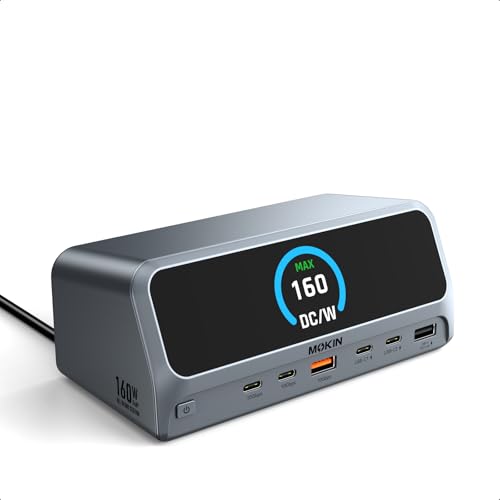
The MOKiN USB-C docking station is a 13-in-1 laptop expansion station with dual HDMI ports, 10Gbps USB-A and USB-C ports, Gigabit Ethernet, and a 2.26" LCD smart display. It is described as a GaN charging station with up to 160W max output, giving one place for display connections, data transfer, networking, and charging.
The vertical design, magnetic base, 150cm cable and screen-lock button are part of the unit’s layout and control features. It also includes an AC port and a built-in LED digital screen that shows connection status for each port.
Who It Is Best For
This dock is aimed at laptop users who want a single connection point for external monitors, wired networking and USB peripherals. It is also relevant if you want a desktop setup with a compact upright form and a visible status display.
Check that your laptop supports USB-C, USB4 or Thunderbolt, and confirm DP Alt Mode and Power Delivery support where needed. macOS users should note the external display behaviour differs from Windows, and Linux is not compatible.
Key Details
| Detail | Verified information and buyer relevance |
|---|---|
| Brand | MOKiN. |
| Product type | USB-C docking station for laptop expansion. |
| Ports and connections | 2 x HDMI, 2 x USB-C, 1 x USB-A, 1 x USB-A 2.0, 1 x USB-A PD, Gigabit Ethernet and AC port for a broad wired setup. |
| Data transfer | USB 3.2 Gen 2 ports support up to 10Gbps on the stated USB-C and USB-A ports. |
| Charging output | Up to 160W max output, with three USB-C ports listed at up to 100W max each and one USB-A port at up to 12W max. |
| Display support | Dual HDMI output is described for dual monitor use, with a macOS limitation to mirrored external monitors. |
| Screen | 2.26" LCD smart display with LED digital status information. |
| Cable length | 150cm cable for positioning the dock relative to the laptop. |
| Compatibility | Compatible with USB-C, USB4 and Thunderbolt connections, plus Windows 10/11 and ChromeOS; Linux is not compatible. |
| Design features | Vertical design and magnetic base, which may suit a tidy desk layout. |
Why Buyers Choose It
- Dual HDMI ports provide the option for two external displays where the connected system supports it.
- 10Gbps USB 3.2 Gen 2 ports are useful when transferring larger files through the stated high-speed ports.
- The 160W max output and multiple USB-C and USB-A charging ports reduce the need for separate chargers in a multi-device setup.
- The upright body and magnetic base support a compact desk arrangement with less horizontal footprint.
How It Works
- Connect the dock to a compatible laptop using the stated USB-C, USB4 or Thunderbolt connection.
- Attach monitors to the HDMI ports if you want external display output.
- Connect USB devices through the USB-C and USB-A ports as needed.
- Use the Gigabit Ethernet port for wired network access.
- Use the screen-lock button when you want to secure sensitive information on the display.
Real World Use
On a desk, this docking station brings video output, data connections, Ethernet and charging into one upright unit. The 150cm cable gives some flexibility in where the dock sits relative to the laptop, while the magnetic base and vertical layout may help keep the setup compact.
The built-in status screen makes it easier to see connection activity at a glance. If you use macOS, review the external display behaviour before ordering, because the two monitors do not operate in the same way as Windows dual-display mode.
What To Know Before You Buy
Confirm that your laptop supports the required USB-C, USB4 or Thunderbolt connection, along with DP Alt Mode and Power Delivery where relevant. The display behaviour differs by operating system, and Linux is not compatible.
Check the port list carefully if you need a specific mix of HDMI, USB-C, USB-A, Ethernet or charging outputs. The upright form and 150cm cable may also matter if you are planning the dock placement on your desk.
Common Buyer Questions
Can it run two external monitors?
Yes, the dock has dual HDMI ports for dual monitor use, with the stated Windows support and a different macOS display behaviour.
Does it support fast data transfer?
Yes, the stated USB 3.2 Gen 2 USB-C and USB-A ports support up to 10Gbps transfer speed.
Can it charge multiple devices?
Yes, it is described as providing up to 160W max output across the charging ports.
Will it work with Linux?
No, Linux is stated as not compatible.
Final Buying View
If you want a feature-rich USB-C docking station with dual HDMI, Ethernet, multiple USB ports and visible status information, this MOKiN unit brings those functions together in one vertical dock. The main checks are laptop connection type, operating system behaviour and the display setup you want to use.
Review the compatibility and port requirements carefully before ordering.


