
Quick Summary
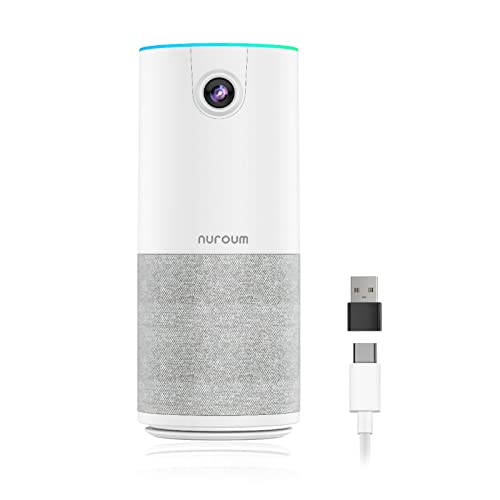
The Nuroum C10 is an all-in-one conference camera with a speaker and microphone for video calls and hybrid meetings. It combines a 90° lens, 1080P video, a 4-elements noise-cancelling microphone array, and a loudspeaker in one portable unit.
It is set up for USB use with no driver or power adapter required, and it includes a folded USB-C cable plus a Type-C to USB-A adapter hidden in the base.
Who It Is Best For
This suits people setting up meetings in a home office, huddle room, or similar small collaboration space. It is also aimed at users who want one compact device for camera, audio input, and audio output rather than separate equipment.
If you need compatibility across desktop and laptop computers, the stated support for Windows, MacOS, and Linux is a useful check before ordering.
Key Details
| Detail | Verified information and buyer relevance |
|---|---|
| Product name | Nuroum C10 conference camera with speaker and microphone. |
| Video | 90° video call view with 1080P@30fps images and videos. |
| Microphones | 4 omnidirectional MEMS microphones with noise reduction for voice pickup. |
| Speaker | Built-in loudspeaker with full duplex audio support. |
| Audio range | AGC is stated to keep sound volume stable up to 3m away from the base. |
| Compatibility | Works with desktop and laptop computers running Windows, MacOS, or Linux. |
| Included connection items | Folded USB-C cable and a Type-C to USB-A adapter hidden in the base. |
| Portability | Stated weight of 384g, which may matter if you plan to move it between rooms. |
Why Buyers Choose It
- The 90° field of view gives a defined meeting frame for individuals and small teams.
- The combined camera, microphone, and speaker design reduces the need for separate conference hardware.
- The folded USB-C cable and hidden USB-A adapter make connection options more flexible at the desk.
- The 384g weight supports portable use if you need to carry it between workspaces.
How It Works
- Connect the device by USB using the folded USB-C cable.
- If needed, use the Type-C to USB-A adapter stored in the base.
- Use the touch buttons to turn off the camera, mute, or adjust the volume.
- Check the light ring on the top of the device for setting status.
Real World Use
The C10 is positioned as a portable conference device for hybrid meetings, home offices, online school, live streaming, and similar setups. Its compact form and single-device layout make it easier to place on a desk or move between locations.
The stated 90° view and 3m audio guidance are useful when choosing where to place it in relation to the people speaking.
What To Know Before You Buy
Confirm that the 90° framing suits your meeting space and that the stated Windows, MacOS, or Linux compatibility matches your computer. The device includes a USB-C cable and a Type-C to USB-A adapter, so check which connection you plan to use.
The C10 is aimed at small meeting setups rather than large rooms, based on the stated field of view and audio pickup guidance.
Common Buyer Questions
Does it need extra software?
No driver is required for use.
Which computers does it work with?
It is stated to work with desktop and laptop computers running Windows, MacOS, or Linux.
What controls are on the device?
There are 4 touch buttons for turning off the camera, muting, and adjusting the volume.
What is included for connection?
A folded USB-C cable is included, along with a Type-C to USB-A adapter hidden in the base.
Final Buying View
If you want an all-in-one conference camera with built-in speaker and microphone for a small meeting space, the Nuroum C10 gives you a clear set of stated connection and audio features. Check the computer compatibility and connection type before ordering.


