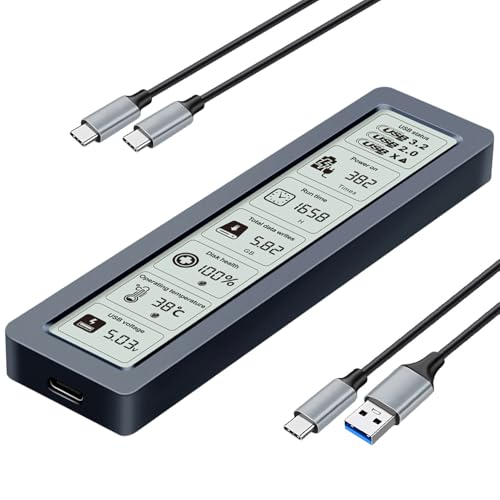
Quick Summary
The SUIDEK M.2 NVMe SSD Enclosure Adapter is a Type-C external adapter for M.2 NVMe and SATA drives, with USB-C transfer support stated at up to 10Gbps for NVMe and 6Gbps for SATA. It is presented as an open-design docking station for users who need to swap drives frequently.
The unit supports M.2 drives of any size, plus 2.5-inch and 3.5-inch SATA III SSDs and HDDs. It is also described as needing no tools or drivers, which keeps the setup straightforward: insert the drive, connect the USB-C cable, and use it.
Who It Is Best For
This adapter suits buyers who want one dock for more than one drive format, including M.2 NVMe and SATA drives. It also suits anyone who needs to handle 2.5-inch or 3.5-inch SATA SSDs and HDDs and wants a unit that supports frequent drive swapping.
Key Details
| Detail | Verified information and buyer relevance |
|---|---|
| Brand | SUIDEK, helping identify the exact product. |
| Product type | M.2 NVMe SSD enclosure adapter / USB-C docking station for external drive connection. |
| Drive support | Supports M.2 NVMe and SATA, plus 2.5-inch and 3.5-inch SATA III SSDs and HDDs. |
| M.2 fit | Supports M.2 drives of any size, so buyers should still check their drive format and keying. |
| Transfer speed | Stated up to 10Gbps for NVMe and 6Gbps for SATA, with USB-C connectivity. |
| Setup | No tools or drivers are needed according to the product description. |
| Protection and extras | Over-voltage and over-current protection, SSD TRIM support, UASP acceleration, LED indicators, and automatic sleep mode after 30 minutes of inactivity are stated. |
| Included item | Type-C to SATA/M.2 enclosure adapter and a 12V/2A power adapter are included. |
| Important checks | Thick heat sinks should be removed before use, encryption should be disabled before connecting, and cloning between SATA and M.2 hard disks is not supported. |
Why Buyers Choose It
- It supports both M.2 NVMe and SATA drives, so one dock covers more than one drive format.
- Support for 2.5-inch and 3.5-inch SATA SSDs and HDDs gives it broader drive compatibility for swapping between devices.
- The stated no-tool, no-driver setup makes the connection process direct once the drive is inserted and the USB-C cable is connected.
- LED indicators, TRIM support, UASP acceleration and sleep mode are all stated features that may matter to buyers managing drives regularly.
How It Works
- Insert the compatible M.2 NVMe SSD or 2.5-inch or 3.5-inch SATA SSD or HDD into the relevant slot.
- Connect the USB-C cable to your computer.
- Use the included 12V/2A power adapter as supplied.
- Check the LED indicators for activity.
- If needed, remove any thick heat sinks from the M.2 SSD before use and disable encryption before connecting.
Real World Use
The open design is presented as useful for people who swap drives frequently. It is also described as compact and portable, so it may be easier to move between a desk, office or travel setup than a fixed enclosure.
The adapter enters sleep mode after 30 minutes of inactivity, which is a stated operating behaviour to keep in mind during storage or between sessions.
What To Know Before You Buy
Confirm that your drive is an M.2 NVMe or SATA drive, or a 2.5-inch or 3.5-inch SATA SSD or HDD, before ordering. For M.2 use, check that any thick heat sink can be removed if necessary and that encryption is disabled before connection. Cloning between SATA and M.2 hard disks is not supported, so it is not a cloning dock.
Pros: It supports multiple drive formats, including M.2 NVMe, SATA SSDs and HDDs, which widens its practical use.
Cons: It does not support cloning between SATA and M.2 hard disks.
Common Buyer Questions
Does it work with both NVMe and SATA drives?
Yes. It is stated to support M.2 NVMe and SATA, plus 2.5-inch and 3.5-inch SATA III SSDs and HDDs.
Do I need tools or software to use it?
No tools or drivers are needed according to the description. You insert the drive and connect the USB-C cable.
What speed does it support?
The stated theoretical speed is up to 10Gbps for NVMe and 6Gbps for SATA.
Can I use it for cloning between drive types?
No. Cloning between SATA and M.2 hard disks is not supported.
Final Buying View
If you need an external USB-C dock for M.2 NVMe and SATA drives, this SUIDEK adapter brings together several stated drive options in one unit. Check your drive type, remove any thick heat sink if needed, and confirm that cloning is not part of your intended use before choosing it.