Quick Summary
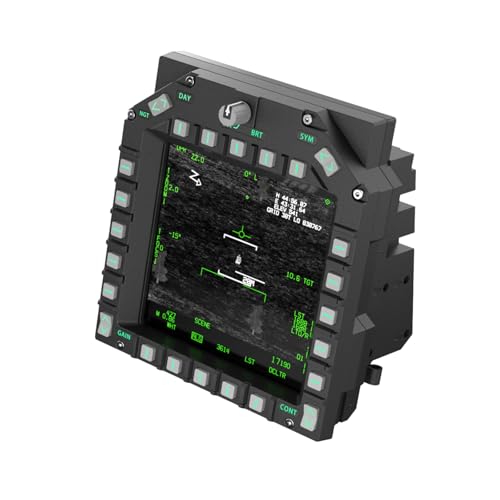
WINWING MFD1 with USB3.0 Display is a modular simulator display and control unit with a USB3.0 instrument display. It is presented as part of a system that includes MFD and USB DISPLAY modules, with SIMAPP PRO plug-and-play support and one-click switching between three custom panels.
The unit also includes backlit controls, three-position slide knobs, encoders, and silicone buttons. The USB display section is described as using a built-in USB graphics card chip for image transmission without occupying HDMI or DP ports, and it uses an IPS hard screen with a stated resolution of 1024*768 @60Hz.
Who It Is Best For
This product is aimed at buyers who want a simulator control panel and USB display that work with supported simulation platforms. It is described for use with DCS and BMS, and for users who want panel switching, backlighting, and modular combinations in one setup.
Key Details
| Detail | Verified information and buyer relevance |
|---|---|
| Product | WINWING MFD1 with USB3.0 Display. |
| Modular design | Uses multiple independent modules that can be freely combined, including UFC, HUD, MFD, USB DISPLAY, and MP1 modules. |
| Panel switching | One-click switching between three custom panels for different scenarios. |
| Platform support | SIMAPP PRO plug-and-play support is stated for DCS and BMS. |
| Controls | Includes three-position slide knobs, encoders, backlit silicone seesaw buttons, and backlit square and rectangular silicone buttons. |
| Display section | USB3.0 instrument display with built-in USB graphics card chip for image transmission without occupying HDMI or DP ports. |
| Screen specification | IPS hard screen with a stated resolution of 1024*768 @60Hz. |
| Lighting | Multi-panel adjustable linked backlighting and backlit keys are listed. |
Why Buyers Choose It
- The modular layout lets the MFD, USB DISPLAY, UFC, HUD and MP1 parts be combined in different ways.
- The one-click panel switching gives access to three custom panel setups.
- The USB3.0 display uses a built-in USB graphics card chip, which avoids using HDMI or DP ports for image transmission.
- Backlit controls and linked backlighting are included for panel visibility.
How It Works
- Connect the unit through USB3.0 for the display section.
- Use SIMAPP PRO plug-and-play support with DCS or BMS where compatible.
- Switch between the three custom panels with the one-click panel function.
- Use the slide knobs, encoders and backlit buttons for control input.
Real World Use
In use, the unit combines a simulator control surface with a USB display section. The stated modular design means the MFD and USB DISPLAY elements can sit within a larger mixed-module setup, depending on the configuration chosen. The listed backlighting and custom panels are intended to support different operating modes and scenarios.
What To Know Before You Buy
Confirm that you want the MFD1 version with USB3.0 Display, as the product name identifies that specific combination. Check that your intended simulator platform is one of the stated supported platforms, DCS or BMS, and review whether the modular setup you want matches the listed UFC, HUD, MFD, USB DISPLAY and MP1 options.
Pros: The USB display section is stated to use a built-in USB graphics card chip rather than taking HDMI or DP ports.
Cons: Buyers should check the exact modular combination and panel setup before ordering.
Common Buyer Questions
Does it support DCS and BMS?
Yes. SIMAPP PRO plug-and-play support is stated for both DCS and BMS platforms.
Does the display use HDMI or DP for image transmission?
No. The USB3.0 display section is described as using a built-in USB graphics card chip without occupying HDMI or DP ports.
Can the panels be changed?
Yes. One-click switching between three custom panels is stated.
What controls are included?
Three-position slide knobs, encoders, backlit silicone seesaw buttons, and backlit square and rectangular silicone buttons are listed.
Final Buying View
WINWING MFD1 with USB3.0 Display suits buyers looking for a modular simulator control and display unit with backlit controls and stated support for DCS and BMS. Check the exact module combination and the display specification against your intended setup before ordering.