Quick Summary
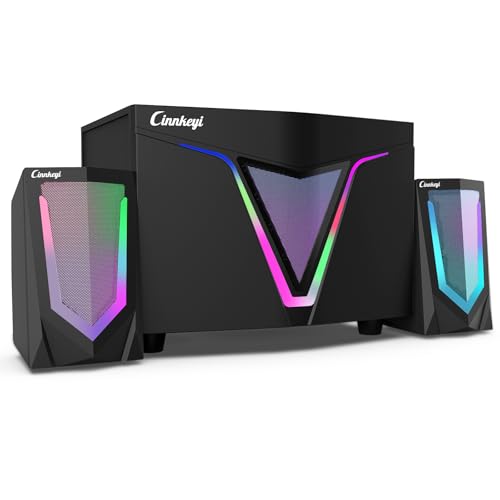
This USB-powered 2.1 computer speaker system includes a 9-inch subwoofer, dual 4.7-inch mid-treble full-range satellite speakers, Dynamic RGB lighting and 3.5mm input. It is set up for PC-style listening with a separate subwoofer adjustment knob and a control panel on the main speaker.
The system also supports AUX, USB and SD cards up to 32GB, and it can be switched between Bluetooth and AUX mode using the Mode button.
Who It Is Best For
This setup suits buyers who want a compact speaker system for a PC, MP3 player or smartphone, and who need the option to connect by AUX, USB, SD card or Bluetooth. The subwoofer adjustment knob will also suit anyone who wants direct bass control.
Key Details
| Detail | Verified information and buyer relevance |
|---|---|
| Product type | 2.1 USB-powered computer speaker system with subwoofer and satellite speakers. |
| Subwoofer | 9-inch subwoofer for the low-frequency section of the system. |
| Satellite speakers | Dual 4.7-inch mid-treble full-range satellites. |
| Power output | Up to 16W is stated in the product title, with 8W + 4W x2 stated in the description. |
| Connections | Supports 3.5mm input, AUX, USB, SD cards up to 32GB and Bluetooth mode. |
| Controls | Main speaker control panel, side volume knob, play/pause button, previous and next track buttons, plus a subwoofer adjustment knob. |
| Lighting | Built-in RGB LED lighting effects change automatically; manual adjustment is not available. |
| Size | Subwoofer measures 23 x 17 x 17 cm and satellite speakers measure 12 x 7 x 7 cm. |
Why Buyers Choose It
- The separate subwoofer adjustment knob gives direct bass control for the listed audio setup.
- The range of input options, including AUX, USB, SD cards and Bluetooth mode, gives flexibility over how you connect devices.
- The main speaker control panel and track buttons keep everyday playback controls close at hand.
- The automatic RGB lighting adds a visual effect without requiring manual adjustment.
How It Works
- Plug into the headphone jack first before connecting the power.
- Use the Mode button to switch to Bluetooth mode for pairing, then press it again to switch to AUX mode.
- Adjust volume with the side knob on the main speaker.
- Press play/pause briefly for playback control.
- Long-press the previous and next track buttons for more precise track control.
- Use the subwoofer adjustment knob to change bass level.
Real World Use
The speaker system is set up for everyday use with PCs and other listed devices, and the compact speaker sizes make it straightforward to place on or near a desk. The automatic RGB lighting changes on its own, while the subwoofer and satellites provide a separate layout for the audio system.
What To Know Before You Buy
Check your preferred connection method before ordering, especially if you want to use Bluetooth, AUX, USB or SD cards. The SD card support is stated for cards up to 32GB, so that is an important variation to confirm if card playback matters to you. Also review the listed sizes of the subwoofer and satellite speakers to make sure they suit your available space.
Common Buyer Questions
Can it connect to Bluetooth?
Yes. Bluetooth mode is listed, and the Mode button is used for pairing and switching back to AUX.
Does it support SD cards?
Yes. SD cards up to 32GB are supported.
Can I adjust the bass?
Yes. There is a dedicated subwoofer adjustment knob for bass control.
Are the RGB lights manual?
No. The RGB LED lighting effects change automatically and manual adjustment is not available.
Final Buying View
This 2.1 speaker system is aimed at buyers who want a compact desktop audio setup with multiple connection options and direct bass adjustment. Confirm your preferred input method, check the SD card limit if relevant, and review the listed speaker sizes before ordering.