
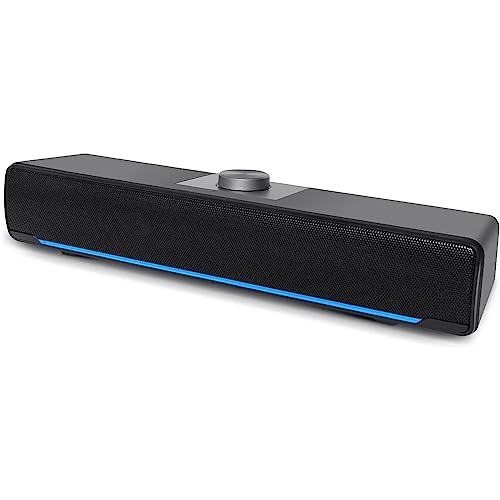
Quick Summary
HEANTTV Computer PC Speakers are a Bluetooth soundbar for desktop monitors with USB powered wired speaker operation. The soundbar is described as supporting Bluetooth and wired connection, and it uses a top knob for basic control.
The opening summary makes the product identity clear for buyers looking for a monitor speaker, laptop speaker or desktop soundbar, while keeping to the stated connection options and controls.
Who It Is Best For
This is aimed at buyers who want a compact computer speaker setup for a desktop monitor, laptop or smartphone and prefer either Bluetooth or wired connection. It will also suit anyone who wants simple control from the speaker itself rather than relying on software.
Key Details
| Detail | Verified information and buyer relevance |
|---|---|
| Brand | HEANTTV, so the product can be identified clearly when comparing listings. |
| Product type | Computer PC speakers in soundbar form for desktop monitors and other listed uses. |
| Connection options | Bluetooth and wired connection are supported, giving two stated ways to connect. |
| Power | USB powered, which means the speaker is powered through a USB connection. |
| Controls | A top knob is used for switching connection mode, turning the LED light on or off, turning the speaker on or off, and adjusting volume. |
| Setup | USB and 3.5mm audio cable are plugged into the corresponding ports, with no driver or software installation required. |
| Listed use cases | Desktop monitors, laptops and smartphones are all named in the product title. |
Why Buyers Choose It
- Bluetooth and wired connection are both stated, so buyers can choose the connection method that suits their setup.
- USB powered operation keeps the power arrangement simple and separate from the audio connection.
- The top knob provides direct control for mode, lighting and volume without needing extra software.
How It Works
- Connect the USB power and the 3.5mm audio cable to the relevant ports on the computer.
- Use Bluetooth or wired connection as required.
- When USB is plugged into the adapter, Bluetooth mode is the default.
- Use the top knob to switch the connection mode, adjust volume, and turn the LED light or speaker on and off.
Real World Use
The soundbar is positioned as a monitor speaker or laptop speaker for everyday computer audio. Because it is described for desktop monitors, laptops and smartphones, it can be checked against the buyer’s intended device before ordering.
What To Know Before You Buy
Check that your setup suits Bluetooth or wired connection, and confirm that you have the USB and 3.5mm audio connections required for the wired setup. Review the intended device type before ordering so the speaker matches your desktop monitor, laptop or smartphone use case.
Common Buyer Questions
Does it need software installation?
No, it is described as plug and play with no driver or software installation required.
How is it controlled?
A top knob is used for mode switching, LED light control, power and volume adjustment.
What devices is it intended for?
The title names desktop monitors, laptops and smartphones.
What connection methods are stated?
Bluetooth and wired connection are both supported.
Final Buying View
HEANTTV Computer PC Speakers suit buyers who want a USB powered soundbar with both Bluetooth and wired connection. Check your device, connection type and cable setup before ordering so the speaker matches your intended use.


