
Quick Summary
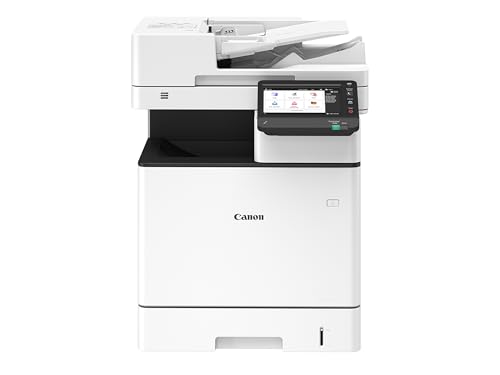
The Canon i-SENSYS MF842Cdw is an all-in-one colour laser printer for A4 print jobs, with print, copy, scan and fax functions. It is listed with wireless, PC connected and network use, plus 38ppm printing and an ADF.
The description also highlights secure setup, duplex print and scan, a 17.8cm / 7 inch LCD touchscreen display, mobile apps and dual network capability.
Who It Is Best For
This printer suits buyers who want one device for printing, copying, scanning and faxing in an office setting, with A4 output and networked use. It is also worth checking if you want a touchscreen interface and automatic document feeding.
Key Details
| Detail | Verified information and buyer relevance |
|---|---|
| Product type | All-in-one colour laser printer for combined print, copy, scan and fax use. |
| Paper size | A4 print support for standard office documents. |
| Print speed | 38ppm stated, which gives a clear speed figure to compare against your workload. |
| Connectivity | Wireless, PC connected and network use are listed, so connection method should match your setup. |
| ADF | An automatic document feeder is included for scan and copy tasks. |
| Display | 17.8cm / 7 inch LCD touchscreen display for on-device control. |
| Duplex printing and scanning | Duplex print and scan are stated, which supports double-sided document handling. |
| Security | Secure setup and strong password settings are highlighted. |
| Connectivity extras | Mobile apps, dual network capability and Microsoft Universal Print are mentioned. |
Why Buyers Choose It
- Print, copy, scan and fax functions are combined in one device, which reduces the need for separate office machines.
- 38ppm print speed gives a concrete figure for comparing output pace.
- The 7 inch touchscreen supports direct on-device control.
- Duplex print and scan support double-sided document handling.
- Mobile apps and dual network capability add more connection options for shared use.
How It Works
- Connect the printer using the supported wireless, PC connected or network option.
- Use the touchscreen to access print, copy, scan and fax functions.
- Feed documents through the ADF when scanning or copying multiple pages.
- Use duplex print and scan where double-sided handling is required.
- Set up security features such as password settings during configuration.
What To Know Before You Buy
Check that you want an A4 all-in-one colour laser printer with print, copy, scan and fax functions before ordering. The connection method should suit your office setup, whether that is wireless, PC connected or network use.
Review whether the 7 inch touchscreen, ADF and duplex print and scan features match the way you plan to work. The secure setup and Microsoft Universal Print mention may also matter if you are fitting it into a managed office environment.
Common Buyer Questions
Does it print in colour?
Yes. It is an all-in-one colour laser printer.
What paper size does it support?
A4 print is stated, so it is aimed at standard A4 document use.
What can it do besides print?
It can copy, scan and fax as part of the all-in-one design.
Does it have a touchscreen?
Yes. A 17.8cm / 7 inch LCD touchscreen display is listed.
Final Buying View
The Canon i-SENSYS MF842Cdw is a feature-led office printer for buyers who want A4 colour printing, copying, scanning and faxing in one machine. Confirm your preferred connection method, document workflow and space for the touchscreen and ADF before choosing.


