
Quick Summary
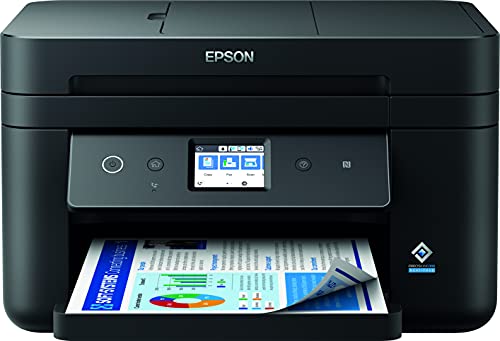
The Epson WorkForce WF-2880DWF is a multifunction printer for print, scan, copy and fax tasks. It includes Wi-Fi, Wi-Fi Direct, a 30-page ADF, double-sided printing and a 150-sheet front loading paper tray.
The large LCD touch screen and new interface are highlighted for easier navigation. It also uses the Epson 603 four-colour ink set, with pigment black and colour inks, and supports standard and XL cartridges.
Who It Is Best For
This printer suits buyers who want a compact multifunction device for a home or small office. It is also relevant if you need multi-page scanning, copying or faxing through the ADF, or want to print from compatible wireless devices.
Key Details
| Detail | Verified information and buyer relevance |
|---|---|
| Product type | Multifunction printer with print, scan, copy and fax functions. |
| Connectivity | Wi-Fi and Wi-Fi Direct for printing from compatible wireless devices without a Wi-Fi network. |
| ADF | 30-page automatic document feeder for multi-page scanning, copying and faxing. |
| Paper tray | 150-sheet front loading paper tray for everyday document handling. |
| Printing | Double-sided printing is included. |
| Ink system | Epson 603 four-colour ink set with pigment black and colour inks, using standard and XL cartridges. |
| Control panel | Large LCD touch screen with a new interface for navigation. |
Why Buyers Choose It
- Print, scan, copy and fax functions in one device reduce the need for separate equipment.
- The 30-page ADF supports multi-page jobs without manual page-by-page handling.
- Wi-Fi Direct gives an option for printing from compatible wireless devices even without a Wi-Fi network.
- Double-sided printing supports two-sided document output.
Real World Use
The compact design makes it easier to place the printer in a home office or small office setting. The front loading paper tray and touch screen are practical for regular document use, while the ADF is useful when handling multi-page scanning, copying or faxing tasks.
The Epson Smart Panel app lets you control the printer from your device, print documents, monitor and troubleshoot.
What To Know Before You Buy
Check that the print, scan, copy and fax functions match what you need before ordering. If you plan to use wireless printing, confirm that your device is compatible with Wi-Fi or Wi-Fi Direct. Review the 150-sheet tray capacity and 30-page ADF against your expected document volume.
Consider the ink system as part of your ongoing printing setup, since the printer uses Epson 603 standard and XL cartridges.
Common Buyer Questions
Can I print without a Wi-Fi network?
Yes. Wi-Fi Direct lets compatible wireless devices print without a Wi-Fi network.
Does it handle multi-page documents?
Yes. The 30-page ADF is intended for multi-page scanning, copying and faxing.
Is it suitable for small spaces?
The printer has a compact design, which makes placement easier in a home or small office.
What kind of ink does it use?
It uses the Epson 603 four-colour ink set with pigment black and colour inks, and supports standard and XL cartridges.
Final Buying View
The WF-2880DWF is a compact multifunction printer for buyers who want print, scan, copy and fax functions together with wireless printing and ADF support. Compare the document handling features and ink setup with your intended use before choosing it.


