
Quick Summary
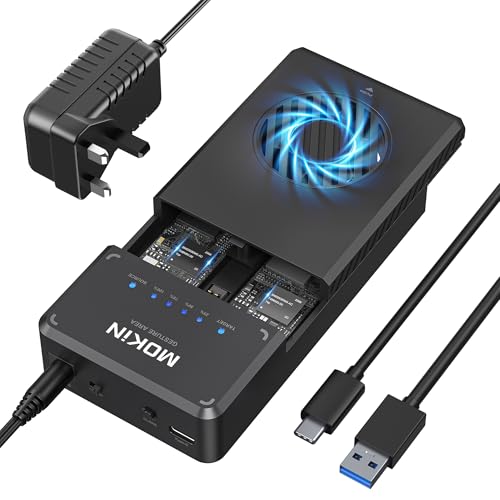
The MOKiN NVMe enclosure is a dual-bay M.2 SSD enclosure with offline clone support, USB 3.1 Gen 2 connectivity and a stated 10Gbps data transfer rate. It is made for NVMe PCIe SSDs in sizes 2230, 2242, 2260 and 2280, and it includes a built-in cooling fan.
It also uses a tool-free design, so the SSDs are fixed in place with clips rather than tools. For offline cloning, the unit uses a button held for 3 seconds and an LED blue indicator to show progress.
Who It Is Best For
This enclosure suits buyers who want to use two NVMe SSDs together in a dual-bay unit, especially where offline cloning is needed without connecting to a computer. It also suits anyone who wants a tool-free enclosure for the stated NVMe PCIe sizes.
Key Details
| Detail | Verified information and buyer relevance |
|---|---|
| Brand | MOKiN, so the product is identified as a specific branded enclosure. |
| Product type | NVMe enclosure and dual-bay docking station with offline clone function. |
| Connection | USB 3.1 Gen 2 with a stated 10Gbps transfer rate. |
| Supported SSD type | NVMe PCIe SSDs only, which helps narrow compatibility. |
| Supported sizes | 2230, 2242, 2260 and 2280. |
| Cooling | Built-in cooling fan for heat dissipation. |
| Setup | Tool-free design with two clips to secure the SSD. |
| Cloning control | Press and hold the offline clone button for 3 seconds. |
| Indicator | Blue LED indicator shows cloning progress. |
| Included cables | USB C to C cable and USB C to A cable. |
| Operating systems | Windows, Linux, Mac OS and Chrome OS are stated as supported. |
Why Buyers Choose It
- The dual-bay layout supports offline cloning between two SSDs without connecting to a computer.
- The stated 10Gbps USB 3.1 Gen 2 connection gives a clear speed reference for the enclosure’s data link.
- The tool-free clip design reduces the need for separate fitting tools when installing SSDs.
- The built-in fan adds an active cooling feature for the enclosure itself.
How It Works
- Fit the NVMe PCIe SSDs into the dual bays using the two clips.
- If you are cloning offline, connect the power adapter first.
- Hold the offline clone button for 3 seconds to start the process.
- Watch the blue LED indicator to track cloning progress.
- When the display reaches 100%, the cloning process is complete.
Real World Use
The enclosure is described for computer maintenance and operation and maintenance tasks, especially where a second drive needs to be duplicated without a direct computer connection. The dual-bay format means both a source SSD and a target SSD are used together, so the selected target drive must be at least as large as the source drive.
What To Know Before You Buy
Check that your drives are NVMe PCIe SSDs and that their size is one of the supported formats: 2230, 2240, 2260 or 2280 is not listed, so review the exact size carefully before ordering.
For offline cloning, the unit requires the power adapter. SATA SSDs and SSDs with a heat sink are not supported, so confirm your drive type and any attached heatsink before purchase. The target SSD also needs to be the same capacity as or larger than the source SSD.
Common Buyer Questions
Does it support SATA SSDs?
No. Only NVMe PCIe SSDs are stated as supported.
Can it clone without a computer?
Yes. It supports offline cloning by pressing and holding the clone button for 3 seconds, provided the power adapter is connected.
Which SSD sizes fit?
The stated supported sizes are 2230, 2242, 2260 and 2280.
What cables are included?
USB C to C and USB C to A cables are included.
Final Buying View
If you need a dual-bay NVMe enclosure with offline clone support, this MOKiN unit gives you a clear set of confirmed features to check against your drives. Confirm the SSD type, size and target capacity before ordering.


