
Quick Summary
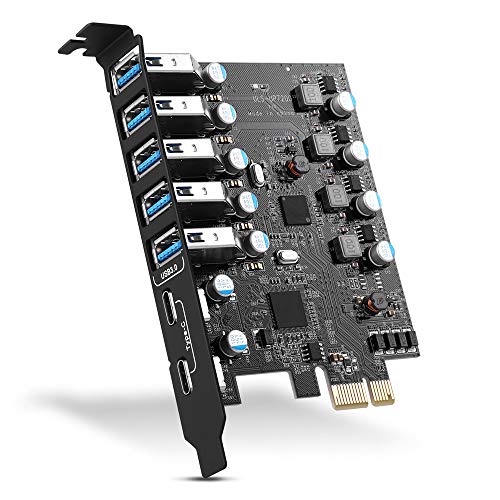
This 7-port PCIe USB 3.0 expansion card adds extra USB connections to a desktop PC, with 5 Type-A ports and 2 Type-C ports. It is intended for users who want to connect several USB devices from one internal expansion card and includes support for Windows and Mac OS.
Who It Is Best For
This card suits desktop PC users who need more USB ports on the computer itself and want a mix of Type-A and Type-C connections. It is also relevant for buyers who need to check PCI Express slot fitment before ordering, because the card is stated to fit PCI Express x1, x4, x8 or x16 sockets.
Key Details
| Detail | Verified information and buyer relevance |
|---|---|
| Product type | PCIe USB 3.0 expansion card for a desktop PC. |
| Total ports | 7 USB ports in total, made up of 5 Type-A and 2 Type-C connections. |
| USB standard | USB 3.0, with backwards compatibility for USB 2.0 and 1.1 devices. |
| Transfer rate | Up to 5Gbps is stated for data transfer, with actual speed limited by the connected device settings. |
| Motherboard support | Comply with PCI-e 3.0, PCIe 2.0 and PCIe 1.0 motherboards. |
| Slot fitment | Fits PCI Express x1, x4, x8 or x16 sockets. |
| Operating system support | Windows XP, Vista, 2008 Server, 7, 8, 10, and Mac OS 10.8.2 above. |
| Included items | USB 3.0 PCI-E expansion card, CD driver, 2 installation screws and user manual. |
| Installation note | Windows XP, Vista, 7 and Server require driver installation, while Windows 10 and Mac OS 10.8.2 above do not. |
Why Buyers Choose It
- 7 USB ports give one expansion card multiple connection points for desktop use.
- The mix of 5 Type-A and 2 Type-C ports supports different USB device connections.
- Backwards compatibility with USB 2.0 and 1.1 devices broadens the range of devices that can be connected.
- The stated PCI Express slot support gives buyers a clear check against their desktop motherboard before fitting.
How It Works
- Shut down the PC and unplug the power supply.
- Remove the PC case.
- Push the card into the PCIe socket and tighten the screws.
- Close the PC case cover and turn on the PC.
- Install the driver if your operating system requires it.
What To Know Before You Buy
Check that your desktop PC has a compatible PCI Express slot, as the card fits x1, x4, x8 or x16 sockets. If you use Windows XP, Vista, 7 or Server, plan for driver installation. The stated transfer rate is up to 5Gbps, but the actual speed depends on the connected device settings.
Common Buyer Questions
Which ports are included?
It includes 5 Type-A ports and 2 Type-C ports, giving a total of 7 USB ports.
Will it work with older USB devices?
Yes, it is stated to be backwards compatible with USB 2.0 and 1.1 devices.
Which operating systems are supported?
Windows XP, Vista, 2008 Server, 7, 8 and 10 are supported, along with Mac OS 10.8.2 and above.
Does it need drivers?
Windows XP, Vista, 7 and Server require driver installation, while Windows 10 and Mac OS 10.8.2 above do not.
Final Buying View
This PCIe USB 3.0 expansion card is a straightforward way to add extra USB ports to a desktop PC, especially if you want both Type-A and Type-C connections. Check your PCIe slot type and operating system before ordering so the card matches your setup.


