Quick Summary
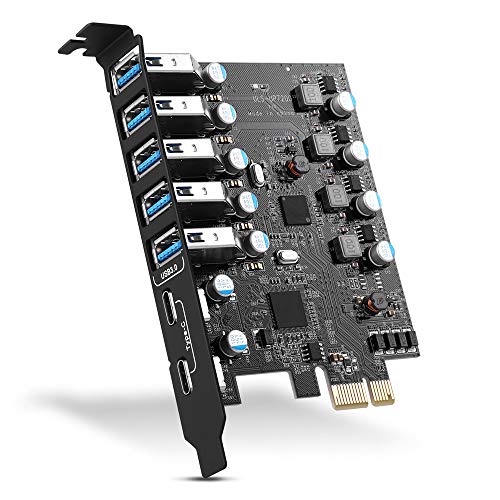
This PCIe to USB 3.2 expansion card adds 5 external USB ports to a PC, with 3 Type A ports and 2 Type C ports. It is listed for Windows 7, 8, 10 and 11, Linux, and OS X, and the description also notes up to 20Gbps total bandwidth.
It is designed for installation into a PCI Express slot and is described as a simple way to connect USB 3.2 devices on a standard desktop.
Who It Is Best For
This card suits buyers who want to add more external USB connections to a desktop PC and who need a mix of Type A and Type C ports. It is also relevant if you are checking operating system support before fitting an expansion card.
Key Details
| Detail | Verified information and buyer relevance |
|---|---|
| Product type | PCIe to USB 3.2 expansion card for adding external USB ports to a PC. |
| Port layout | 5 external ports in total, made up of 3 Type A ports and 2 Type C ports. |
| Bandwidth | Listed as having up to 20Gbps total bandwidth. |
| Per-port speed | Each port is stated to support up to 10Gbps when used individually. |
| Compatibility | Listed for Windows 7, 8, 10 and 11, Linux, and OS X. |
| Installation | Fits into a PCI Express slot and the PC case is opened for installation. |
| Driver note | Drivers are required for Windows XP, Windows 7 and Server, and are not required for Windows 10, Windows 11, OS X and Linux. |
What To Know Before You Buy
Check that your PC has a suitable PCI Express slot before ordering. The card is specified with 5 external ports, so it is worth confirming that 3 Type A and 2 Type C matches the devices you want to connect. If you use Windows XP, Windows 7 or Server, plan for driver installation.
The rear case space is mentioned as a point to check during installation, as the card may need the crossbar between two rear slots cut in narrow cases.
Common Buyer Questions
How many ports does it add?
It adds 5 external USB ports, consisting of 3 Type A ports and 2 Type C ports.
Which operating systems are listed?
Windows 7, 8, 10 and 11, Linux, and OS X are listed.
Do all systems need drivers?
No. Drivers are stated as required for Windows XP, Windows 7 and Server, but not for Windows 10, Windows 11, OS X or Linux.
How is it installed?
It is installed by turning off the PC, opening the case, inserting the card into the PCIe slot, tightening the screws, closing the case and then installing the driver where required.
Final Buying View
If you need a PCIe expansion card with 5 external USB ports and a mix of Type A and Type C connections, this model gives a clear specification to compare against your PC. Confirm the PCI Express slot, operating system and rear case space before ordering.