
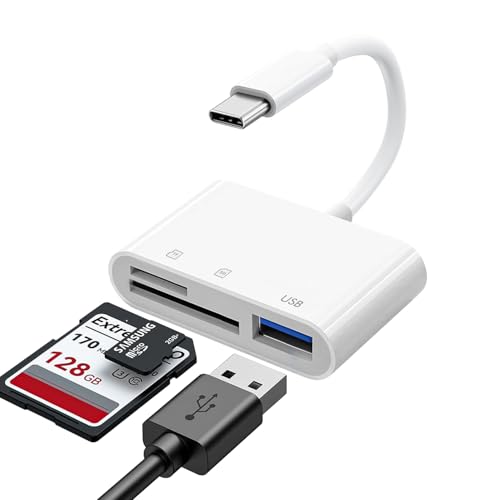
Quick Summary
This USB-C 3-in-1 card reader is a memory card adapter for USB-C and Type-C devices. It supports SD, SDHC, SDXC, Micro SD, Micro SDHC and Micro SDXC cards, and it also includes a USB A female port for connecting USB peripherals. The built-in USB-C cable is designed to save space and let ports sit side by side more easily.
It is listed for use with iPhone 15 and 16 models, iPad, Mac, MacBook Pro, MacBook Air, Android devices and other USB-C devices. The reader does not use SD cards and TF cards at the same time.
Key Details
| Detail | Verified information and buyer relevance |
|---|---|
| Product type | USB-C 3-in-1 SD card reader and adapter. |
| Card support | Supports SD, SDHC, SDXC, Micro SD, Micro SDHC and Micro SDXC cards. |
| USB port | Includes a USB A female port for USB peripherals. |
| Connection | USB type C connector with a built-in USB-C cable. |
| Device compatibility | Listed for iPhone 15 and 16 models, iPad, Mac, MacBook Pro, MacBook Air, Android devices and other USB-C devices. |
| System support | Compatible with MacOS, Windows, Linux and Chrome. |
| Use note | SD cards and TF cards cannot be used simultaneously. |
What to Compare Before Buying
- Device connection: Check that your device has a USB-C port, since this reader uses a USB type C connector.
- Card format: Make sure your card type is one of the supported SD or Micro SD formats.
- USB accessory needs: If you want to connect a USB peripheral, confirm that the USB A female port suits the device you plan to use.
- System support: Compare your operating system with the stated MacOS, Windows, Linux and Chrome compatibility.
- Card use: If you need to switch between SD and TF cards, remember they cannot be used together at the same time.
Compatibility, Size and Fit
This reader is intended for USB-C and Type-C devices, including iPhone 15 and 16 models, iPad, Mac, MacBook Pro, MacBook Air and Android devices. It is also listed for specific iPad Pro, iPad Air and iPad mini generations.
If you are choosing it for a particular tablet or laptop, check the exact device model and confirm that the USB-C connection matches your setup.
What Else You May Need
You will need compatible SD or Micro SD cards for storage access, and any USB accessory you want to connect through the USB A female port.
Before You Decide
Confirm your device has USB-C, check the exact card format you plan to use, and note that SD and TF cards cannot be used at the same time. If you need USB peripheral support as well, make sure the USB A female port suits your setup.


