Quick Summary
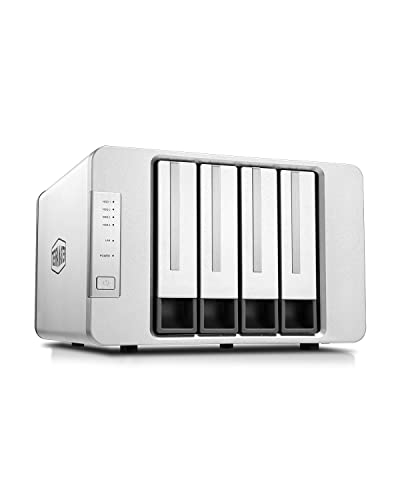
The TERRAMASTER F4-212 is a 4-bay NAS for home and SOHO use, supplied diskless. It runs TOS 5.1 and uses an ARM v8 quad-core 1.7GHz CPU with 1GB RAM, which is not upgradeable.
It is set up as network attached storage for personal cloud and backup use, and it supports multiple file services plus 3.5" and 2.5" SATA HDD and 2.5" SATA SSD drives.
Who It Is Best For
This NAS suits buyers who want a home or small office storage device with backup features, cross-platform file services and media playback support through uPnP/DLNA compatibility. It is also relevant if you want a diskless unit and plan to add your own drives.
Key Details
| Detail | Verified information and buyer relevance |
|---|---|
| Brand and model | TERRAMASTER F4-212, so you can identify the exact NAS variant. |
| Bay count | 4-bay NAS, which gives room for up to four drives. |
| Supplied format | Diskless, so drives are not included and must be selected separately. |
| Processor | ARM v8 quad-core 1.7GHz CPU. |
| Memory | 1GB RAM, not upgradeable. |
| Operating system | TOS 5.1 operating system. |
| File services | SMB, NFS, SFTP/FTP, AFP, iSCSI and WebDAV are supported. |
| Drive compatibility | Compatible with 3.5" and 2.5" SATA HDD, and 2.5" SATA SSD. |
| Stated drive capacity | Each bay supports up to 22TB HDD, with up to 88TB total in RAID 0. |
| Backup tools | Duple Backup, TSSS, TFM Backup and CloudSync are mentioned for backup use. |
| Media support | 4K video hardware decoding and uPnP/DLNA compatibility are stated. |
Why Buyers Choose It
- The 4-bay format gives flexibility when planning storage across multiple drives.
- Diskless supply lets you choose the drives that match your own capacity and type requirements.
- Support for several file services helps the NAS fit different network setups.
- The stated backup applications provide multiple ways to organise backups and cloud sync tasks.
How It Works
Initial setup is described as straightforward, with online tutorials and videos available, plus a Default mode that applies home-oriented settings during the first installation.
- Install your chosen SATA drives into the bays.
- Carry out the first system installation.
- Use Default mode to complete the basic configuration.
- Set up the required file services, permissions and backup applications.
Real World Use
In everyday use, the F4-212 acts as a personal cloud and file server for home or SOHO storage. Its multiple file services and folder, user and group permissions make it easier to organise shared storage across different network environments.
The 4K video hardware decoding and uPnP/DLNA compatibility also make it relevant for buyers who want a home multimedia centre function alongside storage and backup.
What To Know Before You Buy
Check that you want the diskless version, because the unit does not include drives. Confirm that your chosen drives are 3.5" or 2.5" SATA HDD, or 2.5" SATA SSD, and review the stated 22TB per bay figure against your storage plan.
The memory is fixed at 1GB and is not upgradeable, so it is worth making sure the supplied specification suits your intended use before ordering.
Common Buyer Questions
Are hard drives included?
No. This is the diskless version, so you need to add your own drives.
What drives does it accept?
It is compatible with 3.5" and 2.5" SATA HDD, plus 2.5" SATA SSD.
Can I use it for backups and file sharing?
Yes. It supports multiple file services and includes backup applications such as Duple Backup, TSSS, TFM Backup and CloudSync.
Does it support media use?
Yes. 4K video hardware decoding and uPnP/DLNA compatibility are stated.
Final Buying View
The TERRAMASTER F4-212 is a diskless 4-bay NAS for home and SOHO storage, backup and personal cloud use. Check the drive type, the fixed 1GB RAM specification and the diskless format before you choose it.