Quick Summary
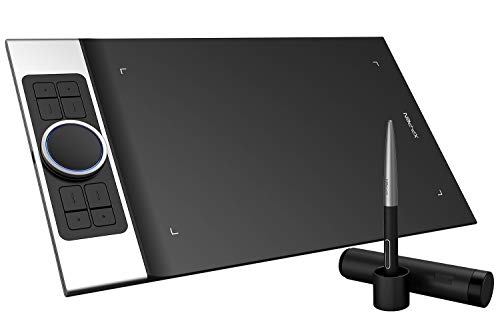
The UGEE S640 is a drawing tablet with a battery-free stylus, tilt function, 8192 levels of pressure sensitivity and 10 express keys. It also has a stated 6.3 x 4 inch working area and a USB-C interface, giving you a compact pen tablet for drawing and writing tasks.
It is described as supporting use for drawing, animation, photo editing and design work, as well as online tutoring software and virtual classroom use. Check your chosen device and operating system before ordering, especially if you plan to use Android through the included OTG adapter.
Who It Is Best For
This tablet is aimed at beginners, kids and users who want a portable pen tablet for creative work, note-taking or online teaching tasks. The compact working area and shortcut keys will matter most if you want a smaller setup with quick access to common functions.
It is also worth checking compatibility carefully if you need Windows, Mac, Linux or Android use, because the system support and adapter requirements are part of the buying decision.
Key Details
| Detail | Verified information and buyer relevance |
|---|---|
| Product type | Drawing tablet / pen tablet for digital drawing and writing tasks. |
| Model | S640, which identifies the exact version listed. |
| Stylus | Battery-free stylus, so there is no battery to manage in the pen itself. |
| Pressure sensitivity | 8192 levels, which is a stated input specification for drawing and writing control. |
| Tilt function | 60° tilt control is stated for angled pen input. |
| Express keys | 10 customised press keys for shortcuts and quicker access to functions. |
| Working area | 6.3 x 4 inches, giving a compact active area for drawing. |
| Connection | USB-C interface. |
| System support | Windows, Mac and Linux are named, with Android 6.0 or later supported via included OTG adapter. |
| Charging | Stated charging time of 2 hours and up to 10 hours of full-time drawing. |
Why Buyers Choose It
- Battery-free stylus means the pen is ready for use without pen charging.
- 8192 pressure levels and 60° tilt control give two stated input features for drawing and line variation.
- 10 express keys provide shortcut access that may reduce menu switching during use.
- The 6.3 x 4 inch working area suits buyers looking for a compact tablet rather than a larger desktop surface.
- Android support via OTG adapter broadens use, but only when the device meets the stated system requirement.
How It Works
- Connect the tablet using the USB-C interface.
- Set up the tablet on a compatible device or operating system.
- If using Android, use the included OTG adapter and check that the device is Android 6.0 or later.
- Use the 10 express keys as customised shortcuts once they are configured.
- Use the stylus for drawing, writing or editing within compatible programs.
Real World Use
The slim and light design makes the tablet easy to carry for classroom use, business trips, e-learning and remote teaching. Its compact size may suit users who want a smaller working area that fits into a mobile setup.
The stated use cases include drawing, animation, photo editing, design work and online tutoring software such as Power Point, Wrod, OneNote and PDF. Review the device connection and operating system before use so the tablet matches your setup.
What To Know Before You Buy
Check that your device matches the stated system support before ordering, especially if you want Android use through the included OTG adapter. The tablet’s working area is 6.3 x 4 inches, so it is important to confirm that this compact size suits your preferred drawing space.
The 10 express keys and battery-free stylus are useful if you want shortcut control and a pen without charging. The stated charging time of 2 hours and up to 10 hours of full-time drawing should be considered as part of your use pattern.
Common Buyer Questions
Does it work with Android?
Yes, Android 6.0 or later is stated as supported through the included OTG adapter.
What size is the drawing area?
The working area is stated as 6.3 x 4 inches.
Does the pen need charging?
No, the stylus is battery-free.
How many shortcut keys does it have?
It has 10 customised press keys.
Final Buying View
If you want a compact pen tablet with a battery-free stylus, 8192 pressure sensitivity and shortcut keys, the UGEE S640 gives a clearly defined feature set. Confirm the chosen system support and the working area size before ordering so it matches your device and drawing space.